What Is Nginx? How It Works and Why Production Applications Use It.
Learn what Nginx is, how its event-driven architecture works, and why production applications use it for reverse proxying, load balancing, HTTPS, security, and performance.
Introduction
Have you ever wondered what happens when someone opens your website?
A user enters your domain in the browser, presses Enter, and within seconds, the application loads.
But behind that simple interaction, several components work together:
DNS resolves your domain to an IP address.
A network connection is established.
The request reaches your web infrastructure.
A web server receives and processes the request.
The request may be forwarded to a backend application.
The application communicates with databases or external services.
Finally, the response travels back to the browser.
One important component in many production architectures is Nginx.
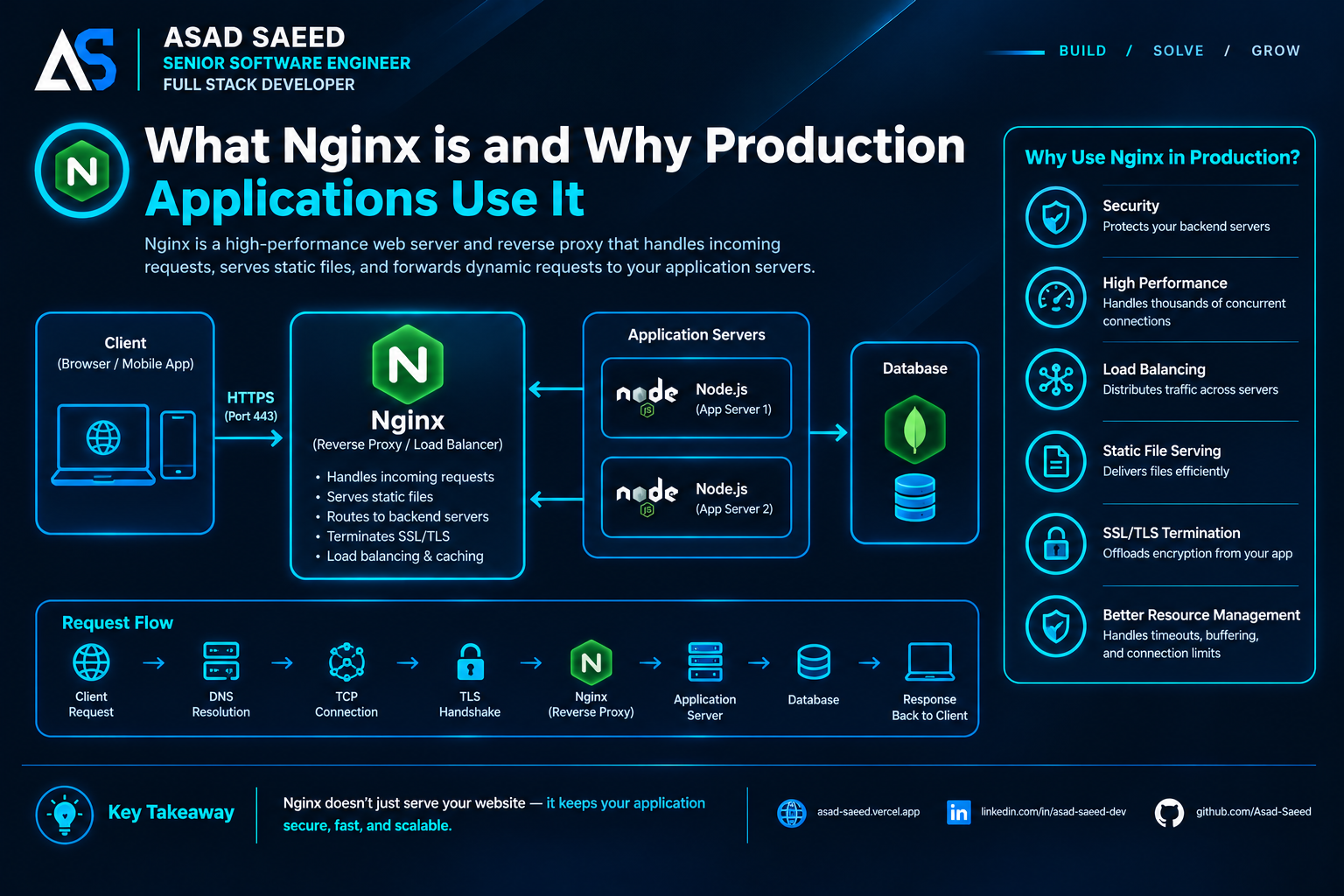
Nginx is widely used as a web server, reverse proxy, load balancer, and HTTP cache. It sits between incoming client requests and application infrastructure, helping manage traffic efficiently.
For example, imagine you're running a MERN Stack application:
React handles the frontend.
Node.js and Express handle backend APIs.
MongoDB stores application data.
Nginx sits in front of your application servers.
Why do we need another server when Node.js can already handle HTTP requests?
What does Nginx actually do? How does it communicate with Node.js? And why do production applications often use it?
Let's understand these concepts step by step.
1. What Is Nginx?
Nginx (pronounced engine-x) is an open-source web server originally created by Igor Sysoev and publicly released in 2004.
It was designed to handle large numbers of concurrent connections efficiently, addressing the limitations of traditional process-per-connection approaches.
Today, Nginx is commonly used for:
Serving static files such as HTML, CSS, JavaScript, and images.
Acting as a reverse proxy.
Distributing requests across multiple backend servers.
Terminating SSL/TLS connections.
Caching frequently requested content.
Compressing HTTP responses.
Applying request limits and access rules.
Routing traffic to different application services.
The important thing to understand is that Nginx doesn't replace your backend application. It works alongside it.
Your Node.js application still handles business logic, authentication, API processing, and database operations.
Nginx manages the incoming HTTP traffic and determines how requests should be handled.
2. Why Do We Need Nginx When Node.js Already Handles HTTP Requests?
This is one of the most common questions developers have.
Node.js can create an HTTP server without requiring Nginx.
For example:
import express from "express";

const app = express();

app.get("/", (req, res) => {
  res.send("Hello from Node.js");
});

app.listen(3000, () => {
  console.log("Server running on port 3000");
});
Your application is now accepting HTTP requests on port 3000.
So why introduce Nginx?
Because production infrastructure has responsibilities beyond executing application code.
Consider these requirements:
Serving thousands of static assets.
Handling incoming HTTPS connections.
Routing requests to different backend services.
Distributing traffic across multiple application instances.
Managing connection timeouts.
Applying request-size restrictions.
Caching frequently requested content.
Protecting internal application servers from direct public exposure.
Nginx provides infrastructure-level capabilities that complement your application server.
Instead of making every application responsible for all these concerns, you can place Nginx in front of your backend.
The architecture becomes:
          Client / Browser
                 |
                 v
              NGINX
                 |
          Reverse Proxy
                 |
                 v
          Node.js / Express
                 |
                 v
              MongoDB
Nginx receives incoming requests and forwards the appropriate requests to your application.
This separation makes the infrastructure easier to manage and scale.
3. How Does Nginx Work Internally?
To understand why Nginx performs well, we need to understand its architecture.
Nginx uses an event-driven, asynchronous, non-blocking architecture.
Unlike traditional server designs that create a separate process or thread for every connection, Nginx uses a master process and worker processes.
Master Process
The master process manages the overall Nginx instance.
Its responsibilities include:
Reading and validating configuration.
Starting and managing worker processes.
Handling configuration reloads.
Managing worker lifecycle.
The master process generally does not handle ordinary client requests directly.
Worker Processes
Worker processes handle incoming connections and process requests.
Each worker uses an event-driven model to manage multiple connections without requiring a dedicated thread for every connection.
For example:
worker_processes auto;

events {
    worker_connections 1024;
}
Here:
worker_processes autoallows Nginx to determine a suitable number of worker processes based on available CPU cores.worker_connections 1024configures the maximum number of simultaneous connections each worker can handle.
A simplified conceptual calculation is:
Total configured worker connections
=
Worker Processes × Worker Connections
For example:
4 Workers × 1024 Connections
= 4096 Configured Connections
This is not a guarantee of 4,096 concurrent application requests. Actual capacity depends on file descriptor limits, upstream connections, memory, traffic patterns, and other configuration constraints.
The important idea is that Nginx can efficiently manage many simultaneous connections using its event-driven architecture.
4. What Is a Reverse Proxy?
A reverse proxy is one of the most important reasons production applications use Nginx.
A reverse proxy receives requests from clients and forwards them to one or more backend servers.
Instead of exposing your Node.js application directly to the internet, you expose Nginx as the public entry point.
Consider:
User Browser
     |
     | HTTPS Request
     v
   NGINX
     |
     | Internal HTTP Request
     v
Node.js Application
     |
     v
  Database
The browser communicates with Nginx, and Nginx communicates with your backend.
Your backend can listen on an internal interface or a private network instead of accepting direct public traffic.
Why is this useful?
1. Hide backend infrastructure
Clients communicate with the public proxy rather than needing direct access to every backend instance.
2. Centralize request handling
You can configure routing, request limits, timeouts, and other policies in one place.
3. Support multiple applications
One Nginx instance can route traffic to multiple services based on domain names or URL paths.
For example:
api.example.com      → Node.js API
admin.example.com    → Admin Application
app.example.com      → Next.js Application
4. Simplify HTTPS management
Nginx can terminate TLS connections and forward requests to internal services.
The internal connection can use HTTP or HTTPS depending on your security requirements.
5. Nginx as a Load Balancer
What happens when your application receives more traffic than one Node.js instance can comfortably handle?
You can run multiple backend instances.
For example:
                 Internet
                    |
                    v
                  NGINX
                    |
          +---------+---------+
          |         |         |
          v         v         v
       Node.js   Node.js   Node.js
       Server 1  Server 2  Server 3
Nginx can distribute incoming requests across these backend servers.
This is called load balancing.
Common Load-Balancing Methods
Round Robin
Requests are distributed across available upstream servers in sequence.
Least Connections
Nginx sends a new request to the server with the fewest active connections.
IP Hash
Requests from a particular client IP are directed to the same upstream server according to the hash calculation.
Example configuration:
http {
    upstream node_backend {
        server 127.0.0.1:3000;
        server 127.0.0.1:3001;
        server 127.0.0.1:3002;
    }

    server {
        listen 80;

        location / {
            proxy_pass http://node_backend;
        }
    }
}
Here, Nginx distributes requests across the configured backend servers using its default upstream balancing behavior.
You can also configure different balancing methods.
For example:
upstream node_backend {
    least_conn;

    server 127.0.0.1:3000;
    server 127.0.0.1:3001;
    server 127.0.0.1:3002;
}
This distributes new requests according to active connection counts.
Load balancing helps improve capacity and availability, but it doesn't automatically make your application fault-tolerant. Session management, shared state, health monitoring, and backend failure handling still matter.
6. Serving Static Files Efficiently
Not every incoming request needs to reach your backend application.
Imagine your React or Next.js application needs:
CSS files.
JavaScript bundles.
Images.
Fonts.
Other static assets.
Nginx can serve these files directly.
For example:
server {
    listen 80;
    server_name example.com;

    root /var/www/my-app/dist;
    index index.html;

    location / {
        try_files $uri $uri/ /index.html;
    }
}
This configuration serves files from the specified directory and falls back to index.html, which is useful for a client-side routed React SPA.
For a production Next.js application, deployment configuration depends on whether you're using a Node.js server, static export, or another hosting model.
Why is serving static content directly useful?
Because the application server doesn't need to process every request for a CSS file or image.
This can reduce unnecessary backend work and improve resource utilization.
7. SSL/TLS Termination: How Nginx Handles HTTPS
Security is another major reason production applications use Nginx.
When users visit a website over HTTPS, their connection is encrypted using TLS.
Nginx can handle the TLS handshake and certificate management at the public entry point.
A simplified architecture looks like this:
        Browser
           |
           | HTTPS
           v
         NGINX
           |
           | HTTP or HTTPS
           v
       Node.js API
This process is called TLS termination.
The browser establishes an encrypted connection with Nginx.
Nginx decrypts the incoming request and forwards it to the backend.
If the backend connection uses HTTP, traffic between Nginx and the backend is not encrypted. For sensitive infrastructure, consider HTTPS or another protected transport on that internal connection as well.
Example:
server {
    listen 443 ssl;
    server_name example.com;

    ssl_certificate /etc/letsencrypt/live/example.com/fullchain.pem;

    ssl_certificate_key /etc/letsencrypt/live/example.com/privkey.pem;

    location / {
        proxy_pass http://127.0.0.1:3000;
    }
}
This is a simplified example. A production HTTPS configuration should also include appropriate TLS protocol settings, certificate renewal, and secure headers where applicable.
8. Nginx as a Security Layer
Nginx can provide several useful protections before requests reach your application.
Request Rate Limiting
You can limit how frequently clients send requests.
http {
    limit_req_zone $binary_remote_addr
        zone=api_limit:10m rate=10r/s;

    server {
        location /api/ {
            limit_req zone=api_limit burst=20 nodelay;

            proxy_pass http://127.0.0.1:3000;
        }
    }
}
This example defines a rate limit of approximately ten requests per second per client IP, with a burst allowance.
Rate limiting can help protect backend resources, although production configuration should account for trusted proxy headers, shared IP addresses, and legitimate traffic patterns.
Restrict Request Body Size
You can limit the size of incoming request bodies:
server {
    client_max_body_size 10M;
}
This helps prevent unexpectedly large uploads from consuming excessive resources.
Configure Proxy Timeouts
You can configure how long Nginx waits for upstream communication:
location /api/ {
    proxy_connect_timeout 10s;
    proxy_send_timeout 60s;
    proxy_read_timeout 60s;

    proxy_pass http://127.0.0.1:3000;
}
These settings help control upstream connection and communication behavior.
Nginx is an additional security layer, not a complete security solution. Application-level authentication, authorization, validation, secure coding, and network security are still necessary.
9. A Real-World Nginx Configuration for a MERN Application
Let's combine what we've learned.
Imagine a production application with:
React frontend.
Node.js and Express backend.
MongoDB database.
Nginx as a reverse proxy.
Your frontend is available at:
https://example.com
Your backend API is available through:
https://example.com/api
Your Node.js server runs internally on port 3000.
A simplified Nginx configuration could look like this:
server {
    listen 80;
    server_name example.com;

    location / {
        root /var/www/react-app/dist;
        try_files $uri $uri/ /index.html;
    }

    location /api/ {
        proxy_pass http://127.0.0.1:3000;

        proxy_http_version 1.1;

        proxy_set_header Host $host;
        proxy_set_header X-Real-IP $remote_addr;
        proxy_set_header X-Forwarded-For $proxy_add_x_forwarded_for;
        proxy_set_header X-Forwarded-Proto $scheme;

        proxy_connect_timeout 10s;
        proxy_read_timeout 60s;
    }
}
Let's understand what happens.
When the user visits the frontend:
The request reaches Nginx.
Nginx checks the requested path.
It searches for the requested static file.
If the file doesn't exist, it returns the SPA entry point.
The browser loads the React application.
When the frontend calls an API:
The request reaches Nginx.
Nginx matches the
/api/location.It forwards the request to Node.js on port 3000.
Express processes the API request.
The backend communicates with MongoDB if required.
The response returns through Nginx to the browser.
Notice that the browser uses one public domain for both frontend and backend API requests.
This simplifies routing and can avoid unnecessary cross-origin configuration.
For production, you would also configure HTTPS, appropriate caching, access controls, and any WebSocket or application-specific proxy requirements.
10. Nginx vs. Apache vs. Node.js
Developers often compare Nginx with Apache and Node.js.
However, these technologies have different responsibilities and can also work together.
FeatureNginxApache HTTP ServerNode.jsPrimary roleWeb server and reverse proxyWeb serverJavaScript runtimeStatic file servingYesYesYes, through application codeReverse proxyYesYesCan be implementedLoad balancingYesYes, with modulesRequires additional implementationEvent-driven architectureYesSupports multiple processing modelsEvent-driven runtimeApplication business logicNoNo, not its primary roleYesJavaScript executionNoNo, not its primary roleYes
Nginx is often selected for its efficient connection handling and reverse proxy capabilities.
Apache remains a capable and widely used web server.
Node.js is an application runtime that allows developers to execute JavaScript on the server.
They aren't necessarily competing technologies. Their responsibilities can complement each other.
11. Common Mistakes When Using Nginx
Even though Nginx is powerful, incorrect configuration can create production problems.
Here are some common mistakes:
1. Exposing backend ports publicly
If your Node.js application should only receive traffic through Nginx, bind it to an appropriate internal interface and restrict external network access.
2. Incorrect proxy headers
Without appropriate forwarding headers, your application may not receive the original host, protocol, or client IP information it expects.
Trust forwarded headers only from known proxies.
3. Misconfigured timeouts
A timeout that's too short can interrupt legitimate long-running operations. One that's too long can allow connections to consume resources unnecessarily.
4. Incorrect static file configuration
Incorrect root, alias, or try_files settings can cause unexpected 404 responses.
5. Ignoring WebSocket configuration
Applications using WebSockets need appropriate HTTP upgrade headers and proxy configuration.
6. Forgetting configuration validation
Before reloading Nginx, validate the configuration:
sudo nginx -tThen reload:
sudo systemctl reload nginxA reload allows Nginx to apply valid configuration changes without requiring a full service restart.
12. When Should You Use Nginx?
You don't necessarily need Nginx for every project.
For example, a small application deployed on a managed platform may already have reverse proxying, TLS termination, and traffic routing handled by its hosting provider.
However, Nginx becomes particularly useful when:
You're managing your own VPS or cloud server.
You have multiple backend services.
You need a reverse proxy in front of Node.js.
You want to serve static assets directly.
You need to distribute traffic across application instances.
You want centralized TLS termination.
You need infrastructure-level request limits and routing.
You're managing production deployments and network configuration.
The important thing is to understand your hosting architecture before adding another infrastructure component.
Conclusion
Nginx is much more than a web server.
It plays an important role in modern production architectures by managing incoming requests, serving static content, forwarding traffic to backend applications, distributing workloads, and providing additional security and performance controls.
For full-stack developers, understanding Nginx is valuable because building an application is only one part of delivering it successfully.
You also need to understand how that application receives traffic, communicates with other services, handles concurrent connections, and remains available under real-world conditions.
The next time you deploy a MERN or Next.js application, think beyond the frontend and backend.
Understand the infrastructure connecting them.
A production-ready application isn't just about writing good code. It's also about building the right architecture around that code.
About the Author
Asad Saeed | Senior Software Engineer | Full Stack Developer
I share practical engineering insights about React, Next.js, Node.js, MERN Stack, system design, backend architecture, cloud infrastructure, and building scalable production applications.
🌐 Portfolio: https://asad-saeed.vercel.app/
💼 LinkedIn: https://linkedin.com/in/asad-saeed-dev
💻 GitHub: https://github.com/Asad-Saeed
Build | Learn | Grow