Skip to main contentSkip to main content
~/profileLIVE
Asad Saeed
Asad SaeedOpen to WorkSenior Frontend Engineer | MERN Stack Developer
01

Identity

Residence
Lahore, Punjab
Nationality
Pakistani
City
Lahore
Age
26
02

Languages

  • English96%
  • Urdu100%
03

Expertise

React.js95%
Next.js95%
JavaScript / TypeScript95%
HTML5, CSS395%
Tailwind, Bootstrap, Shadcn UI95%
Material UI, SCSS, Styled Components90%
Redux Toolkit, React Query, Zustand92%
REST & GraphQL APIs92%
Git, GitHub, Bitbucket98%
Node.js, Express.js, NestJS85%
MongoDB, PostgreSQL, Prisma80%
WebSockets, Real-Time Systems82%
AI & Automation (n8n, OpenAI)78%
04

Stack

4949 technologies
ReactJSNextJSJavaScriptTypeScriptReact NativeNestJSNode.jsExpress.jsMongoDBPostgreSQLMySQLPrisma ORMFirebaseREST APIGraphQL APIApollo ClientWebSockets / Socket.ioReduxRedux ToolkitReact QueryZustandTailwind CSSShadcn UIMaterial UIBootstrapSCSSCSSModule.cssStyled ComponentsFramer MotionStripe Payment Integrationn8nOpenAI APIAWS LambdaDockerVercelNetlifyGitHub Actions (CI/CD)JestGitGitHubBitbucketPostmanSwaggerJira SoftwareStrapiSanityFigmaAdobe XD
05

Contact

Email
asadsaeed.dev@gmail.com
Phone
+92 3017631644·+92 478730644
Download Resume
HomeSkillsBackgroundPortfolioContact
Chat with Asad
All Posts
NestJS Architecture Explained: Controllers, Providers, Modules, Middleware, Guards & Interceptors (2026 Guide)

NestJS Architecture Explained: Controllers, Providers, Modules, Middleware, Guards & Interceptors (2026 Guide)

NESTJSNODEJSSOFTWARE ARCHITECTUREBACKEND DEVELOPMENTTYPESCRIPTASAD SAEED
August 5, 20266 min readBy Asad Saeed

Master the NestJS architecture by understanding Modules, Controllers, Providers, Dependency Injection, Middleware, Guards, Pipes, Interceptors, and Exception Filters. Learn the complete NestJS request lifecycle and build scalable, production-ready backend applications.

Introduction

NestJS has become one of the most popular backend frameworks for building scalable Node.js applications.

Its popularity comes from something many frameworks struggle with:

✅ Clean architecture
✅ Dependency Injection
✅ Modular design
✅ Enterprise-ready patterns
✅ Built-in support for authentication, validation, logging, caching, and microservices

However, many developers learn NestJS by creating CRUD APIs without fully understanding how its architecture works internally.

Questions like:

  • What is a Module?

  • Why do we need Providers?

  • What is the difference between Middleware and Guards?

  • When should I use Interceptors?

  • Where do Pipes fit in?

  • What is the complete request lifecycle?

Understanding these concepts is what separates simply using NestJS from designing scalable systems with it.

In this article, we'll break down the core building blocks of NestJS and explain how an incoming request flows through the framework.


The NestJS Philosophy

NestJS follows principles inspired by:

  • Angular

  • Dependency Injection (DI)

  • SOLID Principles

  • Modular Architecture

  • Separation of Concerns

Instead of putting everything in one file, NestJS organizes applications into clear layers.

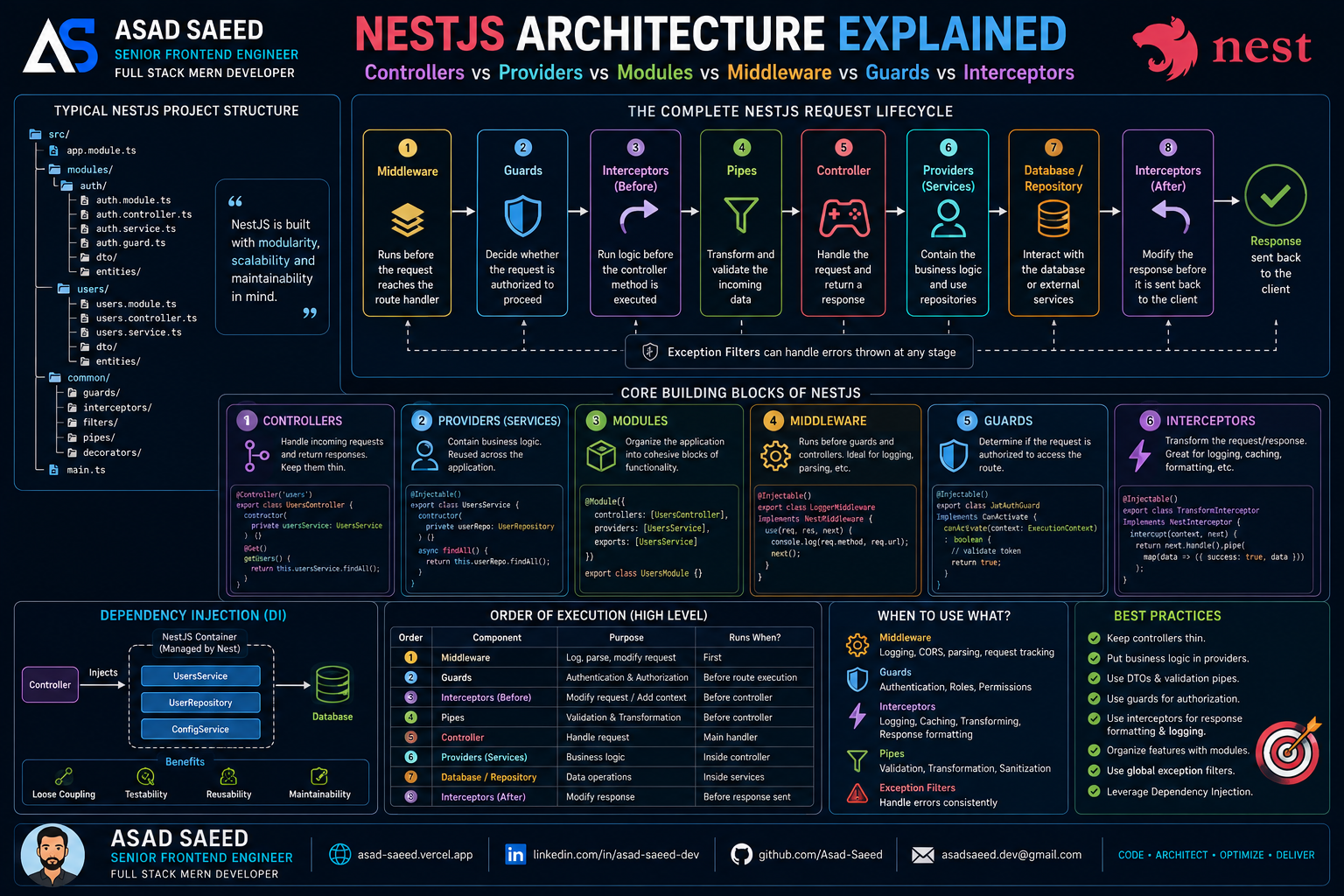
Client Request
      │
      ▼
Middleware
      │
      ▼
Guards
      │
      ▼
Interceptors (Before)
      │
      ▼
Pipes
      │
      ▼
Controller
      │
      ▼
Provider / Service
      │
      ▼
Repository / Database
      │
      ▼
Interceptors (After)
      │
      ▼
Response

Understanding this flow is essential for building production-ready applications.


A Typical NestJS Project Structure

src/

├── app.module.ts

├── modules/
│
├── auth/
│   ├── auth.module.ts
│   ├── auth.controller.ts
│   ├── auth.service.ts
│   ├── auth.guard.ts
│   ├── dto/
│   └── entities/
│
├── users/
│   ├── users.module.ts
│   ├── users.controller.ts
│   ├── users.service.ts
│   ├── dto/
│   └── entities/
│
├── common/
│   ├── guards/
│   ├── interceptors/
│   ├── filters/
│   ├── pipes/
│   └── decorators/
│
└── shared/

Each feature is isolated inside its own module.

This makes applications easier to maintain as they grow.


1. Modules

What is a Module?

Modules are the fundamental building blocks of a NestJS application.

They group related functionality together.

Example:

@Module({
  controllers: [UsersController],
  providers: [UsersService]
})
export class UsersModule {}

A module can contain:

  • Controllers

  • Providers

  • Services

  • Guards

  • Pipes

  • Interceptors


Why Modules Matter

Without modules:

One Huge Application

With modules:

Application

├── Auth Module

├── User Module

├── Product Module

├── Payment Module

└── Notification Module

Benefits:

✅ Better organization
✅ Clear boundaries
✅ Reusability
✅ Easier testing


2. Controllers

What is a Controller?

Controllers receive incoming HTTP requests and return responses.

Example:

@Controller("users")
export class UsersController {

  @Get()
  getUsers() {
    return this.usersService.findAll();
  }
}

Controllers should remain thin.

Bad:

Controller → Database

Good:

Controller

↓

Service

↓

Repository

↓

Database

Controllers should only handle:

  • Routing

  • Request parameters

  • Response formatting

Business logic belongs elsewhere.


3. Providers (Services)

What is a Provider?

Providers contain business logic.

Example:

@Injectable()
export class UsersService {

  findAll() {
    return this.userRepository.find();
  }
}

Providers are injected using Dependency Injection.

Example:

constructor(
  private usersService: UsersService
) {}

Why Providers Matter

Benefits:

✅ Reusability

✅ Testability

✅ Separation of concerns

✅ Better architecture


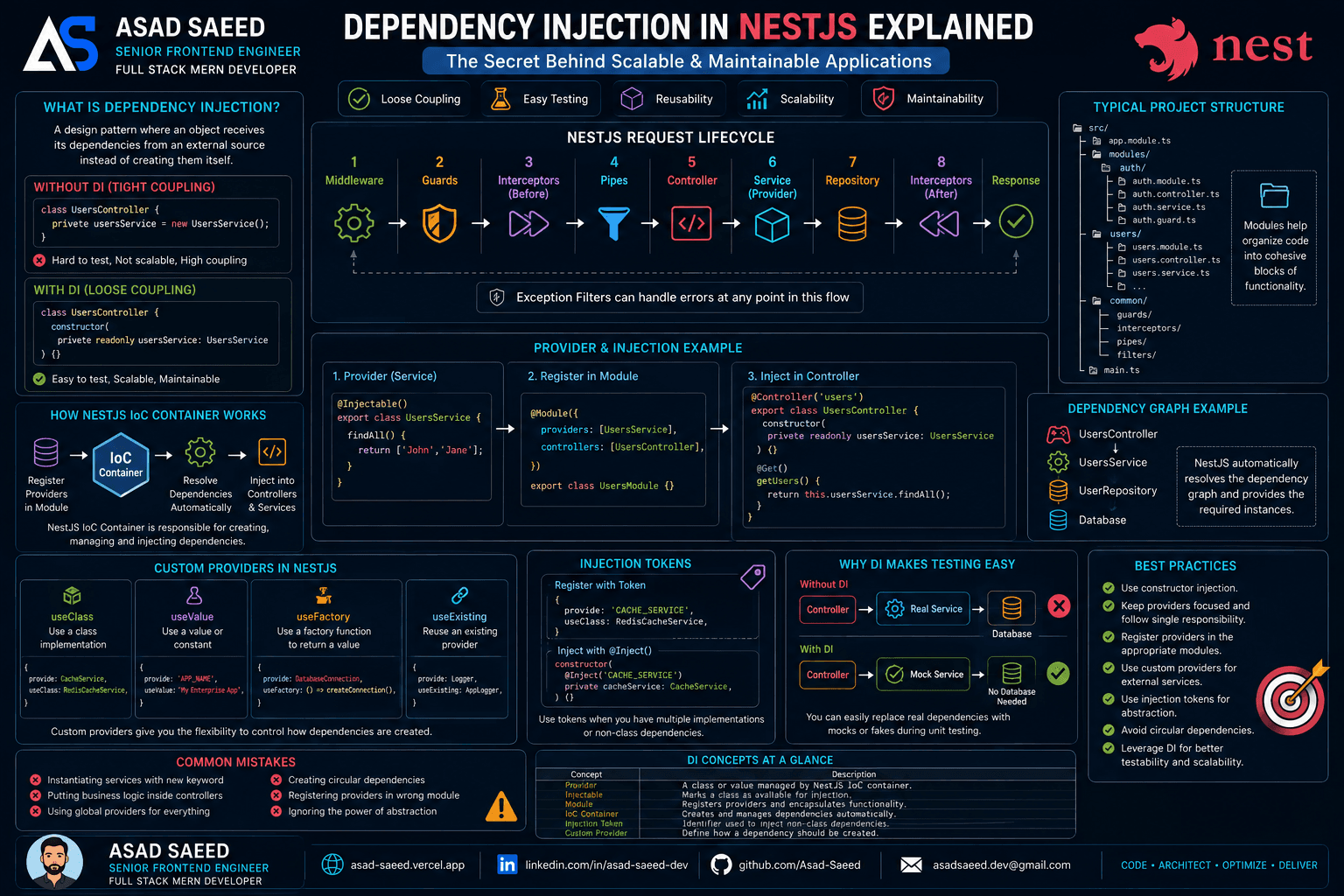
4. Dependency Injection (DI)

NestJS automatically creates and manages objects.

Instead of:

const userService = new UserService();

NestJS injects it:

constructor(
  private userService: UserService
) {}

Benefits:

  • Loose coupling

  • Easier testing

  • Cleaner architecture

This is one of the reasons NestJS scales so well in enterprise applications.


5. Middleware

What is Middleware?

Middleware runs before the request reaches the controller.

Example:

Client

↓

Middleware

↓

Controller

Example use cases:

  • Logging

  • Request tracking

  • CORS

  • Authentication setup

  • Custom headers

Example:

@Injectable()
export class LoggerMiddleware
implements NestMiddleware {

  use(req, res, next) {
    console.log(req.url);
    next();
  }
}

Middleware vs Guards

Middleware:

✅ Runs early

✅ Doesn't know route metadata

Guards:

✅ Know route metadata

✅ Used for authorization


6. Guards

What are Guards?

Guards decide whether a request can continue.

Example:

Client

↓

Guard

↓

Allow / Deny

Example:

@UseGuards(JwtGuard)
@Get()
getProfile() {}

Common use cases:

  • JWT Authentication

  • RBAC

  • Permissions

  • Role validation


Example

@Injectable()
export class JwtGuard
implements CanActivate {

  canActivate() {
    return true;
  }
}

Guards are one of the most important security features in NestJS.


7. Pipes

What are Pipes?

Pipes transform and validate incoming data.

Example:

@Post()
createUser(
  @Body() dto: CreateUserDto
) {}

Validation:

export class CreateUserDto {

  @IsEmail()
  email: string;
}

Benefits:

✅ Cleaner controllers

✅ Validation

✅ Data transformation


8. Interceptors

What are Interceptors?

Interceptors run before and after controller execution.

Request

↓

Interceptor

↓

Controller

↓

Interceptor

↓

Response

Example:

@Injectable()
export class LoggingInterceptor
implements NestInterceptor {

 intercept(context, next) {
   return next.handle();
 }
}

Common Uses

  • Logging

  • Response formatting

  • Caching

  • Performance tracking

  • Error handling

Example:

{
  "success": true,
  "data": {}
}

Interceptors are ideal for standardizing API responses.


9. Exception Filters

Exception Filters handle errors globally.

Example:

@Catch()
export class GlobalExceptionFilter {}

Without filters:

Random Errors

With filters:

{
  "statusCode": 400,
  "message": "Invalid Request"
}

Benefits:

  • Consistent responses

  • Better debugging

  • Cleaner code


Complete Request Lifecycle

Client Request

↓

Middleware

↓

Guards

↓

Interceptors (Before)

↓

Pipes

↓

Controller

↓

Service

↓

Repository

↓

Database

↓

Interceptors (After)

↓

Response

This flow is one of NestJS's biggest strengths.

Every concern has a dedicated place.


A Real Authentication Example

Imagine a protected route:

User Request

↓

Middleware

↓

JWT Guard

↓

Validation Pipe

↓

Controller

↓

Auth Service

↓

Database

↓

Response Interceptor

↓

Client

This architecture keeps authentication secure and maintainable.


Common Mistakes

❌ Putting business logic inside controllers

❌ Skipping DTO validation

❌ Using middleware for authorization

❌ Writing large services

❌ Ignoring modules

❌ Returning inconsistent responses

❌ Not using Dependency Injection properly


Best Practices

✔ Keep controllers thin

✔ Move business logic into services

✔ Use DTOs for validation

✔ Use Guards for authorization

✔ Use Interceptors for response formatting

✔ Use Modules for feature isolation

✔ Use Exception Filters globally

✔ Follow SOLID principles


My Recommended Architecture

Controller

↓

Service

↓

Repository

↓

Database

Cross-cutting concerns:

  • Middleware → Logging

  • Guards → Authentication

  • Pipes → Validation

  • Interceptors → Formatting

  • Filters → Error Handling

This architecture is scalable, maintainable, and production-ready.


Final Thoughts

NestJS isn't just an Express wrapper—it provides a complete architectural framework for building enterprise Node.js applications.

Understanding how Controllers, Providers, Modules, Middleware, Guards, Pipes, and Interceptors work together allows you to design systems that are:

✅ Scalable
✅ Maintainable
✅ Testable
✅ Secure

As applications grow, architecture matters more than code.

Learning the NestJS request lifecycle is one of the best investments backend developers can make.


About the Author

Asad Saeed

Senior Frontend Engineer | Full Stack MERN Developer

I build scalable web and mobile applications using React.js, Next.js, React Native, TypeScript, Node.js, Express.js, NestJS, MongoDB, PostgreSQL, Redis, AWS, Docker, and modern CI/CD pipelines.

🌐 Portfolio: https://asad-saeed.vercel.app/
💼 LinkedIn: https://linkedin.com/in/asad-saeed-dev
💻 GitHub: https://github.com/Asad-Saeed
📧 Email: asadsaeed.dev@gmail.com


#NestJS #NodeJS #BackendDevelopment #SoftwareArchitecture #DependencyInjection #SystemDesign #TypeScript #MERN #SoftwareEngineering #AsadSaeed

Asad Saeed

Asad Saeed

Senior Frontend Engineer | MERN Stack Developer

More posts →

Related Posts

Don't Stop Here

Monolith vs Modular Monolith vs Microservices: Choosing the Right Software Architecture in 2026

Monolith vs Modular Monolith vs Microservices: Choosing the Right Software Architecture in 2026

Learn the differences between Monolith, Modular Monolith, and Microservices architectures. Compare scalability, deployment, complexity, and real-world use cases to choose the right architecture for your next MERN or enterprise application.

SOFTWARE ARCHITECTUREMICROSERVICESSYSTEM DESIGN
© 2026 · Asad Saeed
All Posts
NestJS Architecture Explained: Controllers, Providers, Modules, Middleware, Guards & Interceptors (2026 Guide)

NestJS Architecture Explained: Controllers, Providers, Modules, Middleware, Guards & Interceptors (2026 Guide)

NESTJSNODEJSSOFTWARE ARCHITECTUREBACKEND DEVELOPMENTTYPESCRIPTASAD SAEED
August 5, 20266 min readBy Asad Saeed

Master the NestJS architecture by understanding Modules, Controllers, Providers, Dependency Injection, Middleware, Guards, Pipes, Interceptors, and Exception Filters. Learn the complete NestJS request lifecycle and build scalable, production-ready backend applications.

Introduction

NestJS has become one of the most popular backend frameworks for building scalable Node.js applications.

Its popularity comes from something many frameworks struggle with:

✅ Clean architecture
✅ Dependency Injection
✅ Modular design
✅ Enterprise-ready patterns
✅ Built-in support for authentication, validation, logging, caching, and microservices

However, many developers learn NestJS by creating CRUD APIs without fully understanding how its architecture works internally.

Questions like:

  • What is a Module?

  • Why do we need Providers?

  • What is the difference between Middleware and Guards?

  • When should I use Interceptors?

  • Where do Pipes fit in?

  • What is the complete request lifecycle?

Understanding these concepts is what separates simply using NestJS from designing scalable systems with it.

In this article, we'll break down the core building blocks of NestJS and explain how an incoming request flows through the framework.


The NestJS Philosophy

NestJS follows principles inspired by:

  • Angular

  • Dependency Injection (DI)

  • SOLID Principles

  • Modular Architecture

  • Separation of Concerns

Instead of putting everything in one file, NestJS organizes applications into clear layers.

Client Request
      │
      ▼
Middleware
      │
      ▼
Guards
      │
      ▼
Interceptors (Before)
      │
      ▼
Pipes
      │
      ▼
Controller
      │
      ▼
Provider / Service
      │
      ▼
Repository / Database
      │
      ▼
Interceptors (After)
      │
      ▼
Response

Understanding this flow is essential for building production-ready applications.


A Typical NestJS Project Structure

src/

├── app.module.ts

├── modules/
│
├── auth/
│   ├── auth.module.ts
│   ├── auth.controller.ts
│   ├── auth.service.ts
│   ├── auth.guard.ts
│   ├── dto/
│   └── entities/
│
├── users/
│   ├── users.module.ts
│   ├── users.controller.ts
│   ├── users.service.ts
│   ├── dto/
│   └── entities/
│
├── common/
│   ├── guards/
│   ├── interceptors/
│   ├── filters/
│   ├── pipes/
│   └── decorators/
│
└── shared/

Each feature is isolated inside its own module.

This makes applications easier to maintain as they grow.


1. Modules

What is a Module?

Modules are the fundamental building blocks of a NestJS application.

They group related functionality together.

Example:

@Module({
  controllers: [UsersController],
  providers: [UsersService]
})
export class UsersModule {}

A module can contain:

  • Controllers

  • Providers

  • Services

  • Guards

  • Pipes

  • Interceptors


Why Modules Matter

Without modules:

One Huge Application

With modules:

Application

├── Auth Module

├── User Module

├── Product Module

├── Payment Module

└── Notification Module

Benefits:

✅ Better organization
✅ Clear boundaries
✅ Reusability
✅ Easier testing


2. Controllers

What is a Controller?

Controllers receive incoming HTTP requests and return responses.

Example:

@Controller("users")
export class UsersController {

  @Get()
  getUsers() {
    return this.usersService.findAll();
  }
}

Controllers should remain thin.

Bad:

Controller → Database

Good:

Controller

↓

Service

↓

Repository

↓

Database

Controllers should only handle:

  • Routing

  • Request parameters

  • Response formatting

Business logic belongs elsewhere.


3. Providers (Services)

What is a Provider?

Providers contain business logic.

Example:

@Injectable()
export class UsersService {

  findAll() {
    return this.userRepository.find();
  }
}

Providers are injected using Dependency Injection.

Example:

constructor(
  private usersService: UsersService
) {}

Why Providers Matter

Benefits:

✅ Reusability

✅ Testability

✅ Separation of concerns

✅ Better architecture


4. Dependency Injection (DI)

NestJS automatically creates and manages objects.

Instead of:

const userService = new UserService();

NestJS injects it:

constructor(
  private userService: UserService
) {}

Benefits:

  • Loose coupling

  • Easier testing

  • Cleaner architecture

This is one of the reasons NestJS scales so well in enterprise applications.


5. Middleware

What is Middleware?

Middleware runs before the request reaches the controller.

Example:

Client

↓

Middleware

↓

Controller

Example use cases:

  • Logging

  • Request tracking

  • CORS

  • Authentication setup

  • Custom headers

Example:

@Injectable()
export class LoggerMiddleware
implements NestMiddleware {

  use(req, res, next) {
    console.log(req.url);
    next();
  }
}

Middleware vs Guards

Middleware:

✅ Runs early

✅ Doesn't know route metadata

Guards:

✅ Know route metadata

✅ Used for authorization


6. Guards

What are Guards?

Guards decide whether a request can continue.

Example:

Client

↓

Guard

↓

Allow / Deny

Example:

@UseGuards(JwtGuard)
@Get()
getProfile() {}

Common use cases:

  • JWT Authentication

  • RBAC

  • Permissions

  • Role validation


Example

@Injectable()
export class JwtGuard
implements CanActivate {

  canActivate() {
    return true;
  }
}

Guards are one of the most important security features in NestJS.


7. Pipes

What are Pipes?

Pipes transform and validate incoming data.

Example:

@Post()
createUser(
  @Body() dto: CreateUserDto
) {}

Validation:

export class CreateUserDto {

  @IsEmail()
  email: string;
}

Benefits:

✅ Cleaner controllers

✅ Validation

✅ Data transformation


8. Interceptors

What are Interceptors?

Interceptors run before and after controller execution.

Request

↓

Interceptor

↓

Controller

↓

Interceptor

↓

Response

Example:

@Injectable()
export class LoggingInterceptor
implements NestInterceptor {

 intercept(context, next) {
   return next.handle();
 }
}

Common Uses

  • Logging

  • Response formatting

  • Caching

  • Performance tracking

  • Error handling

Example:

{
  "success": true,
  "data": {}
}

Interceptors are ideal for standardizing API responses.


9. Exception Filters

Exception Filters handle errors globally.

Example:

@Catch()
export class GlobalExceptionFilter {}

Without filters:

Random Errors

With filters:

{
  "statusCode": 400,
  "message": "Invalid Request"
}

Benefits:

  • Consistent responses

  • Better debugging

  • Cleaner code


Complete Request Lifecycle

Client Request

↓

Middleware

↓

Guards

↓

Interceptors (Before)

↓

Pipes

↓

Controller

↓

Service

↓

Repository

↓

Database

↓

Interceptors (After)

↓

Response

This flow is one of NestJS's biggest strengths.

Every concern has a dedicated place.


A Real Authentication Example

Imagine a protected route:

User Request

↓

Middleware

↓

JWT Guard

↓

Validation Pipe

↓

Controller

↓

Auth Service

↓

Database

↓

Response Interceptor

↓

Client

This architecture keeps authentication secure and maintainable.


Common Mistakes

❌ Putting business logic inside controllers

❌ Skipping DTO validation

❌ Using middleware for authorization

❌ Writing large services

❌ Ignoring modules

❌ Returning inconsistent responses

❌ Not using Dependency Injection properly


Best Practices

✔ Keep controllers thin

✔ Move business logic into services

✔ Use DTOs for validation

✔ Use Guards for authorization

✔ Use Interceptors for response formatting

✔ Use Modules for feature isolation

✔ Use Exception Filters globally

✔ Follow SOLID principles


My Recommended Architecture

Controller

↓

Service

↓

Repository

↓

Database

Cross-cutting concerns:

  • Middleware → Logging

  • Guards → Authentication

  • Pipes → Validation

  • Interceptors → Formatting

  • Filters → Error Handling

This architecture is scalable, maintainable, and production-ready.


Final Thoughts

NestJS isn't just an Express wrapper—it provides a complete architectural framework for building enterprise Node.js applications.

Understanding how Controllers, Providers, Modules, Middleware, Guards, Pipes, and Interceptors work together allows you to design systems that are:

✅ Scalable
✅ Maintainable
✅ Testable
✅ Secure

As applications grow, architecture matters more than code.

Learning the NestJS request lifecycle is one of the best investments backend developers can make.


About the Author

Asad Saeed

Senior Frontend Engineer | Full Stack MERN Developer

I build scalable web and mobile applications using React.js, Next.js, React Native, TypeScript, Node.js, Express.js, NestJS, MongoDB, PostgreSQL, Redis, AWS, Docker, and modern CI/CD pipelines.

🌐 Portfolio: https://asad-saeed.vercel.app/
💼 LinkedIn: https://linkedin.com/in/asad-saeed-dev
💻 GitHub: https://github.com/Asad-Saeed
📧 Email: asadsaeed.dev@gmail.com


#NestJS #NodeJS #BackendDevelopment #SoftwareArchitecture #DependencyInjection #SystemDesign #TypeScript #MERN #SoftwareEngineering #AsadSaeed
Asad Saeed

Asad Saeed

Senior Frontend Engineer | MERN Stack Developer

More posts →

Related Posts

Don't Stop Here

Monolith vs Modular Monolith vs Microservices: Choosing the Right Software Architecture in 2026

Monolith vs Modular Monolith vs Microservices: Choosing the Right Software Architecture in 2026

Learn the differences between Monolith, Modular Monolith, and Microservices architectures. Compare scalability, deployment, complexity, and real-world use cases to choose the right architecture for your next MERN or enterprise application.

SOFTWARE ARCHITECTUREMICROSERVICESSYSTEM DESIGN
© 2026 · Asad Saeed
Jul 28, 20265 min read
Read
WebSockets vs Server-Sent Events (SSE) vs Polling: Which Real-Time Communication Method Should You Choose in 2026?

WebSockets vs Server-Sent Events (SSE) vs Polling: Which Real-Time Communication Method Should You Choose in 2026?

Learn the differences between WebSockets, Server-Sent Events (SSE), and Polling. Compare performance, scalability, bandwidth, and real-world MERN Stack use cases to choose the best real-time communication method.

WEBSOCKETSWEBSOCKETS VS POLLINGREAL-TIME COMMUNICATION
Jul 24, 20265 min read
Read
Redis in MERN: Caching, Sessions & Performance — A Practical Guide for Scalable Applications (2026)

Redis in MERN: Caching, Sessions & Performance — A Practical Guide for Scalable Applications (2026)

Learn how Redis improves MERN applications with API caching, session storage, rate limiting, Pub/Sub messaging, queues, and performance optimization. A practical guide for building fast and scalable Node.js applications.

REDISNODEJSMERN
Jul 21, 20265 min read
Read
F
Made with ❤️ by Asad Saeed
© 2026 · Asad Saeed
Made with ❤️ by Asad Saeed
F
Jul 28, 20265 min read
Read
WebSockets vs Server-Sent Events (SSE) vs Polling: Which Real-Time Communication Method Should You Choose in 2026?

WebSockets vs Server-Sent Events (SSE) vs Polling: Which Real-Time Communication Method Should You Choose in 2026?

Learn the differences between WebSockets, Server-Sent Events (SSE), and Polling. Compare performance, scalability, bandwidth, and real-world MERN Stack use cases to choose the best real-time communication method.

WEBSOCKETSWEBSOCKETS VS POLLINGREAL-TIME COMMUNICATION
Jul 24, 20265 min read
Read
Redis in MERN: Caching, Sessions & Performance — A Practical Guide for Scalable Applications (2026)

Redis in MERN: Caching, Sessions & Performance — A Practical Guide for Scalable Applications (2026)

Learn how Redis improves MERN applications with API caching, session storage, rate limiting, Pub/Sub messaging, queues, and performance optimization. A practical guide for building fast and scalable Node.js applications.

REDISNODEJSMERN
Jul 21, 20265 min read
Read
F
Made with ❤️ by Asad Saeed
© 2026 · Asad Saeed
Made with ❤️ by Asad Saeed
F