Dependency Injection in NestJS Explained: Providers, IoC Container, Injection Tokens & Custom Providers (2026 Guide)
Learn how Dependency Injection works in NestJS, including Providers, the IoC Container, Constructor Injection, Injection Tokens, Custom Providers, and best practices for building scalable, testable, and enterprise-ready Node.js applications.
Introduction
One of the biggest reasons developers choose NestJS over plain Express.js is its powerful Dependency Injection (DI) system.
If you've worked with NestJS, you've probably written code like this:
constructor(private readonly usersService: UsersService) {}It looks simple—but behind the scenes, NestJS is doing much more than automatically creating an object.
It's using an Inversion of Control (IoC) Container to manage dependencies, making your application more modular, testable, and scalable.
Many developers use Dependency Injection every day without fully understanding:
What Dependency Injection actually is
Why it's important
How the NestJS IoC Container works
What Providers are
What Injection Tokens are
When to use Custom Providers
Common mistakes and best practices
In this article, we'll explore these concepts with practical examples to help you build enterprise-grade NestJS applications.
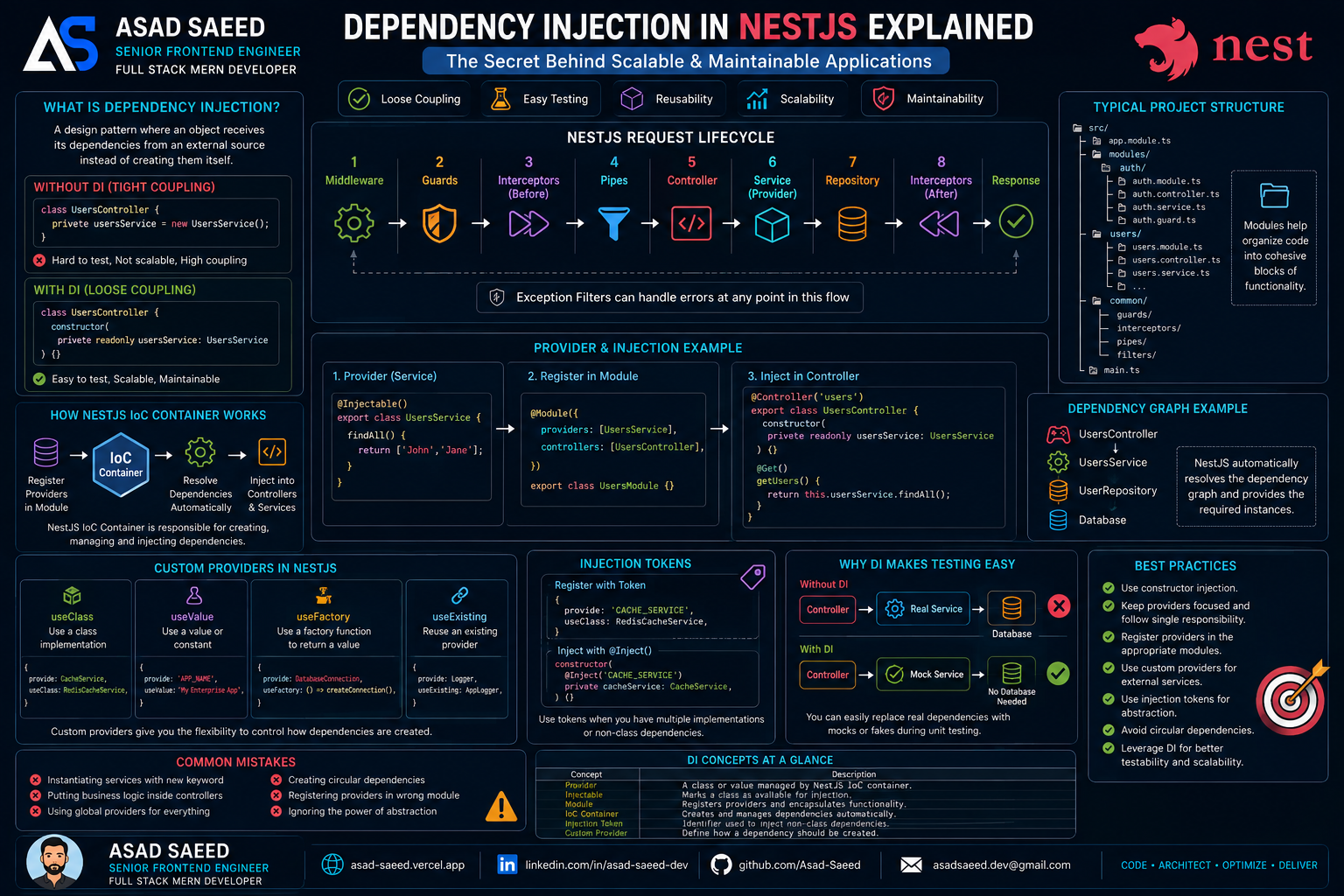
What is Dependency Injection?
Dependency Injection is a design pattern where an object receives its dependencies from an external source instead of creating them itself.
Without DI:
class UsersController {
  private usersService = new UsersService();
}
The controller is tightly coupled to UsersService.
With DI:
class UsersController {
  constructor(
    private readonly usersService: UsersService
  ) {}
}
Now NestJS provides the service automatically.
The controller no longer worries about creating or managing the dependency.
Why is Dependency Injection Important?
Imagine a project with:
Authentication
Users
Products
Orders
Payments
Notifications
Without DI, every class would manually create its dependencies.
Controller
   │
new Service()
   │
new Repository()
   │
new Database()
As the application grows, this quickly becomes difficult to maintain.
With Dependency Injection:
Controller
      │
      ▼
NestJS IoC Container
      │
      ▼
Service
      │
      ▼
Repository
      │
      ▼
Database
The framework manages object creation and lifecycle, allowing developers to focus on business logic.
Understanding the IoC Container
NestJS includes an Inversion of Control (IoC) Container.
Its responsibilities include:
Creating providers
Managing dependencies
Reusing singleton instances
Resolving dependency graphs
Injecting services where needed
Instead of creating objects manually, the container does it for you.
What are Providers?
In NestJS, almost everything is a Provider.
Examples include:
Services
Repositories
Configurations
Custom classes
Database clients
A provider is simply a class managed by the NestJS IoC Container.
Example:
@Injectable()
export class UsersService {
  findAll() {
    return [];
  }
}
The @Injectable() decorator tells NestJS that this class can be managed and injected.
Registering Providers
Providers are registered inside a module.
@Module({
  providers: [UsersService],
})
export class UsersModule {}
Once registered, NestJS knows how to create and inject the service.
Injecting a Provider
Instead of creating the service manually:
const usersService = new UsersService();Inject it through the constructor:
@Controller('users')
export class UsersController {
  constructor(
    private readonly usersService: UsersService
  ) {}
}
This is Constructor Injection—the most common and recommended approach in NestJS.
Dependency Graph
NestJS automatically resolves dependencies.
UsersController
        │
        ▼
UsersService
        │
        ▼
UserRepository
        │
        ▼
Database
When a request reaches the controller, NestJS ensures every dependency in the chain has already been created.
Singleton Providers
By default, providers are Singletons.
Application

↓

One UsersService Instance

↓

Shared Across Requests
Benefits:
Lower memory usage
Better performance
Consistent shared state (when appropriate)
In most applications, singleton providers are exactly what you want.
Injection Tokens
Sometimes you don't inject a class—you inject an identifier.
Example:
{
  provide: 'CACHE_SERVICE',
  useClass: RedisCacheService,
}
Then inject it like this:
constructor(
  @Inject('CACHE_SERVICE')
  private cacheService: CacheService,
) {}
Injection Tokens are useful when:
Swapping implementations
Creating reusable libraries
Working with interfaces
Injecting external services
Custom Providers
NestJS supports several types of custom providers.
useClass
Choose between different implementations.
{
  provide: CacheService,
  useClass: RedisCacheService,
}
useValue
Inject constants or configuration.
{
  provide: 'APP_NAME',
  useValue: 'My Enterprise App',
}
useFactory
Generate dependencies dynamically.
{
  provide: DatabaseConnection,
  useFactory: () => createConnection(),
}
Ideal for:
Database connections
Redis clients
External APIs
Environment-based configuration
useExisting
Reuse an existing provider.
{
  provide: Logger,
  useExisting: AppLogger,
}
This avoids creating duplicate instances.
Real-World Example
Imagine an authentication module.
AuthController
        │
        ▼
AuthService
        │
        ▼
JwtService
        │
        ▼
ConfigService
        │
        ▼
Database
Notice that no class manually creates another.
Everything is managed by the IoC Container.
Why Dependency Injection Makes Testing Easier
Without DI:
Controller

↓

Real Database
Unit testing becomes difficult because your controller always depends on real services.
With DI:
Controller

↓

Mock Service
You can replace the real service with a mock or fake implementation, making tests faster and more reliable.
This is one of the biggest reasons enterprise applications rely heavily on Dependency Injection.
Common Mistakes
❌ Instantiating services manually using new
❌ Placing business logic inside controllers
❌ Creating circular dependencies between services
❌ Using global providers for everything
❌ Registering providers in the wrong module
❌ Ignoring the benefits of constructor injection
Best Practices
✔ Use constructor injection instead of creating objects manually.
✔ Keep providers focused on a single responsibility.
✔ Register providers within their feature modules.
✔ Use custom providers for external services and configuration.
✔ Use injection tokens when multiple implementations are possible.
✔ Follow SOLID principles to keep dependencies loosely coupled.
✔ Avoid circular dependencies whenever possible.
Dependency Injection at a Glance
ConceptPurposeProviderA class managed by NestJSInjectableMarks a class as injectableModuleRegisters providersIoC ContainerCreates and manages dependenciesConstructor InjectionRecommended way to receive dependenciesInjection TokenInjects non-class dependenciesCustom ProviderAllows flexible dependency creation
My Recommended Pattern
For production NestJS applications, I recommend this flow:
Controller
      │
      ▼
Service
      │
      ▼
Repository
      │
      ▼
Database
Cross-cutting services like logging, caching, email, configuration, and authentication should also be injected rather than instantiated directly.
This keeps your application modular, maintainable, and easy to test.
Final Thoughts
Dependency Injection is much more than a convenience feature—it's one of the foundations of scalable software architecture.
By letting the NestJS IoC Container manage object creation, you reduce coupling, improve testability, and make your codebase easier to maintain as it grows.
Whether you're building a small API or a large enterprise platform, mastering Dependency Injection will help you write cleaner, more reusable, and production-ready NestJS applications.
Understanding how dependencies are managed is just as important as understanding the business logic they implement.
About the Author
Asad Saeed
Senior Frontend Engineer | Full Stack MERN Developer
I build scalable web and mobile applications using React.js, Next.js, React Native, TypeScript, Node.js, Express.js, NestJS, MongoDB, PostgreSQL, Redis, AWS, Docker, and modern CI/CD pipelines.
Connect with Me
🌐 Portfolio: https://asad-saeed.vercel.app/
💼 LinkedIn: https://linkedin.com/in/asad-saeed-dev
💻 GitHub: https://github.com/Asad-Saeed
📧 Email: asadsaeed.dev@gmail.com
Follow for more content on:
NestJS
Node.js
Backend Architecture
Dependency Injection
Software Engineering
MERN Stack
TypeScript
System Design
Cloud & AWS
Enterprise Development
#NestJS #DependencyInjection #NodeJS #BackendDevelopment #SoftwareArchitecture #TypeScript #SystemDesign #SoftwareEngineering #MERN #AsadSaeed