Skip to main contentSkip to main content
~/profileLIVE
Asad Saeed
Asad SaeedOpen to WorkSenior Frontend Engineer | MERN Stack Developer
01

Identity

Residence
Lahore, Punjab
Nationality
Pakistani
City
Lahore
Age
26
02

Languages

  • English96%
  • Urdu100%
03

Expertise

React.js95%
Next.js95%
JavaScript / TypeScript95%
HTML5, CSS395%
Tailwind, Bootstrap, Shadcn UI95%
Material UI, SCSS, Styled Components90%
Redux Toolkit, React Query, Zustand92%
REST & GraphQL APIs92%
Git, GitHub, Bitbucket98%
Node.js, Express.js, NestJS85%
MongoDB, PostgreSQL, Prisma80%
WebSockets, Real-Time Systems82%
AI & Automation (n8n, OpenAI)78%
04

Stack

4949 technologies
ReactJSNextJSJavaScriptTypeScriptReact NativeNestJSNode.jsExpress.jsMongoDBPostgreSQLMySQLPrisma ORMFirebaseREST APIGraphQL APIApollo ClientWebSockets / Socket.ioReduxRedux ToolkitReact QueryZustandTailwind CSSShadcn UIMaterial UIBootstrapSCSSCSSModule.cssStyled ComponentsFramer MotionStripe Payment Integrationn8nOpenAI APIAWS LambdaDockerVercelNetlifyGitHub Actions (CI/CD)JestGitGitHubBitbucketPostmanSwaggerJira SoftwareStrapiSanityFigmaAdobe XD
05

Contact

Email
asadsaeed.dev@gmail.com
Phone
+92 3017631644·+92 478730644
Download Resume
HomeSkillsBackgroundPortfolioContact
Chat with Asad
All Posts
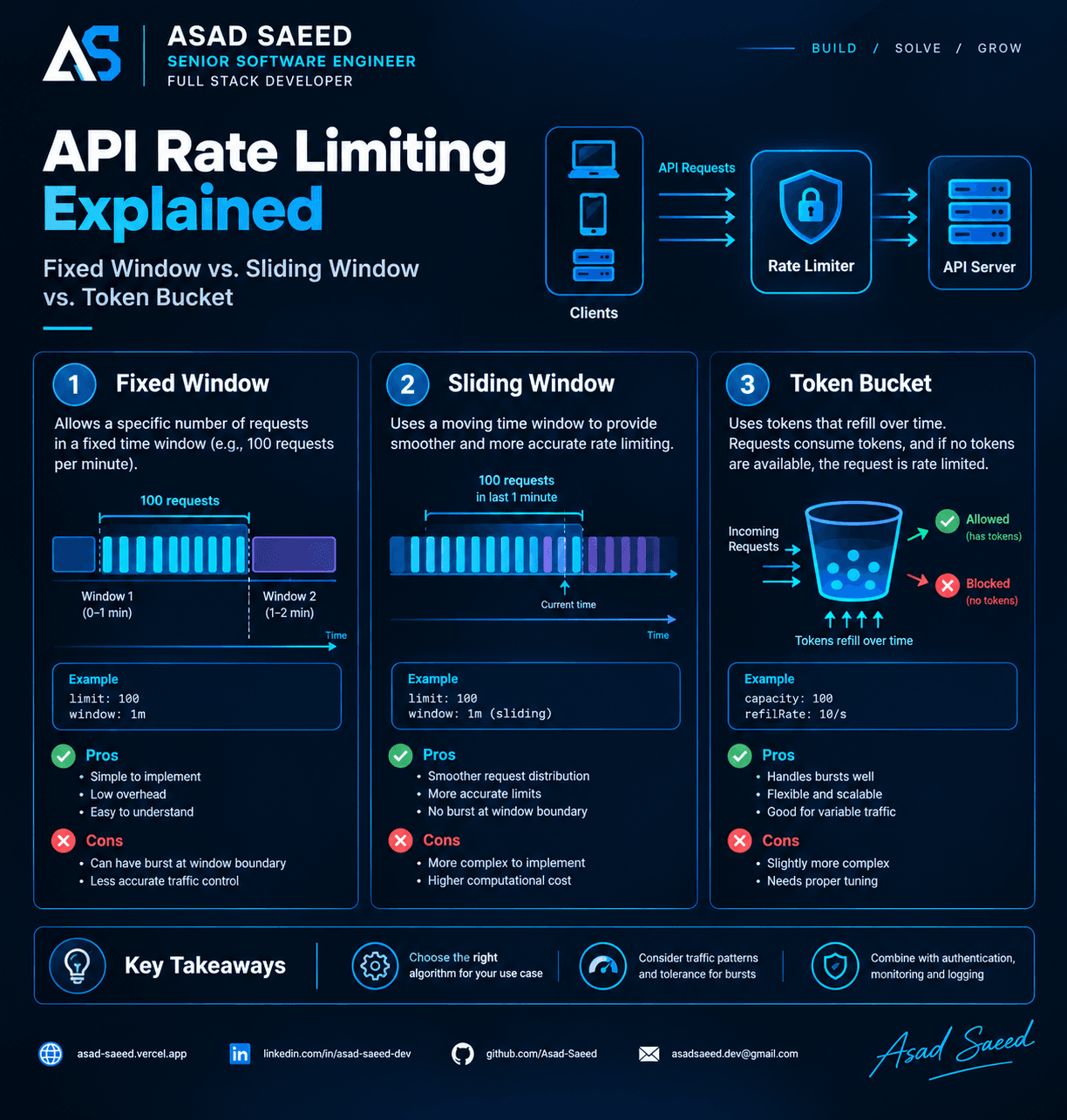
React Native in 2026: Expo vs Bare Workflow — Which One Should You Choose?

React Native in 2026: Expo vs Bare Workflow — Which One Should You Choose?

REACT NATIVEREACTEXPOCLIEXPO VS BARE WORKFLOWASAD SAEEDMERN STACKMOBILE APP
July 12, 20265 min readBy Asad Saeed

Today, Expo has evolved into a production-ready platform with features like EAS Build, OTA Updates, and Development Builds, making it a great choice for the majority of applications. That said, the Bare Workflow still shines when your project requires deep native integrations, custom SDKs, or complete platform control.

Introduction

One of the first questions every React Native developer asks is:

"Should I use Expo or the Bare React Native workflow?"

A few years ago, the answer wasn't always straightforward.

Expo had limitations, many native modules weren't supported, and developers often ejected to React Native CLI as soon as projects became complex.

Fast forward to 2026, and the landscape has changed dramatically.

Expo is no longer just a beginner-friendly framework—it has evolved into a mature platform that powers production applications for startups and enterprises alike.

At the same time, the Bare workflow remains the best choice for applications requiring complete native control.

So which one should you choose?

In this guide, we'll compare both approaches from a real-world engineering perspective rather than simply listing features.


What is Expo?

Expo is an open-source framework and platform built on top of React Native that simplifies mobile app development.

Instead of spending hours configuring Android Studio, Xcode, Gradle, CocoaPods, certificates, and native dependencies, Expo provides an ecosystem that handles much of the complexity for you.

With Expo you get:

  • Expo SDK

  • Expo Router

  • EAS Build

  • EAS Update (OTA Updates)

  • Push Notifications

  • Secure Storage

  • Camera APIs

  • File System APIs

  • Authentication Support

  • App Deployment Services

Think of Expo as a productivity layer built on top of React Native.


What is the Bare Workflow?

The Bare workflow is the traditional React Native setup.

You have complete access to:

  • Android native code (Kotlin/Java)

  • iOS native code (Swift/Objective-C)

  • Gradle

  • CocoaPods

  • Native Build Configuration

  • Native SDK Integration

This gives developers unlimited flexibility but also requires more maintenance.


Quick Comparison

Expo Bare Workflow

Setup ⭐⭐⭐⭐⭐ ⭐⭐⭐

Native Access Limited Full

OTA Updates ✅ Manual

Build EAS Xcode / Gradle

Maintenance Easy Moderate

Best For 90% of Apps Native-heavy Apps


Getting Started

Expo

Creating a project takes only a few seconds.

npx create-expo-app my-app

Start development:

npm start

That's it.

No Android Studio setup required to begin coding.


Bare Workflow

npx react-native init MyApp

You'll also need:

  • Android Studio

  • Xcode (macOS)

  • CocoaPods

  • Java SDK

  • Gradle

  • Android SDK

The initial setup takes considerably longer.


Developer Experience

This is where Expo truly shines.

Features include:

✅ Hot Reload

✅ Fast Refresh

✅ QR Code Preview

✅ OTA Updates

✅ Built-in APIs

✅ Automatic Configuration

Developers spend less time configuring and more time building features.


Native Modules

This used to be Expo's biggest weakness.

Not anymore.

Today Expo supports most popular libraries including:

  • React Navigation

  • React Query

  • Zustand

  • Firebase

  • Stripe

  • SQLite

  • Camera

  • Maps

  • Notifications

  • Authentication

  • Secure Store

If a package isn't available, you can create a Development Build using EAS.

Only highly customized native integrations typically require the Bare workflow.


Performance

A common misconception is:

"Bare React Native is always faster."

In reality, both Expo and Bare use the same React Native engine.

Both support:

  • Hermes

  • Fabric

  • TurboModules

  • JSI

  • React Native New Architecture

Performance differences are usually negligible.

The biggest performance improvements come from writing efficient JavaScript—not from choosing Expo or Bare.


EAS Build

One of Expo's biggest advantages is EAS Build.

Instead of configuring:

  • Xcode

  • Android Studio

  • Build Servers

You simply run:

eas build

Expo handles the cloud build process for Android and iOS.

This is especially useful for remote teams and CI/CD pipelines.


OTA Updates

Imagine fixing a UI bug without waiting for App Store approval.

Expo Updates makes this possible.

You can push JavaScript updates directly to users.

Benefits include:

  • Faster bug fixes

  • Instant UI updates

  • Reduced release cycles

Native code changes still require a new app store release.


Development Builds

Expo is no longer limited to the Managed Workflow.

Development Builds provide the flexibility of native development while keeping the Expo developer experience.

This means you can integrate custom native libraries without abandoning Expo.


CI/CD

Expo integrates seamlessly with:

  • GitHub Actions

  • Bitbucket Pipelines

  • GitLab CI

  • Azure DevOps

A modern pipeline might look like:

Developer
     │
GitHub Push
     │
GitHub Actions
     │
EAS Build
     │
App Store Connect
     │
Google Play Console

Deployment becomes largely automated.


Folder Structure

A scalable Expo project might use:

src/
│
├── app/
├── components/
├── features/
├── hooks/
├── services/
├── api/
├── navigation/
├── store/
├── constants/
├── assets/
├── utils/
├── types/
└── theme/

Feature-based organization scales much better than grouping by file type.


When Should You Choose Expo?

Expo is an excellent choice for:

  • SaaS Applications

  • Startup MVPs

  • Business Apps

  • Internal Company Apps

  • Social Applications

  • E-commerce Apps

  • Booking Platforms

  • Educational Apps

In my experience, Expo is the right choice for the vast majority of React Native projects.


When Should You Choose the Bare Workflow?

Choose the Bare workflow if your application requires:

  • Custom Native SDKs

  • Proprietary Hardware Integrations

  • Bluetooth Low Energy (advanced use cases)

  • Custom Camera Processing

  • AR/VR Features

  • Specialized Native Performance Optimizations

  • Highly Customized Build Configurations

If your app heavily depends on native platform APIs beyond what Expo supports, the Bare workflow provides the flexibility you need.


My Recommendation

As someone who builds production applications with React, Next.js, TypeScript, Node.js, and React Native, my recommendation is simple:

  • Start with Expo for new projects unless you know you need deep native customization from day one.

  • Use the Bare workflow when project requirements genuinely demand it—not because "that's what senior developers do."

Choosing the right workflow is about solving business problems efficiently, not adding unnecessary complexity.


Final Thoughts

The question is no longer:

"Is Expo good enough?"

The better question is:

"Does my application actually need the Bare workflow?"

For most modern applications, Expo provides an exceptional developer experience, powerful tooling, and production-ready capabilities.

The Bare workflow remains an excellent option when your application requires full native control.

Understanding both approaches—and knowing when to use each—is what separates experienced React Native developers from those who simply follow trends.


About the Author

Asad Saeed

Senior Frontend Engineer | Full Stack MERN Developer

I build scalable web and mobile applications using modern technologies including:

  • React.js

  • Next.js

  • React Native

  • TypeScript

  • JavaScript (ES6+)

  • Node.js

  • Express.js

  • NestJS

  • MongoDB

  • PostgreSQL

  • AWS

  • CI/CD

  • System Design

Connect with Me

🌐 Portfolio
https://asad-saeed.vercel.app/

💼 LinkedIn
https://linkedin.com/in/asad-saeed-dev

💻 GitHub
https://github.com/Asad-Saeed

📧 Email
asadsaeed.dev@gmail.com

📱 Phone
+92 301 7631644


If you enjoyed this article, consider following me for more in-depth content on:

  • React Native

  • React.js

  • Next.js

  • Full Stack Development

  • Frontend Architecture

  • Mobile Development

  • System Design

  • AWS & Cloud

  • CI/CD

  • Software Engineering

#ReactNative #Expo #MobileDevelopment #JavaScript #TypeScript #ReactJS #FullStackDevelopment #SoftwareEngineering #NextJS #AsadSaeed

Asad Saeed

Asad Saeed

Senior Frontend Engineer | MERN Stack Developer

More posts →

Related Posts

Don't Stop Here

NestJS Architecture Explained: Controllers, Providers, Modules, Middleware, Guards & Interceptors (2026 Guide)

NestJS Architecture Explained: Controllers, Providers, Modules, Middleware, Guards & Interceptors (2026 Guide)

Master the NestJS architecture by understanding Modules, Controllers, Providers, Dependency Injection, Middleware, Guards, Pipes, Interceptors, and Exception Filters. Learn the complete NestJS request lifecycle and build scalable, production-ready backend applications.

NESTJSNODEJSSOFTWARE ARCHITECTURE
© 2026 · Asad Saeed
All Posts
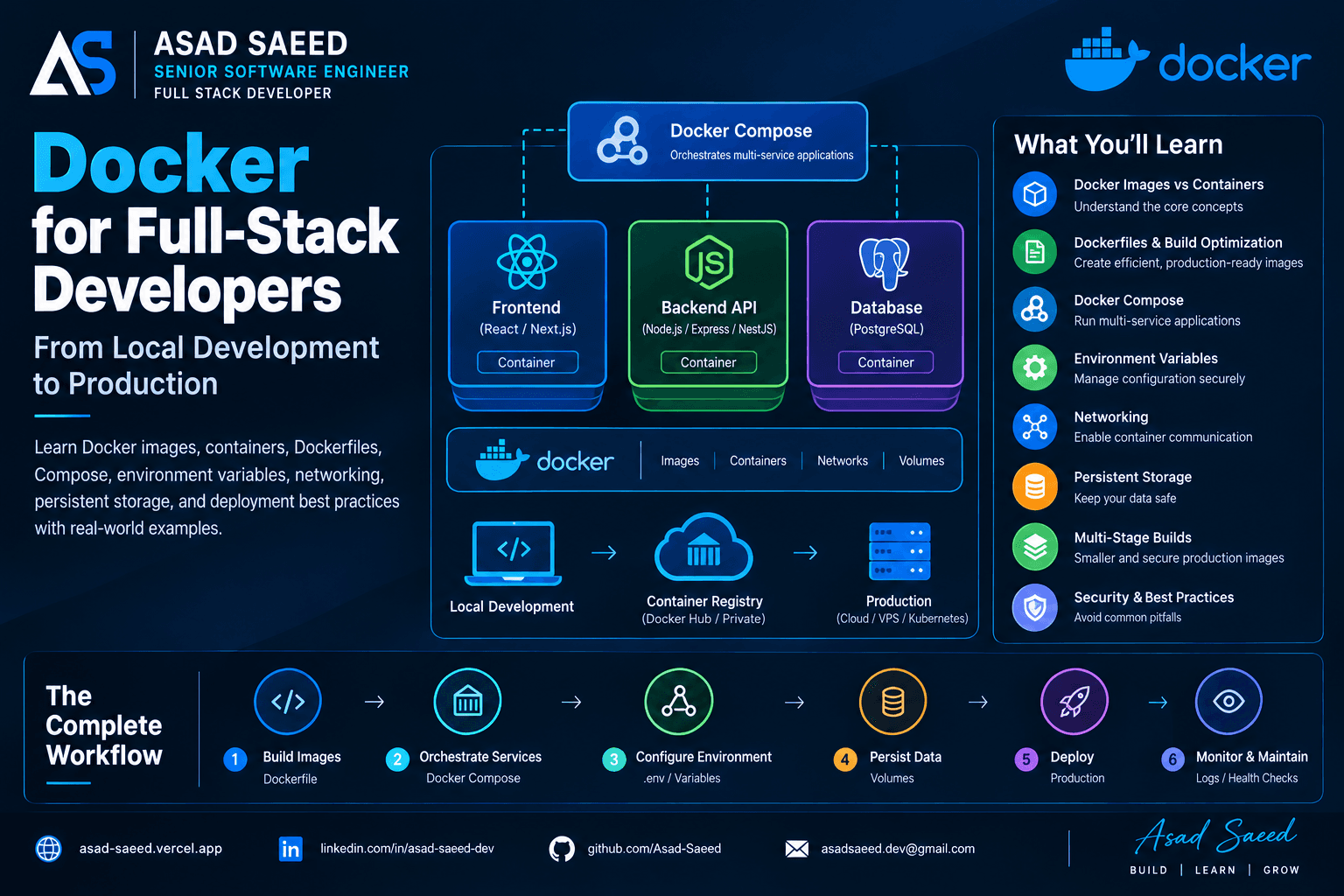
React Native in 2026: Expo vs Bare Workflow — Which One Should You Choose?

React Native in 2026: Expo vs Bare Workflow — Which One Should You Choose?

REACT NATIVEREACTEXPOCLIEXPO VS BARE WORKFLOWASAD SAEEDMERN STACKMOBILE APP
July 12, 20265 min readBy Asad Saeed

Today, Expo has evolved into a production-ready platform with features like EAS Build, OTA Updates, and Development Builds, making it a great choice for the majority of applications. That said, the Bare Workflow still shines when your project requires deep native integrations, custom SDKs, or complete platform control.

Introduction

One of the first questions every React Native developer asks is:

"Should I use Expo or the Bare React Native workflow?"

A few years ago, the answer wasn't always straightforward.

Expo had limitations, many native modules weren't supported, and developers often ejected to React Native CLI as soon as projects became complex.

Fast forward to 2026, and the landscape has changed dramatically.

Expo is no longer just a beginner-friendly framework—it has evolved into a mature platform that powers production applications for startups and enterprises alike.

At the same time, the Bare workflow remains the best choice for applications requiring complete native control.

So which one should you choose?

In this guide, we'll compare both approaches from a real-world engineering perspective rather than simply listing features.


What is Expo?

Expo is an open-source framework and platform built on top of React Native that simplifies mobile app development.

Instead of spending hours configuring Android Studio, Xcode, Gradle, CocoaPods, certificates, and native dependencies, Expo provides an ecosystem that handles much of the complexity for you.

With Expo you get:

  • Expo SDK

  • Expo Router

  • EAS Build

  • EAS Update (OTA Updates)

  • Push Notifications

  • Secure Storage

  • Camera APIs

  • File System APIs

  • Authentication Support

  • App Deployment Services

Think of Expo as a productivity layer built on top of React Native.


What is the Bare Workflow?

The Bare workflow is the traditional React Native setup.

You have complete access to:

  • Android native code (Kotlin/Java)

  • iOS native code (Swift/Objective-C)

  • Gradle

  • CocoaPods

  • Native Build Configuration

  • Native SDK Integration

This gives developers unlimited flexibility but also requires more maintenance.


Quick Comparison

Expo Bare Workflow

Setup ⭐⭐⭐⭐⭐ ⭐⭐⭐

Native Access Limited Full

OTA Updates ✅ Manual

Build EAS Xcode / Gradle

Maintenance Easy Moderate

Best For 90% of Apps Native-heavy Apps


Getting Started

Expo

Creating a project takes only a few seconds.

npx create-expo-app my-app

Start development:

npm start

That's it.

No Android Studio setup required to begin coding.


Bare Workflow

npx react-native init MyApp

You'll also need:

  • Android Studio

  • Xcode (macOS)

  • CocoaPods

  • Java SDK

  • Gradle

  • Android SDK

The initial setup takes considerably longer.


Developer Experience

This is where Expo truly shines.

Features include:

✅ Hot Reload

✅ Fast Refresh

✅ QR Code Preview

✅ OTA Updates

✅ Built-in APIs

✅ Automatic Configuration

Developers spend less time configuring and more time building features.


Native Modules

This used to be Expo's biggest weakness.

Not anymore.

Today Expo supports most popular libraries including:

  • React Navigation

  • React Query

  • Zustand

  • Firebase

  • Stripe

  • SQLite

  • Camera

  • Maps

  • Notifications

  • Authentication

  • Secure Store

If a package isn't available, you can create a Development Build using EAS.

Only highly customized native integrations typically require the Bare workflow.


Performance

A common misconception is:

"Bare React Native is always faster."

In reality, both Expo and Bare use the same React Native engine.

Both support:

  • Hermes

  • Fabric

  • TurboModules

  • JSI

  • React Native New Architecture

Performance differences are usually negligible.

The biggest performance improvements come from writing efficient JavaScript—not from choosing Expo or Bare.


EAS Build

One of Expo's biggest advantages is EAS Build.

Instead of configuring:

  • Xcode

  • Android Studio

  • Build Servers

You simply run:

eas build

Expo handles the cloud build process for Android and iOS.

This is especially useful for remote teams and CI/CD pipelines.


OTA Updates

Imagine fixing a UI bug without waiting for App Store approval.

Expo Updates makes this possible.

You can push JavaScript updates directly to users.

Benefits include:

  • Faster bug fixes

  • Instant UI updates

  • Reduced release cycles

Native code changes still require a new app store release.


Development Builds

Expo is no longer limited to the Managed Workflow.

Development Builds provide the flexibility of native development while keeping the Expo developer experience.

This means you can integrate custom native libraries without abandoning Expo.


CI/CD

Expo integrates seamlessly with:

  • GitHub Actions

  • Bitbucket Pipelines

  • GitLab CI

  • Azure DevOps

A modern pipeline might look like:

Developer
     │
GitHub Push
     │
GitHub Actions
     │
EAS Build
     │
App Store Connect
     │
Google Play Console

Deployment becomes largely automated.


Folder Structure

A scalable Expo project might use:

src/
│
├── app/
├── components/
├── features/
├── hooks/
├── services/
├── api/
├── navigation/
├── store/
├── constants/
├── assets/
├── utils/
├── types/
└── theme/

Feature-based organization scales much better than grouping by file type.


When Should You Choose Expo?

Expo is an excellent choice for:

  • SaaS Applications

  • Startup MVPs

  • Business Apps

  • Internal Company Apps

  • Social Applications

  • E-commerce Apps

  • Booking Platforms

  • Educational Apps

In my experience, Expo is the right choice for the vast majority of React Native projects.


When Should You Choose the Bare Workflow?

Choose the Bare workflow if your application requires:

  • Custom Native SDKs

  • Proprietary Hardware Integrations

  • Bluetooth Low Energy (advanced use cases)

  • Custom Camera Processing

  • AR/VR Features

  • Specialized Native Performance Optimizations

  • Highly Customized Build Configurations

If your app heavily depends on native platform APIs beyond what Expo supports, the Bare workflow provides the flexibility you need.


My Recommendation

As someone who builds production applications with React, Next.js, TypeScript, Node.js, and React Native, my recommendation is simple:

  • Start with Expo for new projects unless you know you need deep native customization from day one.

  • Use the Bare workflow when project requirements genuinely demand it—not because "that's what senior developers do."

Choosing the right workflow is about solving business problems efficiently, not adding unnecessary complexity.


Final Thoughts

The question is no longer:

"Is Expo good enough?"

The better question is:

"Does my application actually need the Bare workflow?"

For most modern applications, Expo provides an exceptional developer experience, powerful tooling, and production-ready capabilities.

The Bare workflow remains an excellent option when your application requires full native control.

Understanding both approaches—and knowing when to use each—is what separates experienced React Native developers from those who simply follow trends.


About the Author

Asad Saeed

Senior Frontend Engineer | Full Stack MERN Developer

I build scalable web and mobile applications using modern technologies including:

  • React.js

  • Next.js

  • React Native

  • TypeScript

  • JavaScript (ES6+)

  • Node.js

  • Express.js

  • NestJS

  • MongoDB

  • PostgreSQL

  • AWS

  • CI/CD

  • System Design

Connect with Me

🌐 Portfolio
https://asad-saeed.vercel.app/

💼 LinkedIn
https://linkedin.com/in/asad-saeed-dev

💻 GitHub
https://github.com/Asad-Saeed

📧 Email
asadsaeed.dev@gmail.com

📱 Phone
+92 301 7631644


If you enjoyed this article, consider following me for more in-depth content on:

  • React Native

  • React.js

  • Next.js

  • Full Stack Development

  • Frontend Architecture

  • Mobile Development

  • System Design

  • AWS & Cloud

  • CI/CD

  • Software Engineering

#ReactNative #Expo #MobileDevelopment #JavaScript #TypeScript #ReactJS #FullStackDevelopment #SoftwareEngineering #NextJS #AsadSaeed
Asad Saeed

Asad Saeed

Senior Frontend Engineer | MERN Stack Developer

More posts →

Related Posts

Don't Stop Here

NestJS Architecture Explained: Controllers, Providers, Modules, Middleware, Guards & Interceptors (2026 Guide)

NestJS Architecture Explained: Controllers, Providers, Modules, Middleware, Guards & Interceptors (2026 Guide)

Master the NestJS architecture by understanding Modules, Controllers, Providers, Dependency Injection, Middleware, Guards, Pipes, Interceptors, and Exception Filters. Learn the complete NestJS request lifecycle and build scalable, production-ready backend applications.

NESTJSNODEJSSOFTWARE ARCHITECTURE
© 2026 · Asad Saeed
Aug 5, 20266 min read
Read
Monolith vs Modular Monolith vs Microservices: Choosing the Right Software Architecture in 2026

Monolith vs Modular Monolith vs Microservices: Choosing the Right Software Architecture in 2026

Learn the differences between Monolith, Modular Monolith, and Microservices architectures. Compare scalability, deployment, complexity, and real-world use cases to choose the right architecture for your next MERN or enterprise application.

SOFTWARE ARCHITECTUREMICROSERVICESSYSTEM DESIGN
Jul 28, 20265 min read
Read
WebSockets vs Server-Sent Events (SSE) vs Polling: Which Real-Time Communication Method Should You Choose in 2026?

WebSockets vs Server-Sent Events (SSE) vs Polling: Which Real-Time Communication Method Should You Choose in 2026?

Learn the differences between WebSockets, Server-Sent Events (SSE), and Polling. Compare performance, scalability, bandwidth, and real-world MERN Stack use cases to choose the best real-time communication method.

WEBSOCKETSWEBSOCKETS VS POLLINGREAL-TIME COMMUNICATION
Jul 24, 20265 min read
Read
F
Made with ❤️ by Asad Saeed
© 2026 · Asad Saeed
Made with ❤️ by Asad Saeed
F
Aug 5, 20266 min read
Read
Monolith vs Modular Monolith vs Microservices: Choosing the Right Software Architecture in 2026

Monolith vs Modular Monolith vs Microservices: Choosing the Right Software Architecture in 2026

Learn the differences between Monolith, Modular Monolith, and Microservices architectures. Compare scalability, deployment, complexity, and real-world use cases to choose the right architecture for your next MERN or enterprise application.

SOFTWARE ARCHITECTUREMICROSERVICESSYSTEM DESIGN
Jul 28, 20265 min read
Read
WebSockets vs Server-Sent Events (SSE) vs Polling: Which Real-Time Communication Method Should You Choose in 2026?

WebSockets vs Server-Sent Events (SSE) vs Polling: Which Real-Time Communication Method Should You Choose in 2026?

Learn the differences between WebSockets, Server-Sent Events (SSE), and Polling. Compare performance, scalability, bandwidth, and real-world MERN Stack use cases to choose the best real-time communication method.

WEBSOCKETSWEBSOCKETS VS POLLINGREAL-TIME COMMUNICATION
Jul 24, 20265 min read
Read
F
Made with ❤️ by Asad Saeed
© 2026 · Asad Saeed
Made with ❤️ by Asad Saeed
F