Skip to main contentSkip to main content
~/profileLIVE
Asad Saeed
Asad SaeedOpen to WorkSenior Frontend Engineer | MERN Stack Developer
01

Identity

Residence
Lahore, Punjab
Nationality
Pakistani
City
Lahore
Age
26
02

Languages

  • English96%
  • Urdu100%
03

Expertise

React.js95%
Next.js95%
JavaScript / TypeScript95%
HTML5, CSS395%
Tailwind, Bootstrap, Shadcn UI95%
Material UI, SCSS, Styled Components90%
Redux Toolkit, React Query, Zustand92%
REST & GraphQL APIs92%
Git, GitHub, Bitbucket98%
Node.js, Express.js, NestJS85%
MongoDB, PostgreSQL, Prisma80%
WebSockets, Real-Time Systems82%
AI & Automation (n8n, OpenAI)78%
04

Stack

4949 technologies
ReactJSNextJSJavaScriptTypeScriptReact NativeNestJSNode.jsExpress.jsMongoDBPostgreSQLMySQLPrisma ORMFirebaseREST APIGraphQL APIApollo ClientWebSockets / Socket.ioReduxRedux ToolkitReact QueryZustandTailwind CSSShadcn UIMaterial UIBootstrapSCSSCSSModule.cssStyled ComponentsFramer MotionStripe Payment Integrationn8nOpenAI APIAWS LambdaDockerVercelNetlifyGitHub Actions (CI/CD)JestGitGitHubBitbucketPostmanSwaggerJira SoftwareStrapiSanityFigmaAdobe XD
05

Contact

Email
asadsaeed.dev@gmail.com
Phone
+92 3017631644Β·+92 478730644
Download Resume
HomeSkillsBackgroundPortfolioContact
Chat with Asad
All Posts
API Rate Limiting Explained: Fixed vs. Sliding Window vs. Token Bucket

API Rate Limiting Explained: Fixed vs. Sliding Window vs. Token Bucket

BACKEND DEVELOPMENTRATE LIMITINGSYSTEM DESIGNSLIDING WINDOW𝗧𝗼𝗸𝗲𝗻 π—•π˜‚π—°π—Έπ—²π˜ASAD SAEED
October 21, 202613 min readBy Asad Saeed

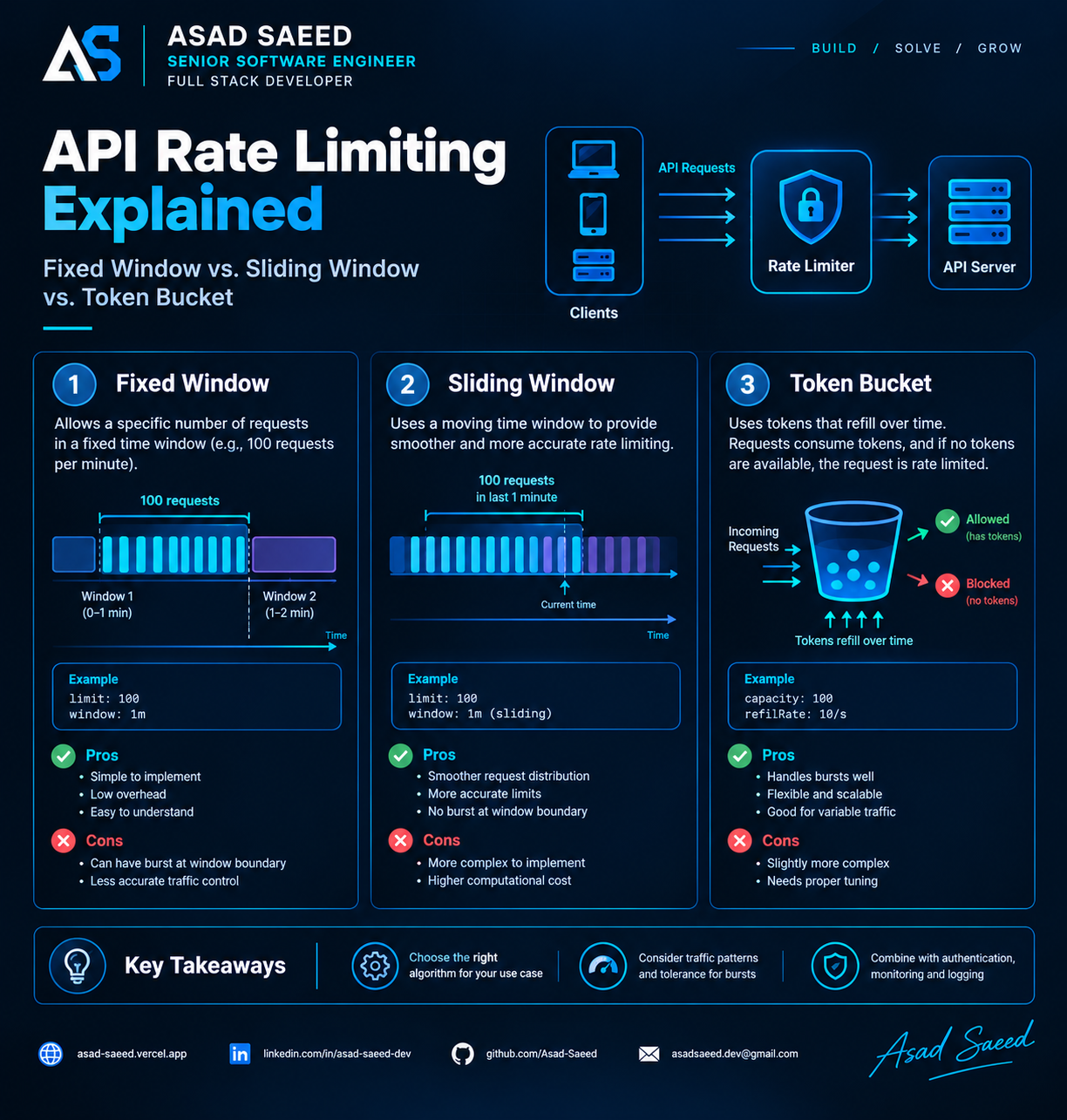
Learn how API rate limiting works and compare Fixed Window, Sliding Window, and Token Bucket algorithms with examples, trade-offs, and production best practices.

Introduction: What Happens When Your API Gets Too Many Requests?

Imagine you've built a REST API for an application with thousands of users.

Everything works well during normal traffic. Then a client starts sending thousands of requests per second. Another client accidentally creates an infinite retry loop. Suddenly, your database connections are exhausted, response times increase, and legitimate users begin experiencing errors.

How do you protect your backend without blocking valid users?

One of the most effective solutions is API rate limiting.

Rate limiting controls how many requests a client can make within a defined period. It helps protect server resources, enforce API usage policies, reduce abuse, and keep services responsive under load.

However, not every rate-limiting algorithm behaves the same way.

Three commonly used approaches are:

  • Fixed Window: Limits requests within fixed time intervals.

  • Sliding Window: Evaluates requests across a moving time interval.

  • Token Bucket: Allows controlled bursts while regulating the long-term request rate.

Understanding their differences helps you choose an algorithm that matches your application's traffic patterns and reliability requirements.

Let's explore how each works, including implementation examples, trade-offs, and production considerations.

1. What Is API Rate Limiting?

API rate limiting defines how frequently a client can access an endpoint or service.

For example, an API might enforce a limit of 100 requests per minute per authenticated user.

Once the client reaches that limit, additional requests may be rejected until capacity becomes available again.

A rate limiter typically considers:

  • Client identity, such as a user ID, API key, or IP address.

  • The number of requests received.

  • A time window or token-refill policy.

  • The configured limit and current usage.

  • The action to take when the limit is exceeded.

A typical request flow looks like this:

Client β†’ API Gateway or Middleware β†’ Rate Limiter β†’ Backend API

If the request is allowed, processing continues. Otherwise, the server returns an HTTP 429 Too Many Requests response.

For example:

HTTP/1.1 429 Too Many Requests
Retry-After: 30
Content-Type: application/json
{
  "error": "rate_limit_exceeded",
  "message": "Too many requests. Please try again later."
}

The Retry-After value should reflect the actual retry policy when the server can determine it.

Rate limiting is not the same as throttling in every implementation. Rate limiting defines the allowed request rate, while throttling can also describe delaying, queueing, or slowing requests when capacity is constrained.

2. Fixed Window Algorithm

The fixed window algorithm divides time into predefined intervals.

For example, with a limit of 100 requests per minute, the windows might be:

  • 10:00:00–10:00:59

  • 10:01:00–10:01:59

  • 10:02:00–10:02:59

The server maintains a request counter for each client and window.

When a request arrives, it checks the current counter. If the count is below the configured limit, the request is allowed and the counter is incremented. Otherwise, the request is rejected.

How it works

Suppose the limit is 100 requests per minute.

  1. A client sends 80 requests during the first window.

  2. The client sends another 20 requests.

  3. The counter reaches 100, so further requests are rejected.

  4. At the beginning of the next window, the counter resets.

  5. The client can now send another 100 requests.

The implementation is straightforward, but there is an important edge case.

The boundary problem

Imagine a client sends 100 requests at 10:00:59 and another 100 requests at 10:01:00.

Both batches belong to different fixed windows.

The client has therefore sent 200 requests in approximately one second, even though the configured limit is 100 requests per minute.

This behavior is known as the fixed-window boundary burst.

Node.js implementation

Here is a simplified in-memory implementation using Express:

const express = require("express");

const app = express();

const LIMIT = 100;
const WINDOW_MS = 60_000;

const counters = new Map();

function fixedWindowRateLimit(req, res, next) {
  const clientId = req.get("x-api-key") || req.ip;
  const now = Date.now();

  const windowId = Math.floor(now / WINDOW_MS);
  const key = `${clientId}:${windowId}`;

  const currentCount = counters.get(key) || 0;

  if (currentCount >= LIMIT) {
    return res.status(429).json({
      error: "rate_limit_exceeded",
      message: "Request limit exceeded",
    });
  }

  counters.set(key, currentCount + 1);

  next();
}

app.use(fixedWindowRateLimit);

app.get("/api/data", (req, res) => {
  res.json({ message: "Request accepted" });
});

This illustrates the basic counter logic, but it is not production-ready.

The map grows unless old entries are cleaned up, each application instance maintains a separate counter, and concurrent operations are not coordinated across servers. The client identifier also needs to be derived safely from trusted authentication or network information.

Advantages

  • Simple to understand and implement.

  • Low computational overhead.

  • Easy to implement using Redis counters and expiration.

  • Suitable for basic quotas and straightforward API policies.

Disadvantages

  • Can allow large bursts around window boundaries.

  • Does not provide smooth traffic control.

  • Requires careful counter expiration and concurrency handling.

Best suited for: simple quotas, internal APIs, and use cases where occasional boundary bursts are acceptable.

3. Sliding Window Algorithm

The sliding window algorithm evaluates requests over a moving interval rather than resetting all usage at a fixed boundary.

For example, a policy may allow 100 requests during any rolling 60-second period.

Instead of asking, "How many requests arrived during this calendar minute?", the limiter asks, "How many requests arrived during the last 60 seconds?"

This produces smoother and more accurate enforcement of a rolling-window limit.

There are two common approaches: the sliding-window log and the sliding-window counter.

Approach A: Sliding Window Log

The server records the timestamps of individual requests.

When a new request arrives, it removes timestamps older than the window, counts the remaining requests, and decides whether to allow the new request.

For a 60-second window:

  1. Read the client's recent request timestamps.

  2. Remove entries older than 60 seconds.

  3. Count the remaining entries.

  4. Reject the request if the count has reached the limit.

  5. Otherwise, record the new timestamp and allow the request.

The main advantage is precision. The main drawback is storage: each request can require a timestamp entry, which becomes expensive at high traffic volumes.

Approach B: Sliding Window Counter

A sliding-window counter estimates rolling usage by combining the previous fixed window's count with the current window's count.

A common approximation is:

estimatedCount =
    previousWindowCount * previousWindowWeight
    + currentWindowCount

The previous-window weight is based on how much of that window overlaps the rolling interval.

For example, if 75% of the previous window falls outside the rolling interval, only the remaining 25% contributes to the estimate.

This method uses less storage than keeping every request timestamp, but it is an approximation rather than an exact rolling log.

Conceptual Node.js implementation

The following example shows the logic of a sliding-window counter. It assumes a reliable storage layer supplies the previous and current window counts atomically.

function estimateSlidingWindowCount({
  previousCount,
  currentCount,
  elapsedInWindow,
  windowMs,
}) {
  const previousWeight =
    1 - elapsedInWindow / windowMs;

  return (
    previousCount * previousWeight +
    currentCount
  );
}

function isRequestAllowed({
  previousCount,
  currentCount,
  elapsedInWindow,
  windowMs,
  limit,
}) {
  const estimatedCount = estimateSlidingWindowCount({
    previousCount,
    currentCount,
    elapsedInWindow,
    windowMs,
  });

  return estimatedCount < limit;
}

This is the decision logic, not a complete concurrent rate limiter. A real implementation must atomically read and update the relevant counters and correctly manage window boundaries and expiration.

Advantages

  • Reduces the sharp boundary burst associated with fixed windows.

  • Provides smoother enforcement over time.

  • A sliding-window counter can be memory-efficient.

  • Useful when a rolling request quota is important.

Disadvantages

  • More complex than a basic fixed-window counter.

  • An approximate counter may differ from exact request-log accounting.

  • An exact sliding-window log can consume substantial storage.

  • Distributed deployments require atomic coordination.

Best suited for: public APIs, user-facing services, and systems that need more consistent rolling-window enforcement.

4. Token Bucket Algorithm

The token bucket algorithm takes a different approach.

Instead of counting requests in a time window, it maintains a bucket containing tokens.

Each accepted request consumes one or more tokens. Tokens are replenished at a configured rate until the bucket reaches its maximum capacity.

If sufficient tokens are available, the request is allowed. If not, the request is rejected or delayed, depending on the implementation.

Two settings define the behavior:

  • Bucket capacity: The maximum number of tokens available, controlling the permitted burst size.

  • Refill rate: The rate at which tokens become available over time, controlling the long-term request rate.

Example

Suppose your API uses these settings:

Bucket capacity: 100 tokens
Refill rate:     10 tokens per second
Request cost:    1 token

If the bucket is full, the client can make up to 100 requests immediately.

After consuming all 100 tokens, the client must wait for tokens to refill. At 10 tokens per second, it can sustain approximately 10 requests per second over time.

This allows temporary bursts without permitting unlimited sustained traffic.

How it works

  1. Initialize the bucket with a token count, up to its capacity.

  2. When a request arrives, calculate how many tokens should have refilled since the last update.

  3. Add the refilled tokens, without exceeding capacity.

  4. If enough tokens are available, subtract the request's cost and allow it.

  5. Otherwise, reject or delay the request.

Node.js implementation

Here's a simplified implementation using a single process:

const buckets = new Map();

const CAPACITY = 100;
const REFILL_RATE = 10; // tokens per second

function allowRequest(clientId, now = Date.now()) {
  let bucket = buckets.get(clientId);

  if (!bucket) {
    bucket = {
      tokens: CAPACITY,
      lastRefill: now,
    };
  }

  const elapsedSeconds =
    Math.max(0, now - bucket.lastRefill) / 1000;

  bucket.tokens = Math.min(
    CAPACITY,
    bucket.tokens + elapsedSeconds * REFILL_RATE
  );

  bucket.lastRefill = now;

  if (bucket.tokens < 1) {
    buckets.set(clientId, bucket);
    return false;
  }

  bucket.tokens -= 1;
  buckets.set(clientId, bucket);

  return true;
}

Example usage:

app.use((req, res, next) => {
  const clientId = req.user?.id || req.ip;

  if (!allowRequest(clientId)) {
    return res.status(429).json({
      error: "rate_limit_exceeded",
      message: "Rate limit exceeded. Try again later.",
    });
  }

  next();
});

The middleware assumes that authentication middleware has already populated req.user where applicable.

This example is suitable for understanding the algorithm, not for coordinating production traffic across multiple server instances. A real implementation needs atomic shared state, memory cleanup, safe client identification, and appropriate handling of concurrent requests.

Advantages

  • Supports controlled bursts.

  • Regulates the long-term request rate.

  • Works well for variable traffic patterns.

  • Can support weighted request costs.

  • Useful for APIs where immediate bursts are acceptable but sustained overload is not.

Disadvantages

  • Requires careful selection of capacity and refill rate.

  • More complex than a simple fixed-window counter.

  • Shared token state must be updated atomically in distributed deployments.

  • A large bucket capacity may permit bursts that overwhelm downstream services.

Best suited for: API gateways, public APIs, traffic shaping, and systems with bursty workloads.

5. Fixed Window vs. Sliding Window vs. Token Bucket

The most suitable algorithm depends on what you want to control.

FeatureFixed WindowSliding WindowToken BucketCore mechanismCounter per fixed intervalUsage across a moving intervalTokens refill over timeBoundary burstsPossibleReduced or eliminated, depending on implementationAllowed within bucket capacityBurst flexibilityLimited by window boundariesControlled by rolling limitExplicitly configurableStorage needsLowModerate to highLow per clientImplementation complexityLowModerate to highModerateBest forSimple quotasRolling-window quotasBursty traffic with a sustained rate limit

A key distinction is that sliding-window algorithms and token buckets enforce different policies.

A sliding-window limiter constrains requests over a rolling interval. A token bucket regulates consumption against a refill rate while allowing bursts up to the available token capacity.

Neither algorithm is universally better.

6. How to Choose the Right Algorithm

Use these practical guidelines when designing an API.

Choose Fixed Window when simplicity matters

A fixed window can be a good choice when:

  • The policy is easy to explain as a quota per minute or hour.

  • Low implementation overhead is important.

  • Boundary bursts are acceptable.

  • You need straightforward counters and expiration.

Choose Sliding Window when rolling fairness matters

A sliding window is appropriate when:

  • You need to enforce a limit across any rolling interval.

  • Sharp boundary bursts are undesirable.

  • Consistent quota enforcement is important.

  • You can accept the additional implementation and storage complexity.

Choose between an exact request log and an approximate counter according to your accuracy and resource requirements.

Choose Token Bucket when controlled bursts matter

A token bucket is often a strong choice when:

  • Legitimate clients send short bursts of traffic.

  • You want to define a sustained request rate.

  • You need explicit control over burst capacity.

  • You want to assign different token costs to expensive operations.

For example, a search endpoint might cost one token, while a resource-intensive report-generation endpoint costs five.

7. Rate Limiting in Distributed Systems

A common mistake is implementing rate limiting independently in every application instance.

Suppose three API servers each allow 100 requests per minute for the same user.

If each server maintains its own counter, the user may be able to send close to 300 requests per minute across the cluster.

The actual outcome depends on request distribution, but the key issue is that each server is enforcing a separate limit.

For shared quotas, use a coordination strategy that matches the consistency requirements.

Common options include:

  • Redis: Shared counters or token state with atomic scripts and expiration.

  • API gateways: Centralized enforcement at the service boundary.

  • Database-backed state: Suitable for some lower-volume policies, with careful attention to contention.

  • Local rate limiting: Useful for per-instance protection, especially when combined with a global limit.

For Redis-backed implementations, operations that must happen together should be atomic. A separate read followed by a write can introduce race conditions when multiple requests arrive concurrently.

You should also consider what happens if the rate-limiting store becomes unavailable.

A fail-open policy allows requests to proceed when the limiter cannot be reached. This preserves availability but may expose downstream systems to excess traffic.

A fail-closed policy rejects requests when the limiter is unavailable. This better preserves the configured quota but can block legitimate traffic.

The right choice depends on the endpoint, security requirements, service criticality, and fallback protections.

8. Production Best Practices

A reliable rate-limiting strategy requires more than choosing an algorithm.

Identify clients correctly. Use authenticated identities or API keys when possible. Do not blindly trust client-supplied headers such as X-Forwarded-For; only use forwarded addresses from trusted proxies.

Apply limits at the right scope. Depending on the use case, enforce limits per user, API key, IP address, organization, endpoint, or overall service.

Return meaningful responses. Use HTTP 429 and document how clients should retry. Where useful, include appropriate Retry-After or rate-limit headers.

Use different policies for different endpoints. Login, password reset, search, report generation, and public read endpoints have different resource and abuse characteristics.

Avoid retry storms. Clients should respect retry guidance and use exponential backoff with jitter where appropriate.

Monitor rejection rates. Track allowed and rejected requests, high-volume clients, limiter latency, storage failures, and downstream service health.

Test concurrency and failure modes. Verify behavior when multiple requests arrive simultaneously, the rate-limit store becomes unavailable, or traffic is distributed across instances.

Protect expensive resources. Rate limiting helps control traffic, but it does not replace authentication, authorization, request validation, concurrency limits, or capacity planning.

Conclusion

API rate limiting is an important part of building secure, reliable, and scalable backend systems.

Fixed Window provides simplicity, Sliding Window offers rolling-window enforcement, and Token Bucket allows controlled bursts while regulating the long-term rate.

The right choice depends on your traffic patterns, fairness requirements, storage constraints, and tolerance for bursts.

For a straightforward quota, Fixed Window may be enough. For rolling-window enforcement, Sliding Window may be more appropriate. For bursty traffic with a defined sustained rate, Token Bucket is often a strong fit.

The goal isn't simply to reject excessive requests. It's to protect system resources while keeping the API responsive for legitimate users.


About the Author

Asad Saeed is a Senior Software Engineer and Full Stack Developer interested in building scalable web applications, reliable backend systems, and maintainable software architectures.

Portfolio: https://asad-saeed.vercel.app/

LinkedIn: https://linkedin.com/in/asad-saeed-dev

GitHub: https://github.com/Asad-Saeed

Follow for practical insights on backend engineering, full-stack development, system design, and software architecture.

#APIDevelopment #BackendDevelopment #SystemDesign #SoftwareEngineering #AsadSaeed

Asad Saeed

Asad Saeed

Senior Frontend Engineer | MERN Stack Developer

More posts β†’

Related Posts

Don't Stop Here

Docker for Full-Stack Developers: Complete Guide (2026)

Docker for Full-Stack Developers: Complete Guide (2026)

Learn Docker for full-stack development with practical examples covering Dockerfiles, images, containers, Docker Compose, networking, environment variables, volumes, and production deployment.

DOCKERDEVOPSSOFTWARE ENGINEERING
Β© 2026 Β· Asad Saeed
All Posts
API Rate Limiting Explained: Fixed vs. Sliding Window vs. Token Bucket

API Rate Limiting Explained: Fixed vs. Sliding Window vs. Token Bucket

BACKEND DEVELOPMENTRATE LIMITINGSYSTEM DESIGNSLIDING WINDOW𝗧𝗼𝗸𝗲𝗻 π—•π˜‚π—°π—Έπ—²π˜ASAD SAEED
October 21, 202613 min readBy Asad Saeed

Learn how API rate limiting works and compare Fixed Window, Sliding Window, and Token Bucket algorithms with examples, trade-offs, and production best practices.

Introduction: What Happens When Your API Gets Too Many Requests?

Imagine you've built a REST API for an application with thousands of users.

Everything works well during normal traffic. Then a client starts sending thousands of requests per second. Another client accidentally creates an infinite retry loop. Suddenly, your database connections are exhausted, response times increase, and legitimate users begin experiencing errors.

How do you protect your backend without blocking valid users?

One of the most effective solutions is API rate limiting.

Rate limiting controls how many requests a client can make within a defined period. It helps protect server resources, enforce API usage policies, reduce abuse, and keep services responsive under load.

However, not every rate-limiting algorithm behaves the same way.

Three commonly used approaches are:

  • Fixed Window: Limits requests within fixed time intervals.

  • Sliding Window: Evaluates requests across a moving time interval.

  • Token Bucket: Allows controlled bursts while regulating the long-term request rate.

Understanding their differences helps you choose an algorithm that matches your application's traffic patterns and reliability requirements.

Let's explore how each works, including implementation examples, trade-offs, and production considerations.

1. What Is API Rate Limiting?

API rate limiting defines how frequently a client can access an endpoint or service.

For example, an API might enforce a limit of 100 requests per minute per authenticated user.

Once the client reaches that limit, additional requests may be rejected until capacity becomes available again.

A rate limiter typically considers:

  • Client identity, such as a user ID, API key, or IP address.

  • The number of requests received.

  • A time window or token-refill policy.

  • The configured limit and current usage.

  • The action to take when the limit is exceeded.

A typical request flow looks like this:

Client β†’ API Gateway or Middleware β†’ Rate Limiter β†’ Backend API

If the request is allowed, processing continues. Otherwise, the server returns an HTTP 429 Too Many Requests response.

For example:

HTTP/1.1 429 Too Many Requests
Retry-After: 30
Content-Type: application/json
{
  "error": "rate_limit_exceeded",
  "message": "Too many requests. Please try again later."
}

The Retry-After value should reflect the actual retry policy when the server can determine it.

Rate limiting is not the same as throttling in every implementation. Rate limiting defines the allowed request rate, while throttling can also describe delaying, queueing, or slowing requests when capacity is constrained.

2. Fixed Window Algorithm

The fixed window algorithm divides time into predefined intervals.

For example, with a limit of 100 requests per minute, the windows might be:

  • 10:00:00–10:00:59

  • 10:01:00–10:01:59

  • 10:02:00–10:02:59

The server maintains a request counter for each client and window.

When a request arrives, it checks the current counter. If the count is below the configured limit, the request is allowed and the counter is incremented. Otherwise, the request is rejected.

How it works

Suppose the limit is 100 requests per minute.

  1. A client sends 80 requests during the first window.

  2. The client sends another 20 requests.

  3. The counter reaches 100, so further requests are rejected.

  4. At the beginning of the next window, the counter resets.

  5. The client can now send another 100 requests.

The implementation is straightforward, but there is an important edge case.

The boundary problem

Imagine a client sends 100 requests at 10:00:59 and another 100 requests at 10:01:00.

Both batches belong to different fixed windows.

The client has therefore sent 200 requests in approximately one second, even though the configured limit is 100 requests per minute.

This behavior is known as the fixed-window boundary burst.

Node.js implementation

Here is a simplified in-memory implementation using Express:

const express = require("express");

const app = express();

const LIMIT = 100;
const WINDOW_MS = 60_000;

const counters = new Map();

function fixedWindowRateLimit(req, res, next) {
  const clientId = req.get("x-api-key") || req.ip;
  const now = Date.now();

  const windowId = Math.floor(now / WINDOW_MS);
  const key = `${clientId}:${windowId}`;

  const currentCount = counters.get(key) || 0;

  if (currentCount >= LIMIT) {
    return res.status(429).json({
      error: "rate_limit_exceeded",
      message: "Request limit exceeded",
    });
  }

  counters.set(key, currentCount + 1);

  next();
}

app.use(fixedWindowRateLimit);

app.get("/api/data", (req, res) => {
  res.json({ message: "Request accepted" });
});

This illustrates the basic counter logic, but it is not production-ready.

The map grows unless old entries are cleaned up, each application instance maintains a separate counter, and concurrent operations are not coordinated across servers. The client identifier also needs to be derived safely from trusted authentication or network information.

Advantages

  • Simple to understand and implement.

  • Low computational overhead.

  • Easy to implement using Redis counters and expiration.

  • Suitable for basic quotas and straightforward API policies.

Disadvantages

  • Can allow large bursts around window boundaries.

  • Does not provide smooth traffic control.

  • Requires careful counter expiration and concurrency handling.

Best suited for: simple quotas, internal APIs, and use cases where occasional boundary bursts are acceptable.

3. Sliding Window Algorithm

The sliding window algorithm evaluates requests over a moving interval rather than resetting all usage at a fixed boundary.

For example, a policy may allow 100 requests during any rolling 60-second period.

Instead of asking, "How many requests arrived during this calendar minute?", the limiter asks, "How many requests arrived during the last 60 seconds?"

This produces smoother and more accurate enforcement of a rolling-window limit.

There are two common approaches: the sliding-window log and the sliding-window counter.

Approach A: Sliding Window Log

The server records the timestamps of individual requests.

When a new request arrives, it removes timestamps older than the window, counts the remaining requests, and decides whether to allow the new request.

For a 60-second window:

  1. Read the client's recent request timestamps.

  2. Remove entries older than 60 seconds.

  3. Count the remaining entries.

  4. Reject the request if the count has reached the limit.

  5. Otherwise, record the new timestamp and allow the request.

The main advantage is precision. The main drawback is storage: each request can require a timestamp entry, which becomes expensive at high traffic volumes.

Approach B: Sliding Window Counter

A sliding-window counter estimates rolling usage by combining the previous fixed window's count with the current window's count.

A common approximation is:

estimatedCount =
    previousWindowCount * previousWindowWeight
    + currentWindowCount

The previous-window weight is based on how much of that window overlaps the rolling interval.

For example, if 75% of the previous window falls outside the rolling interval, only the remaining 25% contributes to the estimate.

This method uses less storage than keeping every request timestamp, but it is an approximation rather than an exact rolling log.

Conceptual Node.js implementation

The following example shows the logic of a sliding-window counter. It assumes a reliable storage layer supplies the previous and current window counts atomically.

function estimateSlidingWindowCount({
  previousCount,
  currentCount,
  elapsedInWindow,
  windowMs,
}) {
  const previousWeight =
    1 - elapsedInWindow / windowMs;

  return (
    previousCount * previousWeight +
    currentCount
  );
}

function isRequestAllowed({
  previousCount,
  currentCount,
  elapsedInWindow,
  windowMs,
  limit,
}) {
  const estimatedCount = estimateSlidingWindowCount({
    previousCount,
    currentCount,
    elapsedInWindow,
    windowMs,
  });

  return estimatedCount < limit;
}

This is the decision logic, not a complete concurrent rate limiter. A real implementation must atomically read and update the relevant counters and correctly manage window boundaries and expiration.

Advantages

  • Reduces the sharp boundary burst associated with fixed windows.

  • Provides smoother enforcement over time.

  • A sliding-window counter can be memory-efficient.

  • Useful when a rolling request quota is important.

Disadvantages

  • More complex than a basic fixed-window counter.

  • An approximate counter may differ from exact request-log accounting.

  • An exact sliding-window log can consume substantial storage.

  • Distributed deployments require atomic coordination.

Best suited for: public APIs, user-facing services, and systems that need more consistent rolling-window enforcement.

4. Token Bucket Algorithm

The token bucket algorithm takes a different approach.

Instead of counting requests in a time window, it maintains a bucket containing tokens.

Each accepted request consumes one or more tokens. Tokens are replenished at a configured rate until the bucket reaches its maximum capacity.

If sufficient tokens are available, the request is allowed. If not, the request is rejected or delayed, depending on the implementation.

Two settings define the behavior:

  • Bucket capacity: The maximum number of tokens available, controlling the permitted burst size.

  • Refill rate: The rate at which tokens become available over time, controlling the long-term request rate.

Example

Suppose your API uses these settings:

Bucket capacity: 100 tokens
Refill rate:     10 tokens per second
Request cost:    1 token

If the bucket is full, the client can make up to 100 requests immediately.

After consuming all 100 tokens, the client must wait for tokens to refill. At 10 tokens per second, it can sustain approximately 10 requests per second over time.

This allows temporary bursts without permitting unlimited sustained traffic.

How it works

  1. Initialize the bucket with a token count, up to its capacity.

  2. When a request arrives, calculate how many tokens should have refilled since the last update.

  3. Add the refilled tokens, without exceeding capacity.

  4. If enough tokens are available, subtract the request's cost and allow it.

  5. Otherwise, reject or delay the request.

Node.js implementation

Here's a simplified implementation using a single process:

const buckets = new Map();

const CAPACITY = 100;
const REFILL_RATE = 10; // tokens per second

function allowRequest(clientId, now = Date.now()) {
  let bucket = buckets.get(clientId);

  if (!bucket) {
    bucket = {
      tokens: CAPACITY,
      lastRefill: now,
    };
  }

  const elapsedSeconds =
    Math.max(0, now - bucket.lastRefill) / 1000;

  bucket.tokens = Math.min(
    CAPACITY,
    bucket.tokens + elapsedSeconds * REFILL_RATE
  );

  bucket.lastRefill = now;

  if (bucket.tokens < 1) {
    buckets.set(clientId, bucket);
    return false;
  }

  bucket.tokens -= 1;
  buckets.set(clientId, bucket);

  return true;
}

Example usage:

app.use((req, res, next) => {
  const clientId = req.user?.id || req.ip;

  if (!allowRequest(clientId)) {
    return res.status(429).json({
      error: "rate_limit_exceeded",
      message: "Rate limit exceeded. Try again later.",
    });
  }

  next();
});

The middleware assumes that authentication middleware has already populated req.user where applicable.

This example is suitable for understanding the algorithm, not for coordinating production traffic across multiple server instances. A real implementation needs atomic shared state, memory cleanup, safe client identification, and appropriate handling of concurrent requests.

Advantages

  • Supports controlled bursts.

  • Regulates the long-term request rate.

  • Works well for variable traffic patterns.

  • Can support weighted request costs.

  • Useful for APIs where immediate bursts are acceptable but sustained overload is not.

Disadvantages

  • Requires careful selection of capacity and refill rate.

  • More complex than a simple fixed-window counter.

  • Shared token state must be updated atomically in distributed deployments.

  • A large bucket capacity may permit bursts that overwhelm downstream services.

Best suited for: API gateways, public APIs, traffic shaping, and systems with bursty workloads.

5. Fixed Window vs. Sliding Window vs. Token Bucket

The most suitable algorithm depends on what you want to control.

FeatureFixed WindowSliding WindowToken BucketCore mechanismCounter per fixed intervalUsage across a moving intervalTokens refill over timeBoundary burstsPossibleReduced or eliminated, depending on implementationAllowed within bucket capacityBurst flexibilityLimited by window boundariesControlled by rolling limitExplicitly configurableStorage needsLowModerate to highLow per clientImplementation complexityLowModerate to highModerateBest forSimple quotasRolling-window quotasBursty traffic with a sustained rate limit

A key distinction is that sliding-window algorithms and token buckets enforce different policies.

A sliding-window limiter constrains requests over a rolling interval. A token bucket regulates consumption against a refill rate while allowing bursts up to the available token capacity.

Neither algorithm is universally better.

6. How to Choose the Right Algorithm

Use these practical guidelines when designing an API.

Choose Fixed Window when simplicity matters

A fixed window can be a good choice when:

  • The policy is easy to explain as a quota per minute or hour.

  • Low implementation overhead is important.

  • Boundary bursts are acceptable.

  • You need straightforward counters and expiration.

Choose Sliding Window when rolling fairness matters

A sliding window is appropriate when:

  • You need to enforce a limit across any rolling interval.

  • Sharp boundary bursts are undesirable.

  • Consistent quota enforcement is important.

  • You can accept the additional implementation and storage complexity.

Choose between an exact request log and an approximate counter according to your accuracy and resource requirements.

Choose Token Bucket when controlled bursts matter

A token bucket is often a strong choice when:

  • Legitimate clients send short bursts of traffic.

  • You want to define a sustained request rate.

  • You need explicit control over burst capacity.

  • You want to assign different token costs to expensive operations.

For example, a search endpoint might cost one token, while a resource-intensive report-generation endpoint costs five.

7. Rate Limiting in Distributed Systems

A common mistake is implementing rate limiting independently in every application instance.

Suppose three API servers each allow 100 requests per minute for the same user.

If each server maintains its own counter, the user may be able to send close to 300 requests per minute across the cluster.

The actual outcome depends on request distribution, but the key issue is that each server is enforcing a separate limit.

For shared quotas, use a coordination strategy that matches the consistency requirements.

Common options include:

  • Redis: Shared counters or token state with atomic scripts and expiration.

  • API gateways: Centralized enforcement at the service boundary.

  • Database-backed state: Suitable for some lower-volume policies, with careful attention to contention.

  • Local rate limiting: Useful for per-instance protection, especially when combined with a global limit.

For Redis-backed implementations, operations that must happen together should be atomic. A separate read followed by a write can introduce race conditions when multiple requests arrive concurrently.

You should also consider what happens if the rate-limiting store becomes unavailable.

A fail-open policy allows requests to proceed when the limiter cannot be reached. This preserves availability but may expose downstream systems to excess traffic.

A fail-closed policy rejects requests when the limiter is unavailable. This better preserves the configured quota but can block legitimate traffic.

The right choice depends on the endpoint, security requirements, service criticality, and fallback protections.

8. Production Best Practices

A reliable rate-limiting strategy requires more than choosing an algorithm.

Identify clients correctly. Use authenticated identities or API keys when possible. Do not blindly trust client-supplied headers such as X-Forwarded-For; only use forwarded addresses from trusted proxies.

Apply limits at the right scope. Depending on the use case, enforce limits per user, API key, IP address, organization, endpoint, or overall service.

Return meaningful responses. Use HTTP 429 and document how clients should retry. Where useful, include appropriate Retry-After or rate-limit headers.

Use different policies for different endpoints. Login, password reset, search, report generation, and public read endpoints have different resource and abuse characteristics.

Avoid retry storms. Clients should respect retry guidance and use exponential backoff with jitter where appropriate.

Monitor rejection rates. Track allowed and rejected requests, high-volume clients, limiter latency, storage failures, and downstream service health.

Test concurrency and failure modes. Verify behavior when multiple requests arrive simultaneously, the rate-limit store becomes unavailable, or traffic is distributed across instances.

Protect expensive resources. Rate limiting helps control traffic, but it does not replace authentication, authorization, request validation, concurrency limits, or capacity planning.

Conclusion

API rate limiting is an important part of building secure, reliable, and scalable backend systems.

Fixed Window provides simplicity, Sliding Window offers rolling-window enforcement, and Token Bucket allows controlled bursts while regulating the long-term rate.

The right choice depends on your traffic patterns, fairness requirements, storage constraints, and tolerance for bursts.

For a straightforward quota, Fixed Window may be enough. For rolling-window enforcement, Sliding Window may be more appropriate. For bursty traffic with a defined sustained rate, Token Bucket is often a strong fit.

The goal isn't simply to reject excessive requests. It's to protect system resources while keeping the API responsive for legitimate users.


About the Author

Asad Saeed is a Senior Software Engineer and Full Stack Developer interested in building scalable web applications, reliable backend systems, and maintainable software architectures.

Portfolio: https://asad-saeed.vercel.app/

LinkedIn: https://linkedin.com/in/asad-saeed-dev

GitHub: https://github.com/Asad-Saeed

Follow for practical insights on backend engineering, full-stack development, system design, and software architecture.

#APIDevelopment #BackendDevelopment #SystemDesign #SoftwareEngineering #AsadSaeed

Asad Saeed

Asad Saeed

Senior Frontend Engineer | MERN Stack Developer

More posts β†’

Related Posts

Don't Stop Here

Docker for Full-Stack Developers: Complete Guide (2026)

Docker for Full-Stack Developers: Complete Guide (2026)

Learn Docker for full-stack development with practical examples covering Dockerfiles, images, containers, Docker Compose, networking, environment variables, volumes, and production deployment.

DOCKERDEVOPSSOFTWARE ENGINEERING
Β© 2026 Β· Asad Saeed
Oct 19, 202612 min read
Read
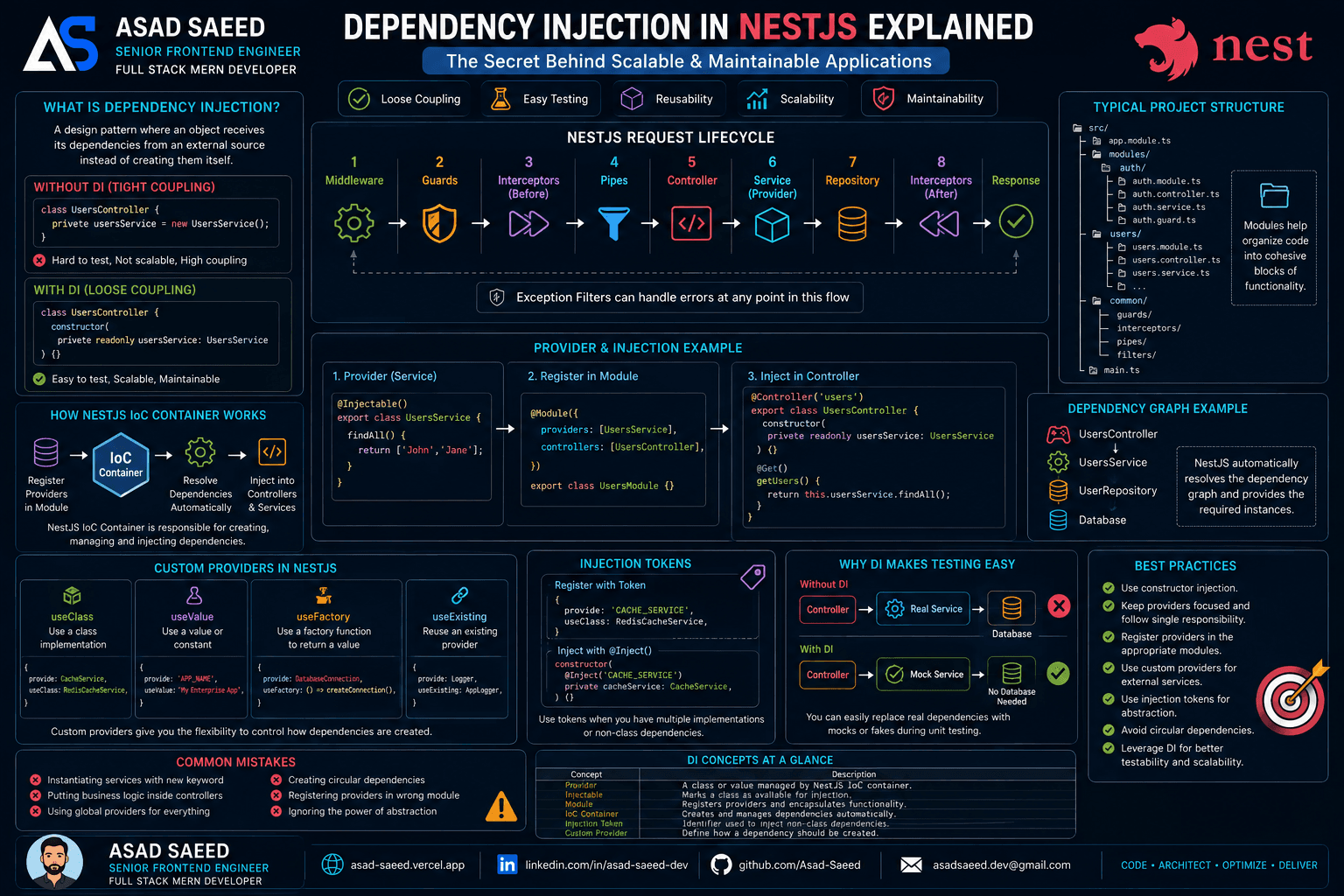
Dependency Injection in NestJS Explained: Providers, IoC Container, Injection Tokens & Custom Providers (2026 Guide)

Dependency Injection in NestJS Explained: Providers, IoC Container, Injection Tokens & Custom Providers (2026 Guide)

Learn how Dependency Injection works in NestJS, including Providers, the IoC Container, Constructor Injection, Injection Tokens, Custom Providers, and best practices for building scalable, testable, and enterprise-ready Node.js applications.

NESTJSDEPENDENCY INJECTIONNODEJS
Oct 19, 20265 min read
Read
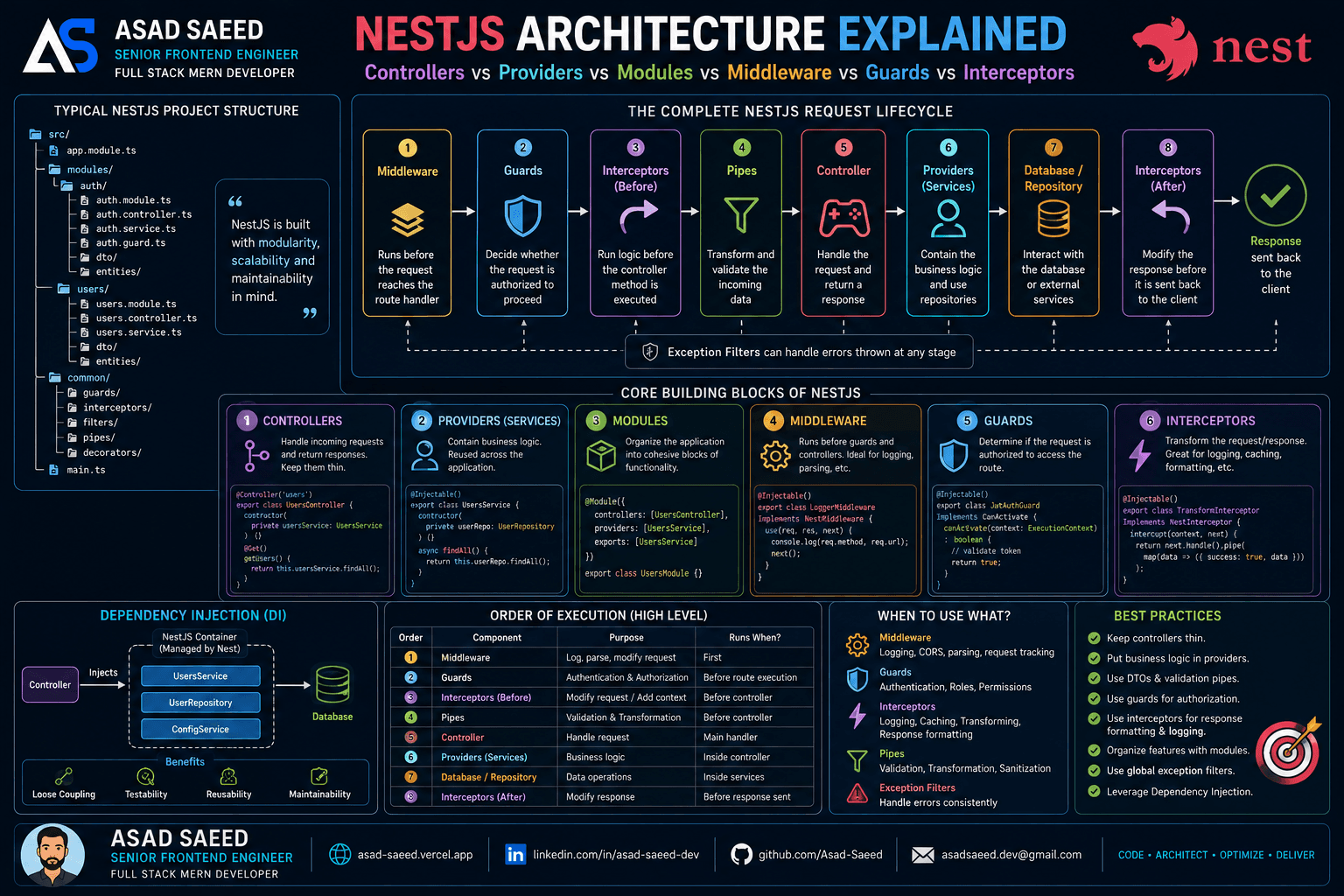
NestJS Architecture Explained: Controllers, Providers, Modules, Middleware, Guards & Interceptors (2026 Guide)

NestJS Architecture Explained: Controllers, Providers, Modules, Middleware, Guards & Interceptors (2026 Guide)

Master the NestJS architecture by understanding Modules, Controllers, Providers, Dependency Injection, Middleware, Guards, Pipes, Interceptors, and Exception Filters. Learn the complete NestJS request lifecycle and build scalable, production-ready backend applications.

NESTJSNODEJSSOFTWARE ARCHITECTURE
Aug 5, 20266 min read
Read
F
Made with ❀️ by Asad Saeed
Β© 2026 Β· Asad Saeed
Made with ❀️ by Asad Saeed
F
Oct 19, 202612 min read
Read
Dependency Injection in NestJS Explained: Providers, IoC Container, Injection Tokens & Custom Providers (2026 Guide)

Dependency Injection in NestJS Explained: Providers, IoC Container, Injection Tokens & Custom Providers (2026 Guide)

Learn how Dependency Injection works in NestJS, including Providers, the IoC Container, Constructor Injection, Injection Tokens, Custom Providers, and best practices for building scalable, testable, and enterprise-ready Node.js applications.

NESTJSDEPENDENCY INJECTIONNODEJS
Oct 19, 20265 min read
Read
NestJS Architecture Explained: Controllers, Providers, Modules, Middleware, Guards & Interceptors (2026 Guide)

NestJS Architecture Explained: Controllers, Providers, Modules, Middleware, Guards & Interceptors (2026 Guide)

Master the NestJS architecture by understanding Modules, Controllers, Providers, Dependency Injection, Middleware, Guards, Pipes, Interceptors, and Exception Filters. Learn the complete NestJS request lifecycle and build scalable, production-ready backend applications.

NESTJSNODEJSSOFTWARE ARCHITECTURE
Aug 5, 20266 min read
Read
F
Made with ❀️ by Asad Saeed
Β© 2026 Β· Asad Saeed
Made with ❀️ by Asad Saeed
F