How Cron Jobs Actually Work: From Scheduler to Execution in Node.js
Learn how cron jobs work internally in Node.js, from scheduling and execution to overlapping tasks, server downtime, retries, recovery, and production reliability.
Introduction
Cron jobs are everywhere in backend development.
They generate daily reports, synchronize external APIs, clean up expired sessions, process pending invoices, send scheduled notifications, and perform database maintenance.
In a Node.js application, scheduling a task can be as simple as writing a few lines of code:
import cron from "node-cron";

cron.schedule("*/5 * * * *", async () => {
  console.log("Running scheduled task");

  await synchronizeData();
});
This code runs the callback every five minutes while the scheduler is running.
But here's a more interesting question:
What actually happens between the scheduled time and the execution of your code?
What triggers the task? Does the operating system execute it? How does Node.js handle it? What happens if the task takes longer than expected? And what if your server goes down at the exact moment the job should run?
These questions become important when scheduled tasks handle real business operations.
In this article, we'll explore how cron jobs work internally, understand the execution lifecycle, examine common failure scenarios, and build a more reliable scheduling approach using Node.js and MongoDB.
1. What Is a Cron Job?
A cron job is a task scheduled to run automatically at specified times or intervals.
Traditional cron is a time-based job scheduler commonly found on Unix-like operating systems.
Developers use it to execute commands, scripts, and maintenance tasks without manually triggering them.
For example, a Linux crontab entry might look like this:
*/5 * * * * /usr/bin/node /app/scripts/sync.jsThis tells the operating-system cron service to run the specified command every five minutes.
Common use cases include:
Generating daily or monthly reports.
Removing expired records.
Synchronizing external data sources.
Processing scheduled invoices.
Sending reminder emails.
Running database maintenance scripts.
Checking the status of pending operations.
In Node.js, developers can also use libraries such as node-cron to schedule callbacks inside an application process.
Although both approaches schedule work, their execution models are different.
Traditional cron starts a command through the operating system, whereas an in-process scheduler triggers code inside an already-running application process.
Understanding this distinction is the first step toward understanding what happens when a server fails.
2. Understanding Cron Expressions
A cron expression defines when a task should run.
A commonly used five-field expression looks like this:
* * * * *
│ │ │ │ │
│ │ │ │ └── Day of week
│ │ │ └──── Month
│ │ └────── Day of month
│ └──────── Hour
└────────── Minute
Consider these examples:
Cron ExpressionMeaning* * * * *Every minute*/5 * * * *Every five minutes0 * * * *At the beginning of every hour0 0 * * *Every day at midnight0 9 * * 1Every Monday at 9:00 AM30 2 * * *Every day at 2:30 AM
These examples use the conventional five-field format. Some schedulers support additional fields or different expression conventions, so check the syntax supported by your scheduler.
A crucial detail is that a cron expression describes a schedule. It does not guarantee that a task will execute successfully.
If the scheduler isn't running when the scheduled time arrives, an ordinary in-process scheduler won't necessarily remember that execution for later.
That leads us to the internal execution flow.
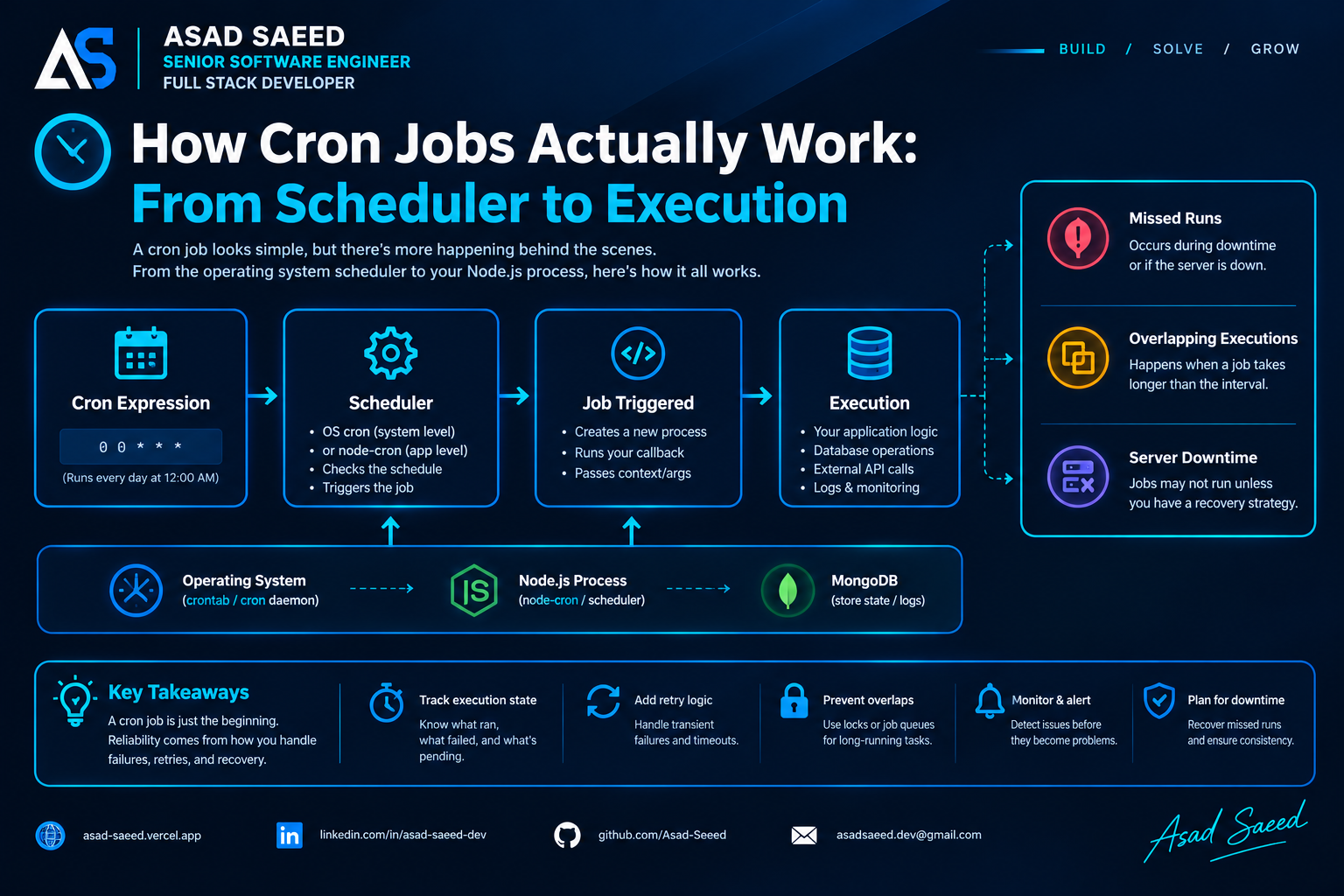
3. How Cron Jobs Work Internally
Let's examine the lifecycle of a scheduled task.
Cron Expression
      |
      v
Scheduler Evaluates Time
      |
      v
Scheduled Time Arrives
      |
      v
Callback or Command Triggered
      |
      v
Application Logic Executes
      |
      v
Task Completes or Fails
      |
      v
Record Result and Handle Errors
Each stage has a different responsibility.
Step 1: The schedule is registered
When your application starts, it registers the task with a scheduler.
For example:
cron.schedule("*/5 * * * *", async () => {
  await synchronizeData();
});
The scheduler receives the cron expression and the callback.
In an in-process scheduler, this registration exists in application memory.
If the process terminates, that in-memory registration disappears.
Traditional operating-system cron works differently because the schedule is configured in the system's crontab rather than being registered inside your Node.js application.
Step 2: The scheduler determines when the task is due
The scheduler evaluates the schedule against the current time.
When the scheduled time arrives, it triggers the configured command or callback.
The exact implementation depends on the scheduler.
For traditional Linux cron, a background service checks configured schedules and launches matching commands.
For Node.js scheduling libraries, the library manages timing within the application process.
The important distinction is that the scheduler determines when work should start; it doesn't automatically make the work durable or guarantee successful completion.
Step 3: The task is triggered
In traditional cron, the operating system launches a command, such as a Node.js script.
With node-cron, the scheduler invokes your registered JavaScript callback.
For example:
cron.schedule("0 * * * *", async () => {
  await generateHourlyReport();
});
When the scheduled time arrives, the callback is invoked.
This doesn't mean the application has successfully completed the report. It only means execution has been triggered.
Step 4: Node.js executes the application logic
Once the callback runs, normal JavaScript execution rules apply.
Node.js executes JavaScript on its event-loop thread by default, while asynchronous operations such as network requests and database queries can complete without blocking that thread for their entire duration.
Consider:
cron.schedule("* * * * *", async () => {
  console.log("Job started");

  await fetchExternalData();

  console.log("Job finished");
});
The callback starts, logs the first message, and begins the asynchronous operation.
When the awaited operation settles, the function continues.
The async keyword does not automatically move the entire task to a separate thread. CPU-intensive synchronous work can still block the event loop and delay other callbacks.
Step 5: The task finishes—or fails
After the business logic runs, the task may complete successfully or encounter an error.
A production scheduler should make it possible to determine:
When the task started.
Whether it completed.
How long execution took.
Whether it failed.
Which records were processed.
Whether a retry is required.
A log message alone may not be enough when a job processes thousands of records or must recover after a server restart.
For important jobs, persist execution state.
4. Traditional Cron vs. Node.js Cron Libraries
These approaches are often confused because both use cron expressions.
However, their operational behavior differs.
FeatureOperating-System CronIn-Process Node.js SchedulerSchedule locationSystem configurationApplication memoryExecutionLaunches a commandInvokes a callbackRequires Node.js app to remain runningNot necessarily; it launches the command when dueYesSurvives a Node.js application restartThe system schedule can remain configuredThe callback must be registered againMissed-run recoveryNot generally guaranteed by ordinary cronNot generally guaranteedJob status trackingRequires additional tooling or application logicRequires additional tooling or application logicDistributed coordinationRequires a separate strategyRequires a separate strategy
An operating-system cron service can launch a script even if your main web application isn't running, provided the host and cron service are available.
An in-process scheduler depends on its application process being alive and able to execute the callback.
Neither approach automatically provides durable job execution, comprehensive retries, or recovery of every missed schedule.
5. What Happens When a Job Takes Longer Than Its Interval?
This is one of the most common problems with scheduled tasks.
Suppose you schedule a task every minute:
cron.schedule("* * * * *", async () => {
  await processLargeDataset();
});
Now imagine processLargeDataset() takes three minutes to finish.
The scheduler may trigger another execution while the previous execution is still running, depending on the scheduling library and its configuration.
The result can look like this:
12:00  Job A starts
12:01  Job B starts
12:02  Job C starts
12:03  Job A finishes
12:03  Job D starts
If multiple executions update the same records, they may interfere with one another.
For example, two jobs might process the same invoice, send duplicate notifications, or attempt to update the same inventory records.
This is an overlapping-execution problem.
Preventing overlap in a single Node.js process
For a simple application with one scheduler process, an in-memory guard can prevent another execution from starting while the current execution is running.
import cron from "node-cron";

let isRunning = false;

cron.schedule("* * * * *", async () => {
  if (isRunning) {
    console.log("Skipping execution: previous job is running");
    return;
  }

  isRunning = true;

  try {
    console.log("Job started");

    await processLargeDataset();

    console.log("Job completed");
  } catch (error) {
    console.error("Job failed:", error);
  } finally {
    isRunning = false;
  }
});
The isRunning variable acts as a local lock.
If another scheduled callback fires while the job is running, the callback skips that execution.
However, this approach has limitations:
It works only within the current process.
It doesn't coordinate multiple application instances.
Skipped executions aren't automatically recovered.
The lock disappears when the process restarts.
For a single-process script, that may be sufficient.
For a distributed production application, you need a stronger strategy.
6. What Happens When the Server Goes Down?
Now consider a more serious scenario.
Your application schedules a task to run at midnight.
At 11:55 PM, the server goes down.
It comes back online at 12:20 AM.
What happens to the midnight execution?
With a conventional in-process scheduler, the scheduled callback generally won't run retroactively just because the process restarted.
If the scheduler doesn't implement missed-run recovery, that execution is missed.
The same applies to a job that was running when the process crashed: the JavaScript execution stops, and the application cannot simply resume the function from the exact instruction where it stopped.
Consider this workflow:
Scheduled Job Starts
        |
        v
Process 1,000 Records
        |
        v
Server Crashes After 400 Records
        |
        v
Process Terminates
        |
        v
Server Restarts
        |
        v
What Happens to the Remaining 600?
Without persistent progress tracking, the application may not know which records were successfully processed.
Depending on the implementation, it might skip work, repeat earlier work, or require manual intervention.
The solution is not simply to restart the cron scheduler.
Reliable recovery requires the application to know what work was scheduled, what was completed, and what remains unfinished.
Strategy 1: Persist job execution records
Store execution information in a database.
For example:
{
  jobName: "daily-report",
  scheduledFor: new Date("2026-10-30T00:00:00Z"),
  status: "running",
  startedAt: new Date(),
  completedAt: null,
  attempts: 1,
  lastError: null
}
This record helps the application distinguish a completed execution from one that may have been interrupted.
A production design should identify each logical scheduled occurrence using a stable key, such as the job name and scheduled period.
That prevents a restart from blindly creating a new logical execution for the same scheduled occurrence.
Strategy 2: Reconcile missed executions
When the application starts, it can inspect its persisted execution history.
For example, if the daily report for yesterday is missing, the application can create or recover the corresponding job.
Application Starts
        |
        v
Read Execution History
        |
        v
Find Missing Scheduled Runs
        |
        v
Create or Recover Pending Jobs
        |
        v
Process Outstanding Work
        |
        v
Persist Results
This is a catch-up strategy.
The application needs a clear policy for missed schedules. It might execute every missed occurrence, process only the latest state, or skip outdated work when running it would no longer make sense.
For example, missed financial reports may need to be generated for every missing reporting period, while an expired cache-refresh task may need only the latest execution.
Strategy 3: Use a persistent job queue
For more demanding workloads, consider a persistent queue such as BullMQ with Redis.
A queue separates the decision to schedule work from the process that executes it.
A typical architecture looks like this:
Scheduler
    |
    v
Create Scheduled Job
    |
    v
Persistent Queue
    |
    v
Worker Claims Job
    |
    v
Execute Business Logic
    |
    +---- Success ---> Completed
    |
    +---- Failure ---> Retry or Failed State
If a worker crashes, a properly configured queue can detect certain interrupted executions and make eligible jobs available for recovery.
The exact behavior depends on queue configuration, job locks, retry policies, and storage durability.
A queue is not a guarantee that every business operation executes exactly once. A worker may perform a side effect and crash before recording successful completion, causing the task to be attempted again.
That's why recovery and duplicate-safe processing must be designed together.
7. Building a More Reliable Scheduled Job with Node.js and MongoDB
Let's look at how to track a scheduled task using MongoDB.
The goal is to demonstrate a basic execution record, not to build a complete distributed job queue.
Step 1: Define a job model
import mongoose from "mongoose";

const jobExecutionSchema = new mongoose.Schema(
  {
    jobKey: {
      type: String,
      required: true,
      unique: true,
    },

    jobName: {
      type: String,
      required: true,
    },

    scheduledFor: {
      type: Date,
      required: true,
    },

    status: {
      type: String,
      enum: ["pending", "running", "completed", "failed"],
      default: "pending",
    },

    attempts: {
      type: Number,
      default: 0,
    },

    startedAt: Date,
    completedAt: Date,
    lastError: String,
  },
  { timestamps: true }
);

export const JobExecution = mongoose.model(
  "JobExecution",
  jobExecutionSchema
);
The unique jobKey identifies a logical scheduled execution.
For example:
daily-report:2026-10-30A unique index helps prevent two records with the same key from being created.
In production, ensure the index has been created before relying on it for concurrency control.
Step 2: Create or identify the scheduled execution
async function ensureJobExecution(jobKey, jobName, scheduledFor) {
  return JobExecution.findOneAndUpdate(
    { jobKey },
    {
      $setOnInsert: {
        jobKey,
        jobName,
        scheduledFor,
        status: "pending",
        attempts: 0,
      },
    },
    {
      upsert: true,
      new: true,
    }
  );
}
This function makes it possible to identify an existing execution instead of creating a new logical job every time the scheduler checks.
However, identifying a job is not the same as safely claiming it for execution.
Two workers could still read the same pending record unless the claim operation is atomic.
Step 3: Claim the job atomically
async function claimJob(jobKey) {
  return JobExecution.findOneAndUpdate(
    {
      jobKey,
      status: "pending",
    },
    {
      $set: {
        status: "running",
        startedAt: new Date(),
      },
      $inc: {
        attempts: 1,
      },
    },
    {
      new: true,
    }
  );
}
Because the update matches only a pending record, one worker can successfully change it to running.
A competing worker will no longer match the same pending state.
This is a useful basic claiming pattern, but it is not a complete production recovery mechanism.
If a worker crashes after claiming the job, the record may remain in the running state indefinitely.
A production implementation needs a lease or timeout, a way to identify stale workers, and a safe recovery policy.
Step 4: Execute and record the outcome
async function executeScheduledJob(jobKey) {
  const job = await claimJob(jobKey);

  if (!job) {
    return;
  }

  try {
    await generateDailyReport(job.scheduledFor);

    await JobExecution.updateOne(
      {
        _id: job._id,
        status: "running",
      },
      {
        $set: {
          status: "completed",
          completedAt: new Date(),
        },
      }
    );
  } catch (error) {
    await JobExecution.updateOne(
      {
        _id: job._id,
        status: "running",
      },
      {
        $set: {
          status: "failed",
          lastError: String(error.message),
        },
      }
    );

    throw error;
  }
}
This example tracks whether the task completed or failed.
It still needs production safeguards, including retry policies, stale-job recovery, and protection against duplicate side effects.
For instance, if the report is generated successfully but the database update fails, the system might attempt to generate the report again.
The report-generation operation should therefore be safe to repeat or have a separate completion mechanism.
Important production considerations
A database record alone doesn't create a fully reliable scheduler.
You must also decide:
How scheduled occurrences are identified.
How workers claim jobs.
How abandoned running jobs are detected.
How retries are scheduled.
How long jobs can run.
How concurrent workers are coordinated.
How completed business operations are distinguished from interrupted ones.
If several application instances execute the same scheduler, they need a shared coordination mechanism or a scheduling architecture that prevents every instance from independently creating and executing the same work.
8. Why Idempotency Matters for Cron Jobs
Retries are necessary for reliable background processing, but retries can cause duplicate side effects.
Imagine a scheduled job processes an invoice.
It successfully marks the invoice as paid in the database, but the worker crashes before recording the job as completed.
When the system retries, it may attempt the same operation again.
A reliable job handler should be designed so that repeating the same logical operation doesn't produce an unintended duplicate result.
This property is called idempotency.
For example, instead of blindly incrementing a payment counter every time a job runs, the application can use a unique invoice identifier and a conditional state transition.
const result = await Invoice.updateOne(
  {
    _id: invoiceId,
    status: "pending",
  },
  {
    $set: {
      status: "processed",
      processedAt: new Date(),
    },
  }
);

if (result.modifiedCount === 0) {
  console.log("Invoice already processed or unavailable");
}
This example prevents a repeated update from changing an invoice that is no longer pending.
However, the complete operation must also account for other side effects, such as external payment requests or emails.
For external APIs, use the provider's idempotency mechanism when available.
For database operations, appropriate unique constraints, conditional updates, and transactional state changes can help prevent duplicate business effects.
A retry mechanism tells your system to try again; idempotency helps make trying again safe.
9. Time Zones and Daylight Saving Time
Cron jobs depend on schedules, and schedules depend on how time is interpreted.
Consider a task configured to run at 9:00 AM every day.
Does that mean 9:00 AM UTC or 9:00 AM in the user's local time zone?
The difference matters for billing, reminders, reporting, and scheduled notifications.
Daylight saving time can also create unusual cases:
Some local times may not occur on a particular day.
Some local clock times may occur twice.
A schedule may behave differently depending on its time-zone configuration.
For example, a daily report scheduled at midnight in a business's local time zone may not correspond to the same UTC time throughout the year.
Best practices include:
Specify the intended time zone.
Use a time-zone-aware scheduling library or scheduler configuration.
Store execution timestamps in UTC.
Keep the intended business time zone explicit.
Define how skipped or repeated local times should be handled.
Test daylight-saving transitions when they apply.
For recurring business operations, persist the logical reporting period as well as the execution timestamp.
That helps prevent the same reporting period from being processed twice merely because the scheduler was restarted or the local clock changed.
10. Monitoring and Observability for Scheduled Tasks
A job that silently fails is difficult to trust.
Production systems should make scheduled execution observable.
At a minimum, track:
Execution status
Was the task scheduled, started, completed, or failed?
Execution duration
Did the task take longer than expected?
Retry count
How many attempts were needed before the job succeeded?
Processing progress
How many records were processed, skipped, or left pending?
Last successful execution
When did the job last complete successfully?
Failure details
What error occurred, and which logical execution was affected?
Missed schedules
Were any expected executions never created or completed?
For example, structured logs could contain:
console.log({
  event: "scheduled_job_completed",
  jobName: "daily-report",
  jobKey: "daily-report:2026-10-30",
  durationMs: 1840,
  status: "completed",
});
A monitoring system can use these events to detect unusual execution times, repeated failures, and missing runs.
For critical jobs, alert when a required execution has not completed within its expected window.
A scheduler being alive doesn't necessarily mean the work it schedules is succeeding.
11. Common Cron Job Mistakes
Mistake 1: Assuming the scheduler guarantees execution
A cron expression describes when a task should run. It doesn't guarantee that the application is available, that the callback starts, or that the task finishes successfully.
Mistake 2: Keeping important state only in memory
In-memory flags and timers disappear when the process terminates.
Persist important execution state when recovery matters.
Mistake 3: Ignoring overlapping executions
A job that takes longer than its scheduling interval may overlap with another execution.
Use suitable concurrency controls and design the business operation to tolerate retries.
Mistake 4: Assuming a restart resumes interrupted JavaScript
A restarted process doesn't automatically continue a function from the point where the old process crashed.
Persist progress and recover unfinished work explicitly.
Mistake 5: Retrying without considering duplicate effects
Retries can repeat database updates, payments, notifications, or other side effects.
Make operations idempotent where appropriate.
Mistake 6: Running the same scheduler on every server
When multiple application instances register the same cron task, each may trigger it independently.
Use distributed coordination or a separate scheduling architecture when only one logical execution should be created.
Mistake 7: Failing to monitor successful completion
Seeing a job-started log doesn't prove the job completed.
Record outcomes and alert on missing or failed executions.
12. Choosing the Right Architecture
Not every scheduled task requires a persistent queue or a distributed scheduler.
Choose an approach based on the consequences of failure.
RequirementPossible ApproachSimple maintenance script on one serverOperating-system cronLightweight scheduled work inside one applicationIn-process schedulerAvoiding overlapping work within one processLocal execution guardRecovering missed business operationsPersisted execution records and catch-up logicDurable job storage and worker retriesPersistent queue such as BullMQ with RedisCoordinating work across multiple application instancesDistributed locks, atomic job claims, or a dedicated schedulerRecovering interrupted multi-step workflowsPersisted progress, safe retries, and explicit state transitionsCritical jobs requiring operational guaranteesDurable scheduling, monitoring, reconciliation, and tested recovery procedures
A queue is not always necessary.
For a script that clears disposable temporary files, ordinary cron may be sufficient.
For jobs that process financial records, generate business-critical reports, or synchronize important data, persistent execution state and recovery procedures become much more important.
The goal is not to add complexity everywhere.
The goal is to make failure behavior match the importance of the work.
Conclusion
Cron jobs look simple because defining a schedule is simple.
The engineering challenge begins when tasks run longer than expected, processes crash, servers become unavailable, or multiple workers attempt the same operation.
Understanding the execution lifecycle helps you distinguish scheduling from execution, and execution from successful completion.
For reliable production systems:
Understand whether scheduling happens inside the application or at the operating-system level.
Track important executions in persistent storage.
Prevent unwanted overlapping work.
Recover missed schedules when required.
Use queues when their durability and worker-management features are valuable.
Design retries and business operations to handle duplicate attempts safely.
Monitor completion, not just job startup.
A cron expression tells your system when work should happen. A reliable architecture makes sure unfinished work can be detected, recovered, and completed safely.
Build reliable systems. Don't just schedule tasks—design for execution, failure, and recovery.
About the Author
Asad Saeed | Senior Software Engineer | Full Stack Developer
I share practical insights on backend engineering, MERN Stack development, distributed systems, database architecture, and building reliable production applications.
🌐 Portfolio: https://asad-saeed.vercel.app/
💼 LinkedIn: https://linkedin.com/in/asad-saeed-dev
💻 GitHub: https://github.com/Asad-Saeed