Skip to main contentSkip to main content
~/profileLIVE
Asad Saeed
Asad SaeedOpen to WorkSenior Software Engineer | Full Stack Developer
01

Identity

Residence
Lahore, Punjab
Nationality
Pakistani
City
Lahore
Age
26
02

Languages

  • English96%
  • Urdu100%
03

Expertise

React.js95%
Next.js95%
JavaScript / TypeScript95%
HTML5, CSS395%
Tailwind, Bootstrap, Shadcn UI95%
Material UI, SCSS, Styled Components90%
Redux Toolkit, React Query, Zustand92%
REST & GraphQL APIs92%
Git, GitHub, Bitbucket98%
Node.js, Express.js, NestJS85%
MongoDB, PostgreSQL, Prisma80%
WebSockets, Real-Time Systems82%
AI & Automation (n8n, OpenAI)78%
04

Stack

4949 technologies
ReactJSNextJSJavaScriptTypeScriptReact NativeNestJSNode.jsExpress.jsMongoDBPostgreSQLMySQLPrisma ORMFirebaseREST APIGraphQL APIApollo ClientWebSockets / Socket.ioReduxRedux ToolkitReact QueryZustandTailwind CSSShadcn UIMaterial UIBootstrapSCSSCSSModule.cssStyled ComponentsFramer MotionStripe Payment Integrationn8nOpenAI APIAWS LambdaDockerVercelNetlifyGitHub Actions (CI/CD)JestGitGitHubBitbucketPostmanSwaggerJira SoftwareStrapiSanityFigmaAdobe XD
05

Contact

Email
asadsaeed.dev@gmail.com
Phone
+92 3017631644·+92 478730644
Download Resume
HomeSkillsBackgroundPortfolioContact
Chat with Asad
All Posts
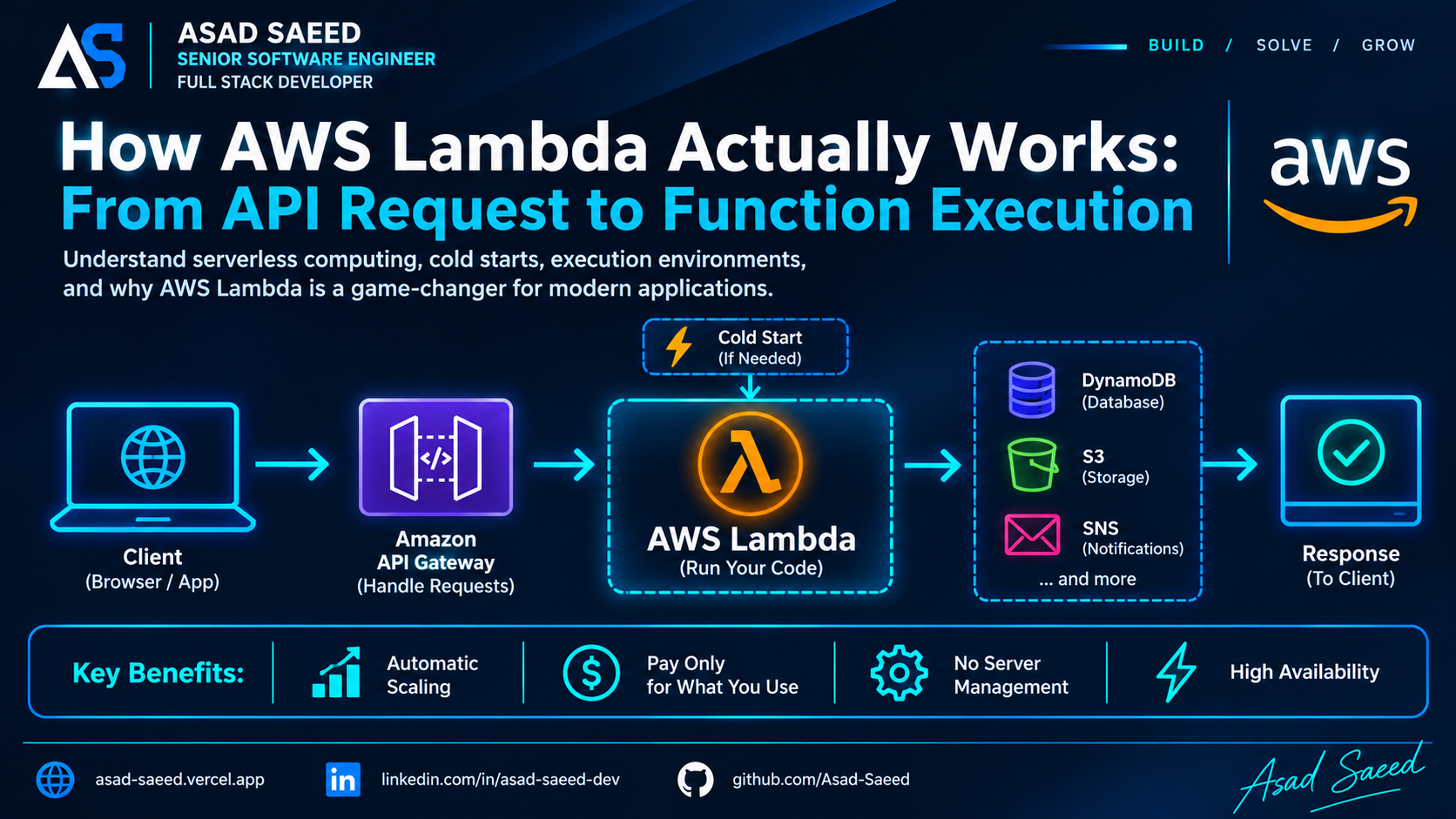
How AWS Lambda Works: From API Request to Function Execution

How AWS Lambda Works: From API Request to Function Execution

AWS LAMBDAAWSSERVERLESSCLOUD COMPUTINGNODE.JSASAD SAEED
November 2, 202614 min readBy Asad Saeed

Learn how AWS Lambda works internally, including execution environments, cold starts, concurrency, API Gateway integration, retries, MongoDB connections, and production monitoring.

Introduction

When building backend applications, developers traditionally deploy Node.js servers on virtual machines, containers, or cloud platforms. These servers continuously run and wait for incoming requests.

But what if you could execute backend code without managing a continuously running server?

This is where AWS Lambda comes in.

AWS Lambda is a serverless compute service that allows developers to run code in response to events without provisioning or managing the underlying server infrastructure.

But how does it actually work internally? What happens when an API request reaches Lambda? How does AWS prepare the execution environment, handle cold starts, manage concurrent requests, and execute your code?

Let's understand the complete lifecycle step by step.

1. What Is AWS Lambda?

AWS Lambda is an event-driven, serverless compute service.

You upload code as a function, configure its execution environment, and connect it to an event source.

When an event triggers the function, AWS Lambda executes your code and returns the result or processes the event.

For example, imagine a MERN application with the following architecture:

  • React or Next.js frontend

  • Node.js backend

  • MongoDB database

  • AWS Lambda for backend operations

  • Amazon API Gateway for HTTP requests

Instead of running a traditional Express server continuously, you can expose individual backend operations through Lambda functions.

Examples include:

  • Creating a user account

  • Processing a payment webhook

  • Generating a report

  • Sending notifications

  • Resizing an uploaded image

  • Processing background jobs

The important point is that Lambda is not limited to HTTP requests. It can be triggered by many AWS services and event sources.

2. What Happens When an API Request Reaches Lambda?

Let's follow a real HTTP request.

Imagine a user clicks the Login button in a React application.

The frontend sends:

POST /login
Content-Type: application/json

{
  "email": "user@example.com",
  "password": "secret123"
}

A typical AWS Lambda HTTP architecture looks like this:

React / Next.js Application
          |
          | HTTP Request
          v
    Amazon API Gateway
          |
          | Invoke Lambda
          v
      AWS Lambda
          |
          | Execute Handler
          v
     Authentication Logic
          |
          v
       MongoDB
          |
          v
      Lambda Response
          |
          v
    Amazon API Gateway
          |
          v
   React / Next.js Client

Let's break down what happens at each stage.

Step 1: The client sends an HTTP request

The frontend sends a request to an API endpoint.

For example:

const response = await fetch(
  "https://api.example.com/login",
  {
    method: "POST",
    headers: {
      "Content-Type": "application/json",
    },
    body: JSON.stringify({
      email: "user@example.com",
      password: "secret123",
    }),
  }
);

const data = await response.json();

The request reaches Amazon API Gateway.

API Gateway acts as the entry point for HTTP APIs. It can handle routing, authentication integration, throttling, and request-level configuration.

Step 2: API Gateway invokes Lambda

API Gateway forwards the request to the configured Lambda function.

The request is represented as an event object containing information such as:

  • HTTP method

  • Request path

  • Headers

  • Query parameters

  • Request body

  • Request context

Lambda receives this event and passes it to your configured handler.

Step 3: AWS prepares an execution environment

This is where Lambda becomes interesting.

AWS needs an execution environment in which your function can run.

An execution environment includes the runtime and the resources needed to execute your code.

For a Node.js Lambda function, this means the Node.js runtime, your application code, dependencies, and configured resources.

AWS may reuse an existing execution environment or prepare a new one.

If a suitable environment is already available, Lambda can execute the function without repeating the entire initialization process.

If a new environment is required, initialization takes place first.

This difference is one of the reasons Lambda sometimes responds more slowly to an initial request.

Step 4: Lambda executes your handler

Once the execution environment is ready, Lambda invokes your handler with the event and context objects.

Here is a simple Node.js example:

export const handler = async (event, context) => {
  const body = JSON.parse(event.body || "{}");

  const { email, password } = body;

  if (!email || !password) {
    return {
      statusCode: 400,
      body: JSON.stringify({
        message: "Email and password are required",
      }),
    };
  }

  // Perform authentication logic here

  return {
    statusCode: 200,
    body: JSON.stringify({
      message: "Login successful",
    }),
  };
};

There are two important parameters:

event: Contains information about the event that triggered the function.

context: Provides runtime information about the invocation, including the request ID and remaining execution time.

Your handler performs the business logic and returns a response.

Step 5: Lambda returns the response

For a synchronous API Gateway invocation, Lambda returns its result to API Gateway.

API Gateway then sends the HTTP response back to the frontend.

The request lifecycle is complete.

Notice that you didn't create an EC2 instance, configure a web server, or manually manage application processes.

AWS handled the execution infrastructure.

3. What Is a Lambda Execution Environment?

An execution environment is the isolated runtime environment in which your Lambda function executes.

It contains the resources required to run your function, including:

  • The language runtime

  • Your deployed code

  • Dependencies

  • Initialization state

  • Temporary storage

One important detail: an execution environment is not necessarily created for every incoming request.

AWS can reuse an existing environment for subsequent invocations.

Consider this example:

let requestCount = 0;

export const handler = async (event) => {
  requestCount++;

  return {
    statusCode: 200,
    body: JSON.stringify({
      requestCount,
    }),
  };
};

If multiple invocations use the same execution environment, the requestCount variable may retain its value.

However, this behavior is not guaranteed across invocations.

A different execution environment starts with its own initialization state.

Important production rule: Never use global variables as a reliable storage mechanism for user sessions, application state, or business data.

Use a proper database, cache, or external storage service instead.

You can use global scope for reusable resources such as database clients, SDK clients, and initialized configuration.

4. What Is a Cold Start?

A cold start happens when Lambda needs to prepare a new execution environment before invoking your handler.

For example, imagine your application hasn't received traffic for some time.

A new request arrives, but there isn't an available warm execution environment for that function.

AWS must prepare one.

A simplified lifecycle looks like this:

Incoming Request
       |
       v
Is an execution environment available?
       |
   +---+---+
   |       |
  Yes      No
   |       |
   |       v
   |   Prepare Environment
   |       |
   |       v
   |   Initialize Runtime
   |       |
   |       v
   |   Load Application Code
   |       |
   +---+---+
       |
       v
  Run Handler
       |
       v
 Return Response

The initialization phase can include:

  1. Preparing the execution environment.

  2. Starting the language runtime.

  3. Loading application code and dependencies.

  4. Executing initialization code outside the handler.

The time required for this process contributes to cold-start latency.

Why do cold starts happen?

Common contributing factors include:

  • Large deployment packages.

  • Heavy dependencies.

  • Runtime initialization work.

  • Complex framework bootstrapping.

  • VPC networking configuration and other environment setup.

The impact varies depending on the runtime, architecture, configuration, and application.

How can you reduce cold starts?

Some practical techniques include:

1. Reduce package size

Avoid installing unnecessary dependencies.

2. Initialize reusable resources efficiently

Keep expensive initialization outside the handler when appropriate.

3. Avoid unnecessary framework overhead

A small Lambda handler may not need an entire application framework.

4. Use provisioned concurrency when necessary

Provisioned concurrency prepares execution environments ahead of incoming traffic to reduce initialization latency.

It comes with additional cost, so it should be used when predictable latency justifies it.

5. How Does Lambda Handle Multiple Requests?

One of the most important Lambda concepts is concurrency.

Imagine your application receives 500 requests at almost the same time.

With a traditional server, those requests are handled by the available server processes, threads, and connections.

Lambda uses a different execution model.

When additional concurrent execution capacity is needed, Lambda can create additional execution environments.

A simplified example:

             Incoming Requests
                     |
          +----------+----------+
          |          |          |
          v          v          v
       Request 1  Request 2  Request 3
          |          |          |
          v          v          v
      Environment Environment Environment
          1          2          3
          |          |          |
          +----------+----------+
                     |
              Function Results

Each execution environment handles one invocation at a time.

Multiple environments allow Lambda to process multiple invocations concurrently.

AWS manages the scaling infrastructure, but concurrency is still subject to account quotas, function limits, and downstream capacity.

What is Lambda concurrency?

Concurrency represents the number of function invocations being processed simultaneously.

For example:

  • 10 concurrent requests mean 10 invocations are running at the same time.

  • 100 concurrent requests mean 100 invocations are running simultaneously.

You can configure reserved concurrency to control the maximum concurrency available to a function.

Provisioned concurrency is different: it prepares execution environments in advance.

Understanding these differences is important when designing high-traffic applications.

6. How Does Lambda Connect to MongoDB?

Let's connect Lambda to a MongoDB database in a MERN-style backend.

A common mistake is creating a new database connection every time the handler executes.

For example:

export const handler = async (event) => {
  const client = new MongoClient(process.env.MONGODB_URI);

  await client.connect();

  // Perform database operations

  await client.close();

  return {
    statusCode: 200,
    body: JSON.stringify({
      message: "Success",
    }),
  };
};

This approach repeatedly creates and closes database connections.

Under high traffic, it can introduce unnecessary connection overhead and put pressure on the database.

A better approach is to reuse the client within a warm execution environment.

import { MongoClient } from "mongodb";

const client = new MongoClient(
  process.env.MONGODB_URI
);

let connectionPromise;

async function connectToDatabase() {
  if (!connectionPromise) {
    connectionPromise = client.connect();
  }

  return connectionPromise;
}

export const handler = async (event) => {
  await connectToDatabase();

  const database = client.db("my_application");

  const users = database.collection("users");

  const result = await users.findOne({
    email: "user@example.com",
  });

  return {
    statusCode: 200,
    body: JSON.stringify({
      user: result,
    }),
  };
};

This allows the MongoDB client to be reused when the same execution environment handles later invocations.

However, there is an important production consideration.

Lambda can scale out to multiple execution environments. Each environment may have its own MongoDB client and connection pool.

If hundreds of environments become active, your database may receive a large number of connections.

Therefore, you should consider:

  • MongoDB connection limits.

  • Connection pool configuration.

  • Lambda concurrency limits.

  • Database capacity.

  • Network configuration.

  • Whether a connection-management solution is needed.

For MongoDB Atlas, review its connection limits and consider an appropriate connection-management strategy.

7. Synchronous vs. Asynchronous Lambda Invocation

Not every Lambda invocation works the same way.

There are different invocation types.

Synchronous invocation

The caller waits for the function to complete and receives its response.

Examples:

  • API Gateway calling Lambda.

  • An application invoking Lambda through the AWS SDK.

Flow:

Client
  |
  v
Lambda
  |
  v
Function Execution
  |
  v
Response Returned

This is useful for operations where the client needs an immediate result.

Asynchronous invocation

The caller submits an event without waiting for the function to finish.

Lambda accepts the event for asynchronous processing and returns an acknowledgement to the caller.

The function executes separately.

Examples:

  • Processing an uploaded file.

  • Sending an email.

  • Handling background tasks.

  • Processing notifications.

Flow:

Event Source
     |
     v
Lambda Async Invocation
     |
     v
Event Queue
     |
     v
Function Execution
     |
     v
Processing Result

Asynchronous invocation can involve retries when function execution fails. Lambda also provides configuration for retry attempts, event age, and failure destinations.

Event source mappings

Services such as Amazon SQS and Amazon Kinesis can use event source mappings.

In this model, Lambda polls the event source, retrieves records in batches, and invokes your function.

This is different from a direct asynchronous invocation.

For example, when using SQS:

Producer
   |
   v
Amazon SQS Queue
   |
   v
Lambda Event Source Mapping
   |
   v
Lambda Function
   |
   v
Database / External API

Your function processes messages from the queue.

You need to design for duplicate delivery and retries. A message can be processed more than once, so important operations should be idempotent.

8. How Does Lambda Handle Errors and Retries?

Failure handling depends on the invocation model.

For synchronous invocations, Lambda returns the function result or an error to the caller. The caller or API integration determines how to handle the failure.

For asynchronous invocations, Lambda can retry failed executions according to its retry configuration.

For SQS event source mappings, messages that fail processing can become visible again after the visibility timeout. A dead-letter queue or redrive policy can help manage messages that repeatedly fail.

This distinction matters because not all Lambda integrations retry in the same way.

A production application should consider:

  • Retry policies.

  • Duplicate event delivery.

  • Idempotent business operations.

  • Dead-letter queues or failure destinations.

  • Logging and alerting.

  • Recovery procedures.

For example, if a payment event is delivered twice, your backend should not charge the customer twice.

Lambda does not automatically make your business operations idempotent.

9. What Happens When Lambda Finishes Executing?

After the handler completes, Lambda returns the invocation result according to the invocation type.

The execution environment may remain available for reuse.

It is not necessarily destroyed immediately.

If AWS reuses the environment, the next invocation may avoid the initialization work associated with a cold start.

However, AWS controls the environment lifecycle. You should not assume that an environment will remain alive for a specific amount of time.

This is why Lambda functions should be designed to be stateless between invocations.

Persist important application data outside the execution environment.

For example:

  • MongoDB for application records.

  • Amazon S3 for files.

  • DynamoDB for key-value data.

  • ElastiCache for caching.

  • SQS for background processing.

10. How Do You Monitor Lambda in Production?

Running a Lambda function successfully is only part of the job.

You also need to understand what happens when it becomes slow, starts failing, or receives more traffic than expected.

AWS Lambda integrates with Amazon CloudWatch.

Important metrics include:

MetricWhat it tells youInvocationsNumber of function executionsDurationHow long the function takesErrorsNumber of failed invocationsThrottlesInvocations rejected due to concurrency limitsConcurrentExecutionsNumber of simultaneous executionsIteratorAgeAge of records being processed by supported stream-based event sources

Lambda also provides logs through CloudWatch Logs.

You can log useful information from your handler:

export const handler = async (event, context) => {
  console.log("Request ID:", context.awsRequestId);

  try {
    // Business logic

    return {
      statusCode: 200,
      body: JSON.stringify({
        message: "Operation completed",
      }),
    };
  } catch (error) {
    console.error("Lambda execution failed:", error);

    throw error;
  }
};

For production applications, structured logging, meaningful error handling, alarms, and distributed tracing can make debugging much easier.

AWS X-Ray and OpenTelemetry-based instrumentation can also help trace requests across services.

11. AWS Lambda vs. Traditional Node.js Servers

Does Lambda mean traditional Node.js servers are no longer needed?

Not at all.

Both approaches solve different problems.

AreaTraditional Node.js ServerAWS LambdaInfrastructureYou manage or configure hostingAWS manages execution infrastructureRuntimeUsually runs continuouslyRuns in response to invocationsScalingDepends on hosting architectureManaged concurrency scalingBillingOften based on provisioned resourcesBased on requests and execution resourcesStateCan maintain process-level stateShould be designed for stateless invocationsLong-running tasksDepends on server limitsHas a maximum execution durationCold startsNo Lambda-style initialization per requestCan occur when a new environment is prepared

Lambda has a maximum execution timeout of 15 minutes.

A traditional server may be more suitable for applications requiring persistent connections, long-running processes, or continuous workloads.

Lambda can be a strong fit for event-driven APIs, background processing, webhooks, scheduled operations, and independently scalable backend tasks.

12. When Should You Use AWS Lambda?

Lambda is useful when you want to execute backend logic without managing continuously running application servers.

Good use cases include:

  • HTTP APIs and lightweight backend operations.

  • Webhook processing.

  • Image and document processing.

  • Background jobs.

  • Event-driven integrations.

  • Scheduled tasks.

  • Notifications.

  • Automation workflows.

However, Lambda is not automatically the best choice for every backend.

You should evaluate:

  • Execution duration.

  • Traffic patterns.

  • Cold-start requirements.

  • Database connection behavior.

  • Concurrency limits.

  • Networking requirements.

  • Total operating cost.

  • Observability and debugging needs.

For example, a traditional NestJS application with persistent WebSocket connections may be better suited to a continuously running service, while individual event-processing tasks could run independently in Lambda.

The right architecture depends on the workload.

Final Thoughts

AWS Lambda is more than a service that executes a JavaScript function in the cloud.

Behind every invocation, AWS manages execution environments, runtime initialization, concurrency, scaling, and resource allocation.

Understanding this lifecycle helps developers make better decisions about application architecture, performance, reliability, and cloud costs.

For full-stack developers working with React, Next.js, Node.js, and MongoDB, Lambda provides another way to build backend systems without managing traditional application servers.

The most important lesson is simple:

You manage the function and its application logic. AWS manages the infrastructure required to execute it.

But designing a reliable production system still requires careful attention to concurrency, database connections, retries, security, and monitoring.

That is where understanding Lambda internally makes a real difference.

About the Author

Asad Saeed | Senior Software Engineer | Full Stack Developer

I share practical insights on backend engineering, MERN Stack development, distributed systems, database architecture, cloud computing, and building reliable production applications.

Asad Saeed

Asad Saeed

Senior Software Engineer | Full Stack Developer

More posts →

Related Posts

Don't Stop Here

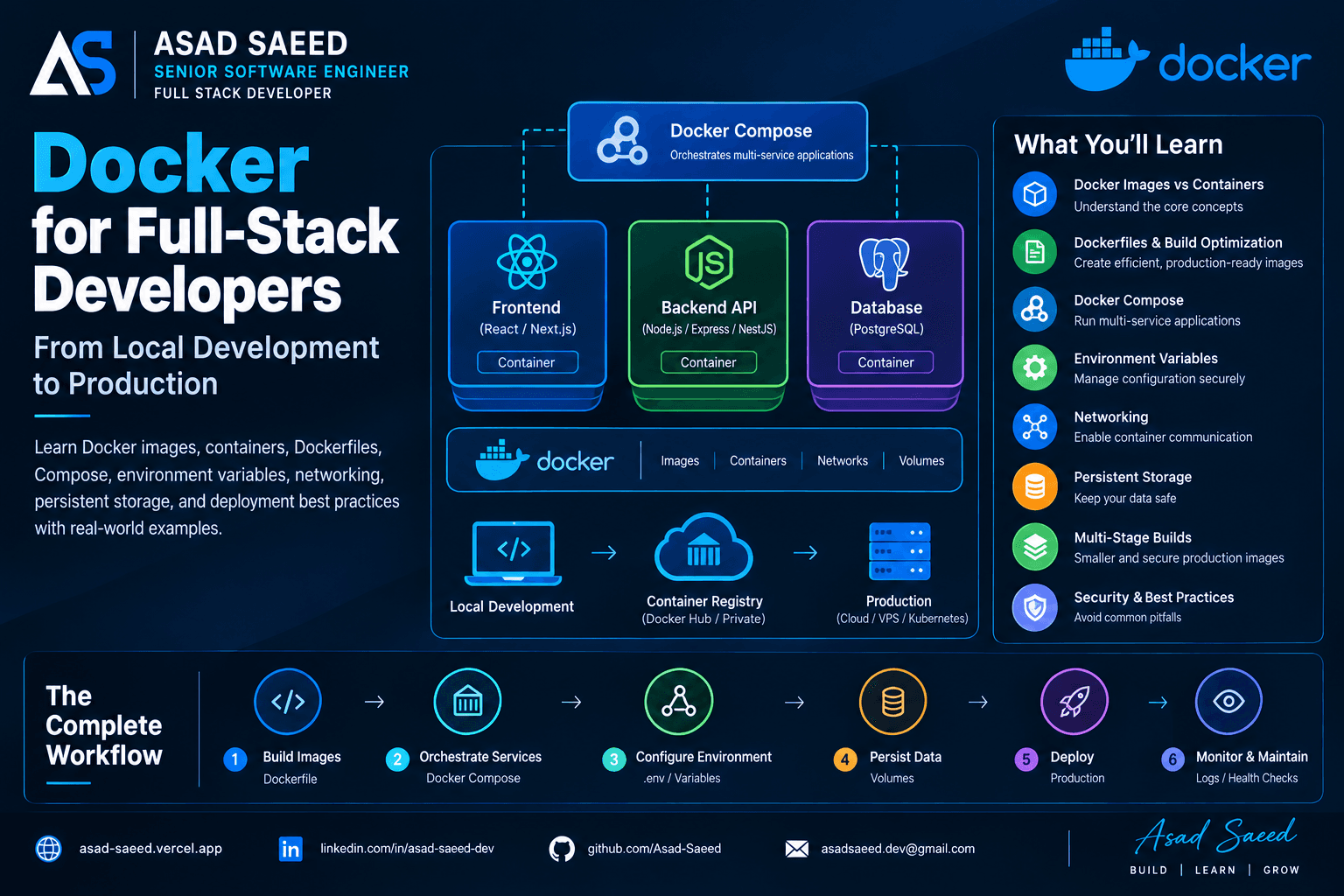
Docker for Full-Stack Developers: Complete Guide (2026)

Docker for Full-Stack Developers: Complete Guide (2026)

Learn Docker for full-stack development with practical examples covering Dockerfiles, images, containers, Docker Compose, networking, environment variables, volumes, and production deployment.

DOCKERDEVOPSSOFTWARE ENGINEERING
© 2026 · Asad Saeed
All Posts
How AWS Lambda Works: From API Request to Function Execution

How AWS Lambda Works: From API Request to Function Execution

AWS LAMBDAAWSSERVERLESSCLOUD COMPUTINGNODE.JSASAD SAEED
November 2, 202614 min readBy Asad Saeed

Learn how AWS Lambda works internally, including execution environments, cold starts, concurrency, API Gateway integration, retries, MongoDB connections, and production monitoring.

Introduction

When building backend applications, developers traditionally deploy Node.js servers on virtual machines, containers, or cloud platforms. These servers continuously run and wait for incoming requests.

But what if you could execute backend code without managing a continuously running server?

This is where AWS Lambda comes in.

AWS Lambda is a serverless compute service that allows developers to run code in response to events without provisioning or managing the underlying server infrastructure.

But how does it actually work internally? What happens when an API request reaches Lambda? How does AWS prepare the execution environment, handle cold starts, manage concurrent requests, and execute your code?

Let's understand the complete lifecycle step by step.

1. What Is AWS Lambda?

AWS Lambda is an event-driven, serverless compute service.

You upload code as a function, configure its execution environment, and connect it to an event source.

When an event triggers the function, AWS Lambda executes your code and returns the result or processes the event.

For example, imagine a MERN application with the following architecture:

  • React or Next.js frontend

  • Node.js backend

  • MongoDB database

  • AWS Lambda for backend operations

  • Amazon API Gateway for HTTP requests

Instead of running a traditional Express server continuously, you can expose individual backend operations through Lambda functions.

Examples include:

  • Creating a user account

  • Processing a payment webhook

  • Generating a report

  • Sending notifications

  • Resizing an uploaded image

  • Processing background jobs

The important point is that Lambda is not limited to HTTP requests. It can be triggered by many AWS services and event sources.

2. What Happens When an API Request Reaches Lambda?

Let's follow a real HTTP request.

Imagine a user clicks the Login button in a React application.

The frontend sends:

POST /login
Content-Type: application/json

{
  "email": "user@example.com",
  "password": "secret123"
}

A typical AWS Lambda HTTP architecture looks like this:

React / Next.js Application
          |
          | HTTP Request
          v
    Amazon API Gateway
          |
          | Invoke Lambda
          v
      AWS Lambda
          |
          | Execute Handler
          v
     Authentication Logic
          |
          v
       MongoDB
          |
          v
      Lambda Response
          |
          v
    Amazon API Gateway
          |
          v
   React / Next.js Client

Let's break down what happens at each stage.

Step 1: The client sends an HTTP request

The frontend sends a request to an API endpoint.

For example:

const response = await fetch(
  "https://api.example.com/login",
  {
    method: "POST",
    headers: {
      "Content-Type": "application/json",
    },
    body: JSON.stringify({
      email: "user@example.com",
      password: "secret123",
    }),
  }
);

const data = await response.json();

The request reaches Amazon API Gateway.

API Gateway acts as the entry point for HTTP APIs. It can handle routing, authentication integration, throttling, and request-level configuration.

Step 2: API Gateway invokes Lambda

API Gateway forwards the request to the configured Lambda function.

The request is represented as an event object containing information such as:

  • HTTP method

  • Request path

  • Headers

  • Query parameters

  • Request body

  • Request context

Lambda receives this event and passes it to your configured handler.

Step 3: AWS prepares an execution environment

This is where Lambda becomes interesting.

AWS needs an execution environment in which your function can run.

An execution environment includes the runtime and the resources needed to execute your code.

For a Node.js Lambda function, this means the Node.js runtime, your application code, dependencies, and configured resources.

AWS may reuse an existing execution environment or prepare a new one.

If a suitable environment is already available, Lambda can execute the function without repeating the entire initialization process.

If a new environment is required, initialization takes place first.

This difference is one of the reasons Lambda sometimes responds more slowly to an initial request.

Step 4: Lambda executes your handler

Once the execution environment is ready, Lambda invokes your handler with the event and context objects.

Here is a simple Node.js example:

export const handler = async (event, context) => {
  const body = JSON.parse(event.body || "{}");

  const { email, password } = body;

  if (!email || !password) {
    return {
      statusCode: 400,
      body: JSON.stringify({
        message: "Email and password are required",
      }),
    };
  }

  // Perform authentication logic here

  return {
    statusCode: 200,
    body: JSON.stringify({
      message: "Login successful",
    }),
  };
};

There are two important parameters:

event: Contains information about the event that triggered the function.

context: Provides runtime information about the invocation, including the request ID and remaining execution time.

Your handler performs the business logic and returns a response.

Step 5: Lambda returns the response

For a synchronous API Gateway invocation, Lambda returns its result to API Gateway.

API Gateway then sends the HTTP response back to the frontend.

The request lifecycle is complete.

Notice that you didn't create an EC2 instance, configure a web server, or manually manage application processes.

AWS handled the execution infrastructure.

3. What Is a Lambda Execution Environment?

An execution environment is the isolated runtime environment in which your Lambda function executes.

It contains the resources required to run your function, including:

  • The language runtime

  • Your deployed code

  • Dependencies

  • Initialization state

  • Temporary storage

One important detail: an execution environment is not necessarily created for every incoming request.

AWS can reuse an existing environment for subsequent invocations.

Consider this example:

let requestCount = 0;

export const handler = async (event) => {
  requestCount++;

  return {
    statusCode: 200,
    body: JSON.stringify({
      requestCount,
    }),
  };
};

If multiple invocations use the same execution environment, the requestCount variable may retain its value.

However, this behavior is not guaranteed across invocations.

A different execution environment starts with its own initialization state.

Important production rule: Never use global variables as a reliable storage mechanism for user sessions, application state, or business data.

Use a proper database, cache, or external storage service instead.

You can use global scope for reusable resources such as database clients, SDK clients, and initialized configuration.

4. What Is a Cold Start?

A cold start happens when Lambda needs to prepare a new execution environment before invoking your handler.

For example, imagine your application hasn't received traffic for some time.

A new request arrives, but there isn't an available warm execution environment for that function.

AWS must prepare one.

A simplified lifecycle looks like this:

Incoming Request
       |
       v
Is an execution environment available?
       |
   +---+---+
   |       |
  Yes      No
   |       |
   |       v
   |   Prepare Environment
   |       |
   |       v
   |   Initialize Runtime
   |       |
   |       v
   |   Load Application Code
   |       |
   +---+---+
       |
       v
  Run Handler
       |
       v
 Return Response

The initialization phase can include:

  1. Preparing the execution environment.

  2. Starting the language runtime.

  3. Loading application code and dependencies.

  4. Executing initialization code outside the handler.

The time required for this process contributes to cold-start latency.

Why do cold starts happen?

Common contributing factors include:

  • Large deployment packages.

  • Heavy dependencies.

  • Runtime initialization work.

  • Complex framework bootstrapping.

  • VPC networking configuration and other environment setup.

The impact varies depending on the runtime, architecture, configuration, and application.

How can you reduce cold starts?

Some practical techniques include:

1. Reduce package size

Avoid installing unnecessary dependencies.

2. Initialize reusable resources efficiently

Keep expensive initialization outside the handler when appropriate.

3. Avoid unnecessary framework overhead

A small Lambda handler may not need an entire application framework.

4. Use provisioned concurrency when necessary

Provisioned concurrency prepares execution environments ahead of incoming traffic to reduce initialization latency.

It comes with additional cost, so it should be used when predictable latency justifies it.

5. How Does Lambda Handle Multiple Requests?

One of the most important Lambda concepts is concurrency.

Imagine your application receives 500 requests at almost the same time.

With a traditional server, those requests are handled by the available server processes, threads, and connections.

Lambda uses a different execution model.

When additional concurrent execution capacity is needed, Lambda can create additional execution environments.

A simplified example:

             Incoming Requests
                     |
          +----------+----------+
          |          |          |
          v          v          v
       Request 1  Request 2  Request 3
          |          |          |
          v          v          v
      Environment Environment Environment
          1          2          3
          |          |          |
          +----------+----------+
                     |
              Function Results

Each execution environment handles one invocation at a time.

Multiple environments allow Lambda to process multiple invocations concurrently.

AWS manages the scaling infrastructure, but concurrency is still subject to account quotas, function limits, and downstream capacity.

What is Lambda concurrency?

Concurrency represents the number of function invocations being processed simultaneously.

For example:

  • 10 concurrent requests mean 10 invocations are running at the same time.

  • 100 concurrent requests mean 100 invocations are running simultaneously.

You can configure reserved concurrency to control the maximum concurrency available to a function.

Provisioned concurrency is different: it prepares execution environments in advance.

Understanding these differences is important when designing high-traffic applications.

6. How Does Lambda Connect to MongoDB?

Let's connect Lambda to a MongoDB database in a MERN-style backend.

A common mistake is creating a new database connection every time the handler executes.

For example:

export const handler = async (event) => {
  const client = new MongoClient(process.env.MONGODB_URI);

  await client.connect();

  // Perform database operations

  await client.close();

  return {
    statusCode: 200,
    body: JSON.stringify({
      message: "Success",
    }),
  };
};

This approach repeatedly creates and closes database connections.

Under high traffic, it can introduce unnecessary connection overhead and put pressure on the database.

A better approach is to reuse the client within a warm execution environment.

import { MongoClient } from "mongodb";

const client = new MongoClient(
  process.env.MONGODB_URI
);

let connectionPromise;

async function connectToDatabase() {
  if (!connectionPromise) {
    connectionPromise = client.connect();
  }

  return connectionPromise;
}

export const handler = async (event) => {
  await connectToDatabase();

  const database = client.db("my_application");

  const users = database.collection("users");

  const result = await users.findOne({
    email: "user@example.com",
  });

  return {
    statusCode: 200,
    body: JSON.stringify({
      user: result,
    }),
  };
};

This allows the MongoDB client to be reused when the same execution environment handles later invocations.

However, there is an important production consideration.

Lambda can scale out to multiple execution environments. Each environment may have its own MongoDB client and connection pool.

If hundreds of environments become active, your database may receive a large number of connections.

Therefore, you should consider:

  • MongoDB connection limits.

  • Connection pool configuration.

  • Lambda concurrency limits.

  • Database capacity.

  • Network configuration.

  • Whether a connection-management solution is needed.

For MongoDB Atlas, review its connection limits and consider an appropriate connection-management strategy.

7. Synchronous vs. Asynchronous Lambda Invocation

Not every Lambda invocation works the same way.

There are different invocation types.

Synchronous invocation

The caller waits for the function to complete and receives its response.

Examples:

  • API Gateway calling Lambda.

  • An application invoking Lambda through the AWS SDK.

Flow:

Client
  |
  v
Lambda
  |
  v
Function Execution
  |
  v
Response Returned

This is useful for operations where the client needs an immediate result.

Asynchronous invocation

The caller submits an event without waiting for the function to finish.

Lambda accepts the event for asynchronous processing and returns an acknowledgement to the caller.

The function executes separately.

Examples:

  • Processing an uploaded file.

  • Sending an email.

  • Handling background tasks.

  • Processing notifications.

Flow:

Event Source
     |
     v
Lambda Async Invocation
     |
     v
Event Queue
     |
     v
Function Execution
     |
     v
Processing Result

Asynchronous invocation can involve retries when function execution fails. Lambda also provides configuration for retry attempts, event age, and failure destinations.

Event source mappings

Services such as Amazon SQS and Amazon Kinesis can use event source mappings.

In this model, Lambda polls the event source, retrieves records in batches, and invokes your function.

This is different from a direct asynchronous invocation.

For example, when using SQS:

Producer
   |
   v
Amazon SQS Queue
   |
   v
Lambda Event Source Mapping
   |
   v
Lambda Function
   |
   v
Database / External API

Your function processes messages from the queue.

You need to design for duplicate delivery and retries. A message can be processed more than once, so important operations should be idempotent.

8. How Does Lambda Handle Errors and Retries?

Failure handling depends on the invocation model.

For synchronous invocations, Lambda returns the function result or an error to the caller. The caller or API integration determines how to handle the failure.

For asynchronous invocations, Lambda can retry failed executions according to its retry configuration.

For SQS event source mappings, messages that fail processing can become visible again after the visibility timeout. A dead-letter queue or redrive policy can help manage messages that repeatedly fail.

This distinction matters because not all Lambda integrations retry in the same way.

A production application should consider:

  • Retry policies.

  • Duplicate event delivery.

  • Idempotent business operations.

  • Dead-letter queues or failure destinations.

  • Logging and alerting.

  • Recovery procedures.

For example, if a payment event is delivered twice, your backend should not charge the customer twice.

Lambda does not automatically make your business operations idempotent.

9. What Happens When Lambda Finishes Executing?

After the handler completes, Lambda returns the invocation result according to the invocation type.

The execution environment may remain available for reuse.

It is not necessarily destroyed immediately.

If AWS reuses the environment, the next invocation may avoid the initialization work associated with a cold start.

However, AWS controls the environment lifecycle. You should not assume that an environment will remain alive for a specific amount of time.

This is why Lambda functions should be designed to be stateless between invocations.

Persist important application data outside the execution environment.

For example:

  • MongoDB for application records.

  • Amazon S3 for files.

  • DynamoDB for key-value data.

  • ElastiCache for caching.

  • SQS for background processing.

10. How Do You Monitor Lambda in Production?

Running a Lambda function successfully is only part of the job.

You also need to understand what happens when it becomes slow, starts failing, or receives more traffic than expected.

AWS Lambda integrates with Amazon CloudWatch.

Important metrics include:

MetricWhat it tells youInvocationsNumber of function executionsDurationHow long the function takesErrorsNumber of failed invocationsThrottlesInvocations rejected due to concurrency limitsConcurrentExecutionsNumber of simultaneous executionsIteratorAgeAge of records being processed by supported stream-based event sources

Lambda also provides logs through CloudWatch Logs.

You can log useful information from your handler:

export const handler = async (event, context) => {
  console.log("Request ID:", context.awsRequestId);

  try {
    // Business logic

    return {
      statusCode: 200,
      body: JSON.stringify({
        message: "Operation completed",
      }),
    };
  } catch (error) {
    console.error("Lambda execution failed:", error);

    throw error;
  }
};

For production applications, structured logging, meaningful error handling, alarms, and distributed tracing can make debugging much easier.

AWS X-Ray and OpenTelemetry-based instrumentation can also help trace requests across services.

11. AWS Lambda vs. Traditional Node.js Servers

Does Lambda mean traditional Node.js servers are no longer needed?

Not at all.

Both approaches solve different problems.

AreaTraditional Node.js ServerAWS LambdaInfrastructureYou manage or configure hostingAWS manages execution infrastructureRuntimeUsually runs continuouslyRuns in response to invocationsScalingDepends on hosting architectureManaged concurrency scalingBillingOften based on provisioned resourcesBased on requests and execution resourcesStateCan maintain process-level stateShould be designed for stateless invocationsLong-running tasksDepends on server limitsHas a maximum execution durationCold startsNo Lambda-style initialization per requestCan occur when a new environment is prepared

Lambda has a maximum execution timeout of 15 minutes.

A traditional server may be more suitable for applications requiring persistent connections, long-running processes, or continuous workloads.

Lambda can be a strong fit for event-driven APIs, background processing, webhooks, scheduled operations, and independently scalable backend tasks.

12. When Should You Use AWS Lambda?

Lambda is useful when you want to execute backend logic without managing continuously running application servers.

Good use cases include:

  • HTTP APIs and lightweight backend operations.

  • Webhook processing.

  • Image and document processing.

  • Background jobs.

  • Event-driven integrations.

  • Scheduled tasks.

  • Notifications.

  • Automation workflows.

However, Lambda is not automatically the best choice for every backend.

You should evaluate:

  • Execution duration.

  • Traffic patterns.

  • Cold-start requirements.

  • Database connection behavior.

  • Concurrency limits.

  • Networking requirements.

  • Total operating cost.

  • Observability and debugging needs.

For example, a traditional NestJS application with persistent WebSocket connections may be better suited to a continuously running service, while individual event-processing tasks could run independently in Lambda.

The right architecture depends on the workload.

Final Thoughts

AWS Lambda is more than a service that executes a JavaScript function in the cloud.

Behind every invocation, AWS manages execution environments, runtime initialization, concurrency, scaling, and resource allocation.

Understanding this lifecycle helps developers make better decisions about application architecture, performance, reliability, and cloud costs.

For full-stack developers working with React, Next.js, Node.js, and MongoDB, Lambda provides another way to build backend systems without managing traditional application servers.

The most important lesson is simple:

You manage the function and its application logic. AWS manages the infrastructure required to execute it.

But designing a reliable production system still requires careful attention to concurrency, database connections, retries, security, and monitoring.

That is where understanding Lambda internally makes a real difference.

About the Author

Asad Saeed | Senior Software Engineer | Full Stack Developer

I share practical insights on backend engineering, MERN Stack development, distributed systems, database architecture, cloud computing, and building reliable production applications.
Asad Saeed

Asad Saeed

Senior Software Engineer | Full Stack Developer

More posts →

Related Posts

Don't Stop Here

Docker for Full-Stack Developers: Complete Guide (2026)

Docker for Full-Stack Developers: Complete Guide (2026)

Learn Docker for full-stack development with practical examples covering Dockerfiles, images, containers, Docker Compose, networking, environment variables, volumes, and production deployment.

DOCKERDEVOPSSOFTWARE ENGINEERING
© 2026 · Asad Saeed
Oct 19, 202612 min read
Read
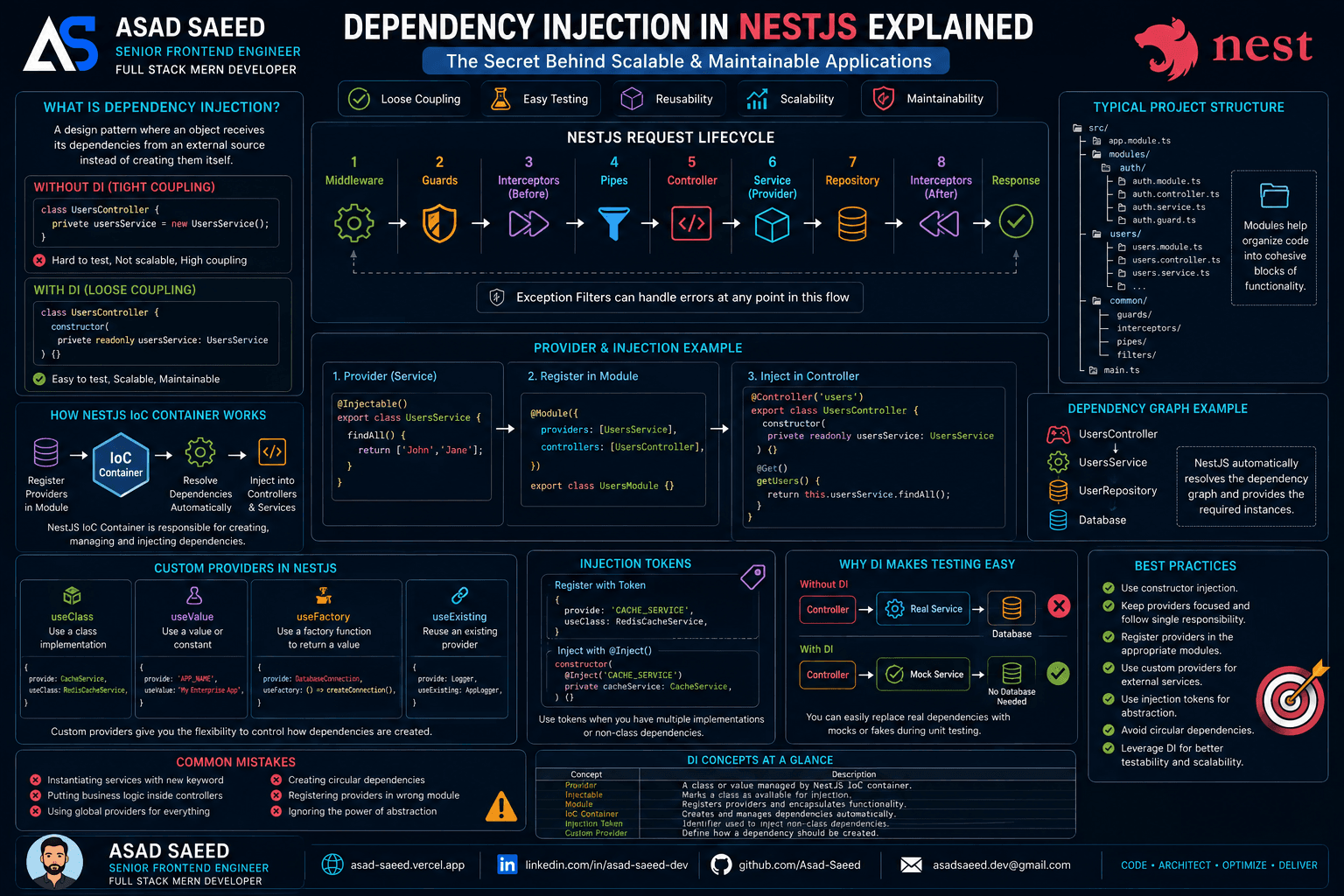
Dependency Injection in NestJS Explained: Providers, IoC Container, Injection Tokens & Custom Providers (2026 Guide)

Dependency Injection in NestJS Explained: Providers, IoC Container, Injection Tokens & Custom Providers (2026 Guide)

Learn how Dependency Injection works in NestJS, including Providers, the IoC Container, Constructor Injection, Injection Tokens, Custom Providers, and best practices for building scalable, testable, and enterprise-ready Node.js applications.

NESTJSDEPENDENCY INJECTIONNODEJS
Oct 19, 20265 min read
Read
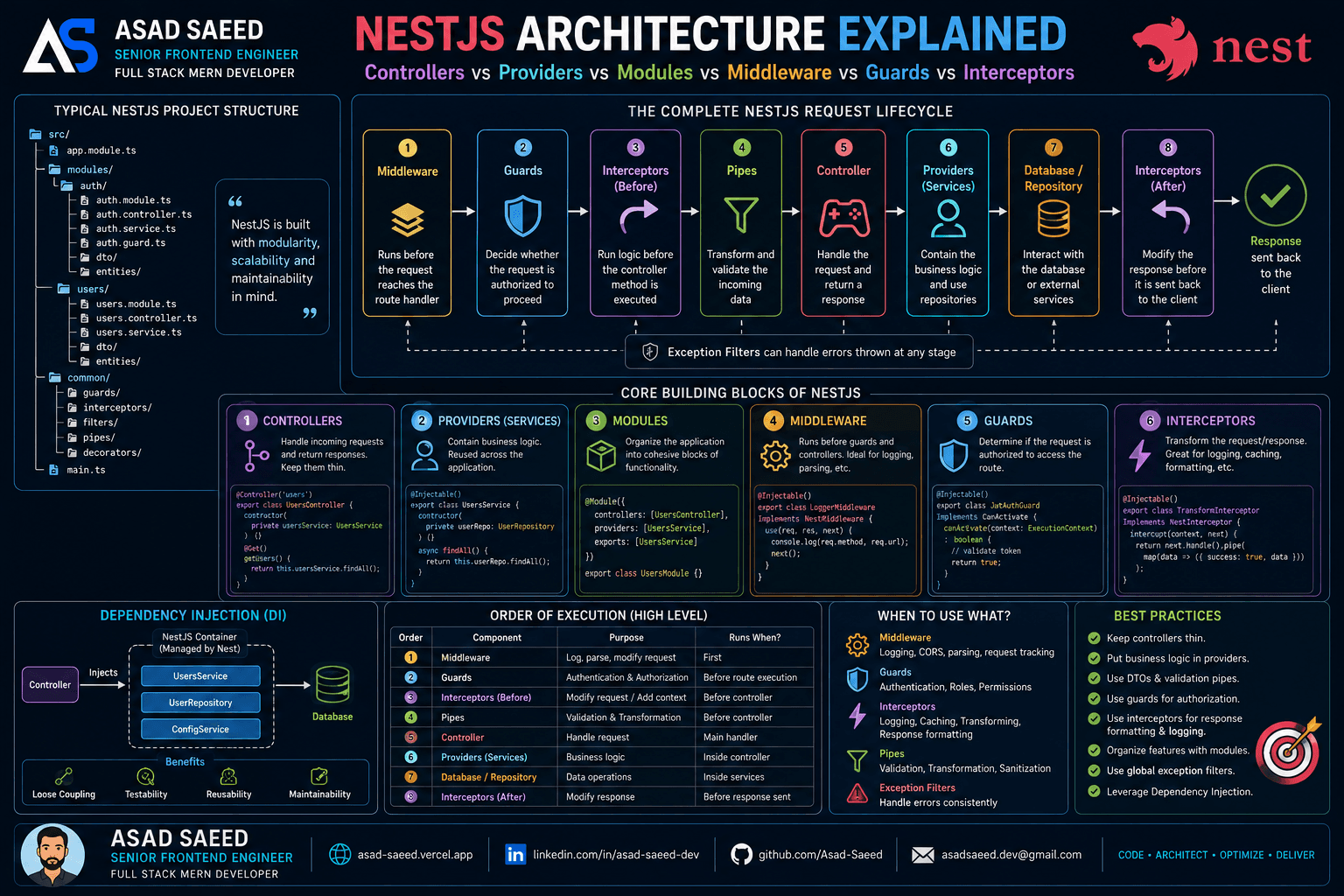
NestJS Architecture Explained: Controllers, Providers, Modules, Middleware, Guards & Interceptors (2026 Guide)

NestJS Architecture Explained: Controllers, Providers, Modules, Middleware, Guards & Interceptors (2026 Guide)

Master the NestJS architecture by understanding Modules, Controllers, Providers, Dependency Injection, Middleware, Guards, Pipes, Interceptors, and Exception Filters. Learn the complete NestJS request lifecycle and build scalable, production-ready backend applications.

NESTJSNODEJSSOFTWARE ARCHITECTURE
Aug 5, 20266 min read
Read
F
Made with ❤️ by Asad Saeed
© 2026 · Asad Saeed
Made with ❤️ by Asad Saeed
F
Oct 19, 202612 min read
Read
Dependency Injection in NestJS Explained: Providers, IoC Container, Injection Tokens & Custom Providers (2026 Guide)

Dependency Injection in NestJS Explained: Providers, IoC Container, Injection Tokens & Custom Providers (2026 Guide)

Learn how Dependency Injection works in NestJS, including Providers, the IoC Container, Constructor Injection, Injection Tokens, Custom Providers, and best practices for building scalable, testable, and enterprise-ready Node.js applications.

NESTJSDEPENDENCY INJECTIONNODEJS
Oct 19, 20265 min read
Read
NestJS Architecture Explained: Controllers, Providers, Modules, Middleware, Guards & Interceptors (2026 Guide)

NestJS Architecture Explained: Controllers, Providers, Modules, Middleware, Guards & Interceptors (2026 Guide)

Master the NestJS architecture by understanding Modules, Controllers, Providers, Dependency Injection, Middleware, Guards, Pipes, Interceptors, and Exception Filters. Learn the complete NestJS request lifecycle and build scalable, production-ready backend applications.

NESTJSNODEJSSOFTWARE ARCHITECTURE
Aug 5, 20266 min read
Read
F
Made with ❤️ by Asad Saeed
© 2026 · Asad Saeed
Made with ❤️ by Asad Saeed
F