Skip to main contentSkip to main content
~/profileLIVE
Asad Saeed
Asad SaeedOpen to WorkSenior Software Engineer | Full Stack Developer
01

Identity

Residence
Lahore, Punjab
Nationality
Pakistani
City
Lahore
Age
26
02

Languages

  • English96%
  • Urdu100%
03

Expertise

React.js95%
Next.js95%
JavaScript / TypeScript95%
HTML5, CSS395%
Tailwind, Bootstrap, Shadcn UI95%
Material UI, SCSS, Styled Components90%
Redux Toolkit, React Query, Zustand92%
REST & GraphQL APIs92%
Git, GitHub, Bitbucket98%
Node.js, Express.js, NestJS85%
MongoDB, PostgreSQL, Prisma80%
WebSockets, Real-Time Systems82%
AI & Automation (n8n, OpenAI)78%
04

Stack

4949 technologies
ReactJSNextJSJavaScriptTypeScriptReact NativeNestJSNode.jsExpress.jsMongoDBPostgreSQLMySQLPrisma ORMFirebaseREST APIGraphQL APIApollo ClientWebSockets / Socket.ioReduxRedux ToolkitReact QueryZustandTailwind CSSShadcn UIMaterial UIBootstrapSCSSCSSModule.cssStyled ComponentsFramer MotionStripe Payment Integrationn8nOpenAI APIAWS LambdaDockerVercelNetlifyGitHub Actions (CI/CD)JestGitGitHubBitbucketPostmanSwaggerJira SoftwareStrapiSanityFigmaAdobe XD
05

Contact

Email
asadsaeed.dev@gmail.com
Phone
+92 3017631644·+92 478730644
Download Resume
HomeSkillsBackgroundPortfolioContact
Chat with Asad
All Posts
AWS SQS vs SNS vs EventBridge: Differences, Use Cases & Architecture

AWS SQS vs SNS vs EventBridge: Differences, Use Cases & Architecture

AWSAMAZON SQSAMAZON SNSAMAZON EVENTBRIDGESYSTEM DESIGNSOFTWARE ENGINEERASAD SAEED
November 11, 202618 min readBy Asad Saeed

Compare AWS SQS, SNS, and EventBridge. Learn how message queues, pub/sub notifications, and event routing work, with real-world examples and architecture patterns.

Introduction

Imagine you're building an e-commerce application using the MERN stack.

A customer places an order.

Your backend needs to perform several operations:

  • Save the order in the database.

  • Process the payment.

  • Update inventory.

  • Send an order confirmation email.

  • Notify the warehouse.

  • Generate an invoice.

  • Update analytics.

One approach is to execute all these operations inside a single API request.

app.post("/orders", async (req, res) => {
  const order = await createOrder(req.body);

  await processPayment(order);
  await updateInventory(order);
  await sendConfirmationEmail(order);
  await notifyWarehouse(order);
  await generateInvoice(order);
  await updateAnalytics(order);

  res.status(201).json(order);
});

It works, but it creates several problems.

What happens if the email service is unavailable?

Does the order request fail even though the order was successfully saved?

What happens if payment processing takes 10 seconds?

Does the customer have to wait for every operation to finish?

What happens if thousands of orders arrive simultaneously?

Your API might become overloaded while trying to execute every task synchronously.

A better approach is to separate the main business operation from background processing.

This is where messaging services become useful.

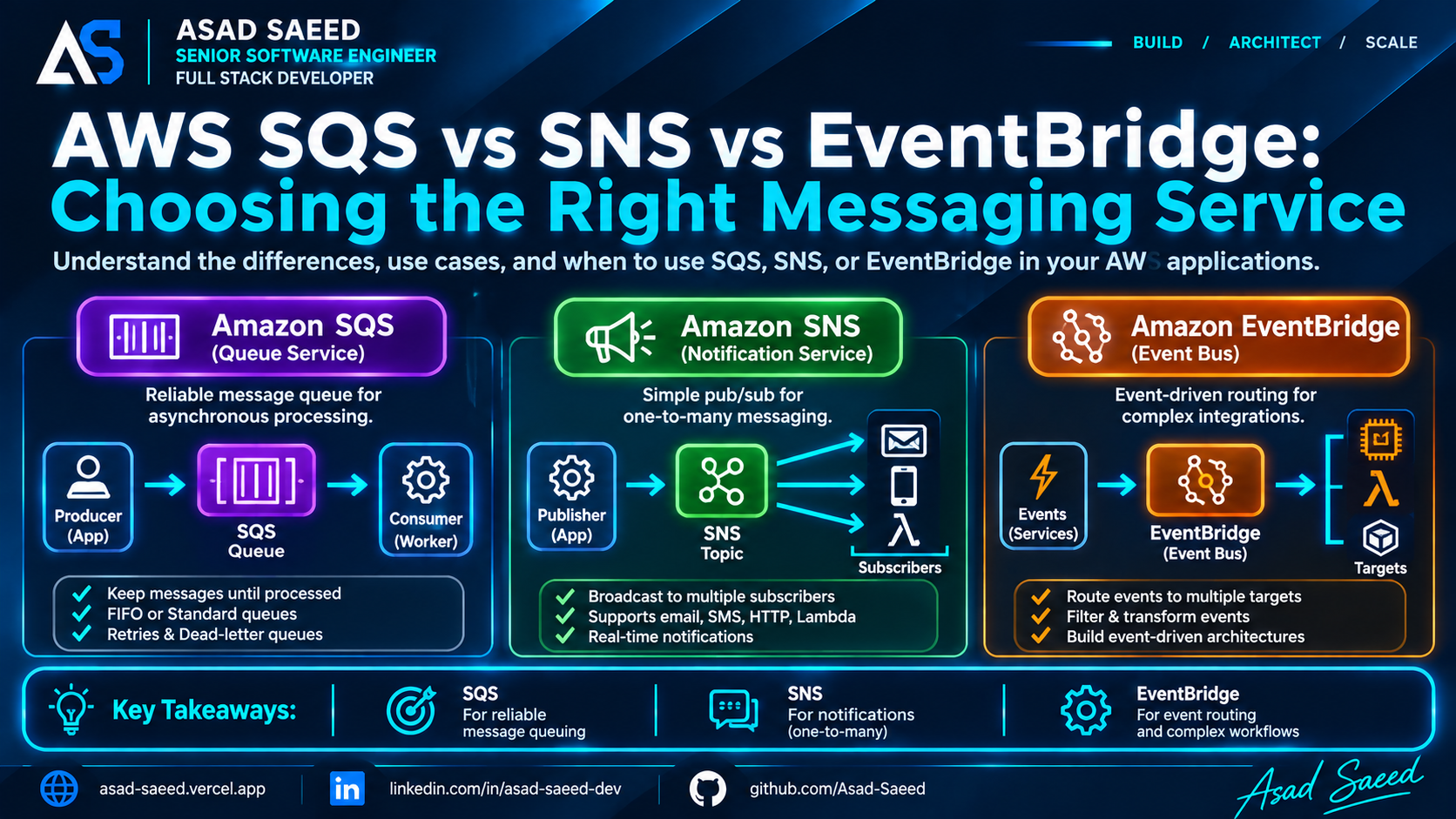
AWS provides three important services for building event-driven architectures:

  • Amazon SQS: Message queuing.

  • Amazon SNS: Publish/subscribe messaging and notifications.

  • Amazon EventBridge: Event routing and event-driven integration.

All three help applications communicate asynchronously, but they solve different problems.

Understanding when to use each one is important when designing scalable backend systems.

1. What Is Asynchronous Messaging?

Before comparing the services, let's understand asynchronous messaging.

In synchronous communication, one service calls another service and waits for its response.

Order API
    |
    v
Payment Service
    |
    v
Inventory Service
    |
    v
Email Service
    |
    v
Response

Every operation is part of the same execution flow.

If one dependency becomes slow, the entire request can become slow.

Asynchronous messaging changes this behavior.

Instead of directly waiting for another service to complete its work, the producer publishes or sends a message to a messaging service.

A consumer processes that message independently.

              Order API
                  |
                  v
             Messaging
               Service
                  |
                  v
             Background
               Worker
                  |
                  v
             Process Order

The producer and consumer no longer need to execute at the same time.

This provides several benefits:

  • Loose coupling between services.

  • Independent processing.

  • Better handling of traffic spikes.

  • Retry mechanisms.

  • Improved fault isolation.

  • Easier integration between different application components.

However, asynchronous messaging introduces new responsibilities, such as duplicate handling, message failures, retries, and monitoring.

2. What Is Amazon SQS?

Amazon Simple Queue Service (SQS) is a fully managed message queuing service.

It allows one application to send messages to a queue while another application retrieves and processes them.

The producer doesn't need to know which worker will process the message.

Similarly, the consumer doesn't need to know which application originally created it.

How SQS Works

Consider an order-processing system.

The Order API creates an order and sends a message to an SQS queue.

A background worker retrieves that message and processes it.

       Order API
           |
           | Send Message
           v
      Amazon SQS
        Queue
           |
           | Receive Message
           v
     Background Worker
           |
           v
     Process Order
           |
           v
     Delete Message

Let's understand the lifecycle.

Step 1: Producer Sends a Message

Your Node.js application sends an order message to SQS.

Example:

{
  "orderId": "ORD-1001",
  "customerId": "USR-501",
  "amount": 2500,
  "status": "pending"
}

The message is stored in the queue until it is successfully processed or otherwise expires according to the queue configuration.

Step 2: Consumer Retrieves the Message

A worker polls the queue to retrieve available messages.

SQS supports short polling and long polling.

With long polling, the consumer waits for messages to become available instead of repeatedly making requests that return no messages.

This can reduce unnecessary polling and improve efficiency.

Step 3: Message Becomes Temporarily Invisible

When a consumer receives a message, SQS doesn't immediately delete it.

Instead, the message becomes temporarily invisible to other consumers.

This period is called the visibility timeout.

For example:

Message Received
       |
       v
Visibility Timeout Starts
       |
       v
Worker Processes Message
       |
       v
Delete Message

If the worker successfully processes the message, it deletes it from the queue.

If processing fails and the message isn't deleted, it can become visible again after the visibility timeout expires.

Another consumer can then receive it.

Step 4: Failed Messages Are Retried

Suppose your worker crashes while processing an order.

The message isn't deleted.

After the visibility timeout expires, SQS can make it available for another processing attempt.

This provides a built-in mechanism for recovering from temporary failures.

However, it also means consumers must be prepared for duplicate deliveries.

Step 5: Dead-Letter Queue

What happens if a message repeatedly fails?

You don't want a problematic message to continue consuming processing resources indefinitely.

SQS supports Dead-Letter Queues (DLQs).

A redrive policy defines how many times a message can be received before SQS moves it to the configured dead-letter queue.

         Main Queue
              |
              v
        Processing Worker
              |
        +-----+-----+
        |           |
      Success     Failure
        |           |
        v           v
      Delete     Retry
                    |
              Max Receive
                Count
                    |
                    v
                  DLQ

You can inspect failed messages, investigate the issue, and decide whether to redrive them after fixing the underlying problem.

Types of SQS Queues

Amazon SQS provides two main queue types.

Standard Queue

  • Very high throughput.

  • At-least-once message delivery.

  • Best-effort message ordering.

  • Messages can occasionally be delivered more than once.

FIFO Queue

  • First-In-First-Out processing order within a message group.

  • Supports deduplication.

  • Useful when message ordering is important.

  • Lower throughput characteristics than Standard queues, with high-throughput options available.

FIFO queues help prevent duplicate sends within the configured deduplication interval, but they don't eliminate the need for idempotent business logic.

When Should You Use SQS?

Use SQS when:

  • You need background job processing.

  • You want to decouple producers from consumers.

  • Tasks should wait until a worker is ready.

  • You need message retention and retry behavior.

  • You need to handle sudden traffic spikes.

  • You need multiple workers processing queued tasks.

Real-world examples:

  • Sending emails in the background.

  • Processing uploaded files.

  • Generating invoices.

  • Processing payment-related jobs.

  • Running background reports.

  • Handling order fulfillment.

The key idea:

SQS is primarily about storing messages until consumers are ready to process them.

3. What Is Amazon SNS?

Amazon Simple Notification Service (SNS) is a fully managed publish/subscribe messaging service.

It allows publishers to send messages to a topic, which can deliver those messages to multiple subscribers.

Unlike a traditional work queue, SNS is designed for distributing notifications to multiple destinations.

How SNS Works

Imagine a customer successfully places an order.

Several independent systems need to know about this event:

  • Email Service

  • SMS Notification Service

  • Analytics Service

  • Inventory Service

Instead of making four separate API calls, the Order Service publishes one message to an SNS topic.

SNS distributes that message to its subscribers.

             Order Service
                   |
                   v
                SNS Topic
                   |
          +--------+--------+
          |        |        |
          v        v        v
        Email    SMS     Analytics
        Service  Service Service

This is called publish/subscribe messaging, commonly shortened to pub/sub.

Step 1: Create an SNS Topic

A topic is a logical communication channel.

For example:

Topic Name: order-created

Applications publish messages to this topic.

Step 2: Publisher Sends a Message

Your Order Service publishes an event:

{
  "eventType": "ORDER_CREATED",
  "orderId": "ORD-1001",
  "customerId": "USR-501",
  "amount": 2500
}

Step 3: SNS Distributes the Message

SNS delivers the published message to its configured subscribers.

Supported subscription protocols include:

  • Amazon SQS

  • AWS Lambda

  • HTTP/HTTPS endpoints

  • Email

  • SMS

  • Other supported AWS destinations

For example:

                 SNS Topic
                     |
        +------------+------------+
        |            |            |
        v            v            v
      SQS Queue    Lambda       Email
        |            |
        v            v
    Inventory     Analytics
     Worker        Handler

Each subscriber receives the notification independently.

SNS Fanout Pattern

One of the most useful SNS patterns is fanout.

Fanout means publishing one message and distributing it to multiple independent queues or subscribers.

For example:

                  Order Created
                        |
                        v
                    SNS Topic
                        |
           +------------+------------+
           |            |            |
           v            v            v
       SQS Queue 1  SQS Queue 2  SQS Queue 3
           |            |            |
           v            v            v
       Inventory     Shipping      Analytics
        Worker        Worker        Worker

Why use SQS between SNS and workers?

Because each consumer may need its own processing speed, retry behavior, and failure handling.

If the Analytics Service is temporarily unavailable, its queue can retain messages without preventing the Inventory Worker from processing its own messages.

This is a powerful architecture for independent background processing.

SNS Message Filtering

SNS supports subscription filter policies.

Suppose your topic receives different order events:

ORDER_CREATED
ORDER_CANCELLED
ORDER_COMPLETED

You can configure subscribers to receive only messages matching specific attributes.

For example:

Order Topic
    |
    +----> Payment Service
    |         |
    |         +---- ORDER_CREATED
    |
    +----> Shipping Service
    |         |
    |         +---- ORDER_COMPLETED
    |
    +----> Notification Service
              |
              +---- ORDER_CANCELLED

Filtering helps avoid sending irrelevant notifications to subscribers.

SNS also supports Standard and FIFO topics, with different ordering and delivery characteristics.

When Should You Use SNS?

Use SNS when:

  • One event needs to notify multiple systems.

  • You need publish/subscribe messaging.

  • You want to broadcast notifications.

  • You need email or SMS notifications.

  • You want to distribute events to multiple SQS queues.

  • You need subscriber-level filtering.

Real-world examples:

  • Order notifications.

  • Payment status updates.

  • User registration notifications.

  • System alerts.

  • Broadcasting application events to independent services.

The key idea:

SNS is primarily about distributing a published message to multiple subscribers.

4. What Is Amazon EventBridge?

Amazon EventBridge is a serverless event bus service designed to connect applications and AWS services through event-driven architectures.

It receives events, evaluates them against rules, and routes matching events to configured targets.

Unlike a basic message queue, EventBridge focuses on event routing and integration.

How EventBridge Works

Imagine your e-commerce application publishes different events:

ORDER_CREATED
PAYMENT_COMPLETED
PAYMENT_FAILED
USER_REGISTERED
INVENTORY_UPDATED

Different services need to react to different events.

Instead of creating separate communication logic between every service, you can publish events to EventBridge.

EventBridge evaluates routing rules and sends matching events to their configured targets.

              Application
                   |
                   v
             EventBridge
                Event Bus
                   |
          +--------+--------+
          |        |        |
          v        v        v
        Rule 1   Rule 2   Rule 3
          |        |        |
          v        v        v
       Lambda     SQS     SNS Topic
       Function   Queue

Step 1: Publish an Event

An application sends an event to an EventBridge event bus.

Example:

{
  "source": "myapp.orders",
  "detail-type": "Order Created",
  "detail": {
    "orderId": "ORD-1001",
    "customerId": "USR-501",
    "amount": 2500,
    "status": "pending"
  }
}

EventBridge receives the event and evaluates it against the rules configured on the event bus.

Step 2: Rules Match Events

A rule defines which events should be routed to a target.

For example:

{
  "source": ["myapp.orders"],
  "detail-type": ["Order Created"],
  "detail": {
    "amount": [
      {
        "numeric": [">", 1000]
      }
    ]
  }
}

This rule matches order-created events where the amount is greater than 1,000.

EventBridge supports content-based filtering using event fields and matching operators.

Step 3: Matching Events Are Routed to Targets

When an event matches a rule, EventBridge sends it to the configured target.

Supported targets include services such as:

  • AWS Lambda

  • Amazon SQS

  • Amazon SNS

  • AWS Step Functions

  • Other supported AWS services and API destinations

For example:

             EventBridge
                  |
          Order Created Event
                  |
         +--------+--------+
         |                 |
         v                 v
    Amount > 1000      All Orders
         |                 |
         v                 v
    Fraud Check        Analytics
      Lambda            Queue

The same event can match multiple rules, allowing multiple independent workflows to react to it.

EventBridge Event Bus Types

EventBridge provides different event bus options.

Default Event Bus

Automatically receives events from AWS services and can also receive custom application events.

Custom Event Bus

Used for events generated by your applications or services.

For example:

myapp.orders
myapp.payments
myapp.users

Partner Event Bus

Receives events from supported third-party SaaS integrations.

This allows external applications to send events into your AWS event-driven architecture.

EventBridge Archive and Replay

One useful EventBridge capability is event archiving and replay.

You can configure an archive to retain events that match its filter criteria.

Later, you can replay archived events back to an event bus.

For example, suppose you introduce a new Analytics Service and want to process historical order events.

Instead of manually recreating every event, you can use EventBridge archive and replay to reprocess archived events.

This is useful for:

  • Rebuilding projections.

  • Reprocessing events after fixing bugs.

  • Recovering from certain processing issues.

  • Testing new event consumers against historical events.

EventBridge Scheduler

EventBridge also provides EventBridge Scheduler, a separate capability for scheduling one-time or recurring tasks.

For example:

Every day at 12:00 AM
          |
          v
EventBridge Scheduler
          |
          v
Trigger Lambda Function
          |
          v
Generate Daily Report

This is useful for scheduled workflows without maintaining your own cron server.

When Should You Use EventBridge?

Use EventBridge when:

  • Multiple services publish business events.

  • You need content-based event routing.

  • Different consumers need different event types.

  • You need to integrate AWS services and third-party applications.

  • You want to build event-driven microservices.

  • You need event archiving and replay.

  • You need scheduled task execution through EventBridge Scheduler.

The key idea:

EventBridge is primarily about routing events to the right destinations based on rules and event content.

5. AWS SQS vs SNS vs EventBridge: Core Differences

Now let's compare the three services directly.

FeatureSQSSNSEventBridgePrimary purposeMessage queuePub/sub notificationsEvent routingCommunication modelQueue-basedPublish/subscribeEvent bus and rulesMessage consumptionConsumers pollPush delivery to subscribersPush to configured targetsMain patternOne queue, competing consumersOne-to-many fanoutEvent-to-many target routingMessage filteringNo native content-based routing rules like SNS/EventBridgeSubscription filter policiesEvent pattern matchingMessage retentionUp to 14 daysNo durable topic message backlogOptional archiveOrderingFIFO queues support ordering within message groupsFIFO topics support orderingNo general strict event ordering guaranteeDead-letter handlingQueue redrive policySubscription delivery DLQs for supported endpointsRetry policy and SQS DLQ supportTypical use caseBackground jobsNotifications and fanoutEvent-driven integration

The most important difference is the communication pattern.

  • SQS stores messages for consumers to process.

  • SNS distributes notifications to subscribers.

  • EventBridge routes events based on rules.

6. SQS vs SNS: Why Are They Often Used Together?

A common architectural mistake is treating SQS and SNS as competing services.

In reality, they solve different problems and are often more powerful when combined.

Consider an order-processing application.

When a customer places an order, multiple systems need to process it independently.

You could publish the event to SNS and subscribe multiple SQS queues.

                 Order Service
                       |
                       v
                    SNS Topic
                       |
           +-----------+-----------+
           |           |           |
           v           v           v
       SQS Queue    SQS Queue   SQS Queue
           |           |           |
           v           v           v
       Inventory    Shipping    Analytics
        Worker       Worker      Worker

Each queue has independent:

  • Message retention.

  • Consumer processing speed.

  • Visibility timeout.

  • Retry behavior.

  • Dead-letter queue configuration.

For example, the Shipping Worker may be busy processing thousands of orders while the Analytics Worker processes messages at a slower rate.

Neither consumer needs to block the other.

This pattern is commonly called SNS-to-SQS fanout.

It combines SNS's broadcast capabilities with SQS's durable queueing and independent processing.

7. EventBridge vs SNS: What's the Difference?

Both services can distribute messages to multiple destinations, but their design goals are different.

SNS: Notification Distribution

SNS is a good fit when you want to publish a notification and distribute it to multiple subscribers.

For example:

Payment Completed
        |
        v
     SNS Topic
        |
   +----+----+
   |         |
   v         v
 Email     SMS

EventBridge: Intelligent Event Routing

EventBridge is a better fit when different destinations should receive events based on their content.

For example:

             Application Events
                     |
                     v
                EventBridge
                     |
          +----------+----------+
          |          |          |
          v          v          v
       Payment     Orders     Analytics
        Events      Events      Events

You can create rules based on:

  • Event source.

  • Event type.

  • Specific event fields.

  • Numeric values.

  • Nested event content.

A useful way to think about it:

SNS answers: "Who should receive this notification?"

EventBridge answers: "Which destinations should receive this event based on its content and routing rules?"

There is overlap, and the best choice depends on the integration pattern rather than just the number of subscribers.

8. Delivery Guarantees, Retries, and Duplicate Messages

This is an important production consideration.

Sending a message successfully doesn't always mean the consumer processed it successfully.

Networks fail. Consumers crash. Services become unavailable. Messages can be delivered more than once.

Let's understand the differences.

SQS Delivery Behavior

SQS Standard queues provide at-least-once delivery.

This means a message can occasionally be delivered more than once.

Your consumer should therefore be idempotent.

For example, before processing a payment, check whether the transaction has already been completed.

async function processPayment(message) {
  const { orderId } = message;

  const existingPayment = await Payment.findOne({
    orderId,
    status: "completed",
  });

  if (existingPayment) {
    return;
  }

  await chargeCustomer(message);
  await markPaymentCompleted(orderId);
}

This simplified example illustrates the idea, but production payment handling should use durable idempotency keys and appropriate database transactions or conditional updates to prevent race conditions.

SNS Delivery Behavior

SNS retries delivery to supported endpoints according to the delivery policy for the endpoint type.

For example, if an HTTP endpoint is temporarily unavailable, SNS can retry delivery according to its configured retry behavior.

For supported subscription endpoints, you can configure a dead-letter queue to capture messages that couldn't be delivered.

EventBridge Delivery Behavior

EventBridge retries failed target deliveries according to its retry policy.

You can configure retry attempts and event age limits.

EventBridge also supports dead-letter queues for supported target configurations.

For event buses, the default retry policy allows retries for up to 24 hours and up to 185 attempts, with backoff and jitter. You can customize this behavior.

Why Idempotency Matters

Imagine an order-processing worker receives the same message twice.

Without idempotency:

Message Received
      |
      v
Payment Processed
      |
      v
Message Delivered Again
      |
      v
Payment Processed Again

This could charge a customer twice.

With idempotency, the application recognizes that the operation has already been completed.

Message Received
      |
      v
Check Idempotency Key
      |
      +------ Already Processed?
      |              |
      |              v
      |          Skip Operation
      |
      v
Process Once

Never assume that an asynchronous messaging system automatically guarantees exactly-once business processing.

Design consumers to handle retries and duplicate deliveries safely.

9. Real-World Architecture: Using All Three Services Together

You don't always need to choose only one service.

In a larger application, SQS, SNS, and EventBridge can work together.

Let's design an e-commerce architecture.

A customer places an order.

The Order Service saves the order and publishes an OrderCreated event.

EventBridge routes the event to different application workflows.

SNS distributes notifications, while SQS queues background tasks for independent workers.

                   Customer
                       |
                       v
                   Order API
                       |
                       v
                 Save Order
                       |
                       v
                EventBridge Bus
                       |
          +------------+-------------+
          |            |             |
          v            v             v
      Payment       Analytics     Order Events
       Rule            Rule          Rule
          |            |             |
          v            v             v
       Lambda         SQS           SNS
          |          Queue          Topic
          |            |             |
          v            v       +-----+-----+
       Payment      Analytics  |           |
       Workflow      Worker    v           v
                            Email       SMS
                            Service   Service

Each service has a clear responsibility:

EventBridge

  • Receives application events.

  • Evaluates event patterns.

  • Routes events to matching workflows.

SNS

  • Distributes notifications to multiple subscribers.

  • Supports notification fanout.

  • Delivers to supported endpoints.

SQS

  • Stores background jobs.

  • Allows independent worker processing.

  • Supports message visibility, retries, and DLQs.

This separation makes the architecture easier to extend.

For example, if you introduce a new Fraud Detection Service, you can add another EventBridge rule without modifying the original Order API's processing logic.

10. Common Mistakes When Choosing AWS Messaging Services

Mistake 1: Using SQS When You Need Broadcast Messaging

SQS is designed around consumers retrieving messages from a queue.

If multiple independent systems must each receive their own copy of an event, publishing to an SNS topic with separate SQS subscriptions is often a better fit.

Mistake 2: Using SNS When You Need Durable Independent Processing

SNS distributes notifications, but it isn't a traditional durable work queue for each consumer.

If each consumer needs its own backlog, retry behavior, and processing capacity, use SQS queues.

Mistake 3: Using EventBridge for Every Background Job

EventBridge is excellent for event routing, but not every background task needs an event bus.

If you simply need to process uploaded files or generate invoices asynchronously, SQS may be the simpler solution.

Mistake 4: Ignoring Duplicate Delivery

A consumer can receive a message more than once.

Always consider idempotency when processing payments, orders, inventory updates, and other business-critical operations.

Mistake 5: Ignoring Dead-Letter Queues

Without proper failure handling, problematic messages can repeatedly fail without a clear investigation process.

Configure DLQs and monitor them.

Mistake 6: Creating Too Many Unnecessary Events

Events should represent meaningful business facts.

For example:

ORDER_CREATED
PAYMENT_COMPLETED
INVENTORY_RESERVED
ORDER_SHIPPED

Avoid creating events for every minor internal function call.

A well-designed event should communicate something meaningful that other systems can independently react to.

11. Which AWS Messaging Service Should You Choose?

Use this practical decision guide.

Choose SQS when:

  • You need a queue for background jobs.

  • Consumers should process messages independently.

  • You need message retention until processing.

  • You need retry and visibility-timeout behavior.

  • You want to control worker concurrency.

Choose SNS when:

  • One message must reach multiple subscribers.

  • You need notifications and broadcast messaging.

  • You want to distribute events to multiple SQS queues.

  • You need subscription-level filtering.

Choose EventBridge when:

  • You need event-driven application integration.

  • You want content-based routing.

  • Different services react to different event types.

  • You need AWS and SaaS event integration.

  • You need event archive and replay capabilities.

Quick Decision Table

RequirementRecommended ServiceProcess background jobsSQSDistribute one notification to multiple subscribersSNSBroadcast to independent worker queuesSNS + SQSRoute events based on contentEventBridgeIntegrate multiple AWS services through eventsEventBridgeProcess ordered messagesSQS FIFOSend email or SMS notificationsSNSReplay archived application eventsEventBridgeSchedule recurring tasksEventBridge Scheduler

12. Final Thoughts

SQS, SNS, and EventBridge are all important building blocks for asynchronous and event-driven architectures on AWS.

But choosing the right service depends on the problem you're solving.

SQS is for reliable message queuing and independent processing.

SNS is for publishing notifications and distributing messages to subscribers.

EventBridge is for routing events intelligently across applications and services.

In real production systems, these services are often combined rather than used in isolation.

For example, EventBridge can route business events, SNS can distribute notifications, and SQS can provide durable processing queues for independent workers.

The goal isn't to use as many AWS services as possible.

It's to choose the right communication pattern, reduce unnecessary coupling, handle failures safely, and build systems that can scale without becoming difficult to maintain.

About the Author

Asad Saeed | Senior Software Engineer | Full Stack Developer

I share practical insights on backend engineering, MERN Stack development, distributed systems, database architecture, cloud computing, and building reliable production applications.

Asad Saeed

Asad Saeed

Senior Software Engineer | Full Stack Developer

More posts →

Related Posts

Don't Stop Here

Docker for Full-Stack Developers: Complete Guide (2026)

Docker for Full-Stack Developers: Complete Guide (2026)

Learn Docker for full-stack development with practical examples covering Dockerfiles, images, containers, Docker Compose, networking, environment variables, volumes, and production deployment.

DOCKERDEVOPSSOFTWARE ENGINEERING
© 2026 · Asad Saeed
All Posts
AWS SQS vs SNS vs EventBridge: Differences, Use Cases & Architecture

AWS SQS vs SNS vs EventBridge: Differences, Use Cases & Architecture

AWSAMAZON SQSAMAZON SNSAMAZON EVENTBRIDGESYSTEM DESIGNSOFTWARE ENGINEERASAD SAEED
November 11, 202618 min readBy Asad Saeed

Compare AWS SQS, SNS, and EventBridge. Learn how message queues, pub/sub notifications, and event routing work, with real-world examples and architecture patterns.

Introduction

Imagine you're building an e-commerce application using the MERN stack.

A customer places an order.

Your backend needs to perform several operations:

  • Save the order in the database.

  • Process the payment.

  • Update inventory.

  • Send an order confirmation email.

  • Notify the warehouse.

  • Generate an invoice.

  • Update analytics.

One approach is to execute all these operations inside a single API request.

app.post("/orders", async (req, res) => {
  const order = await createOrder(req.body);

  await processPayment(order);
  await updateInventory(order);
  await sendConfirmationEmail(order);
  await notifyWarehouse(order);
  await generateInvoice(order);
  await updateAnalytics(order);

  res.status(201).json(order);
});

It works, but it creates several problems.

What happens if the email service is unavailable?

Does the order request fail even though the order was successfully saved?

What happens if payment processing takes 10 seconds?

Does the customer have to wait for every operation to finish?

What happens if thousands of orders arrive simultaneously?

Your API might become overloaded while trying to execute every task synchronously.

A better approach is to separate the main business operation from background processing.

This is where messaging services become useful.

AWS provides three important services for building event-driven architectures:

  • Amazon SQS: Message queuing.

  • Amazon SNS: Publish/subscribe messaging and notifications.

  • Amazon EventBridge: Event routing and event-driven integration.

All three help applications communicate asynchronously, but they solve different problems.

Understanding when to use each one is important when designing scalable backend systems.

1. What Is Asynchronous Messaging?

Before comparing the services, let's understand asynchronous messaging.

In synchronous communication, one service calls another service and waits for its response.

Order API
    |
    v
Payment Service
    |
    v
Inventory Service
    |
    v
Email Service
    |
    v
Response

Every operation is part of the same execution flow.

If one dependency becomes slow, the entire request can become slow.

Asynchronous messaging changes this behavior.

Instead of directly waiting for another service to complete its work, the producer publishes or sends a message to a messaging service.

A consumer processes that message independently.

              Order API
                  |
                  v
             Messaging
               Service
                  |
                  v
             Background
               Worker
                  |
                  v
             Process Order

The producer and consumer no longer need to execute at the same time.

This provides several benefits:

  • Loose coupling between services.

  • Independent processing.

  • Better handling of traffic spikes.

  • Retry mechanisms.

  • Improved fault isolation.

  • Easier integration between different application components.

However, asynchronous messaging introduces new responsibilities, such as duplicate handling, message failures, retries, and monitoring.

2. What Is Amazon SQS?

Amazon Simple Queue Service (SQS) is a fully managed message queuing service.

It allows one application to send messages to a queue while another application retrieves and processes them.

The producer doesn't need to know which worker will process the message.

Similarly, the consumer doesn't need to know which application originally created it.

How SQS Works

Consider an order-processing system.

The Order API creates an order and sends a message to an SQS queue.

A background worker retrieves that message and processes it.

       Order API
           |
           | Send Message
           v
      Amazon SQS
        Queue
           |
           | Receive Message
           v
     Background Worker
           |
           v
     Process Order
           |
           v
     Delete Message

Let's understand the lifecycle.

Step 1: Producer Sends a Message

Your Node.js application sends an order message to SQS.

Example:

{
  "orderId": "ORD-1001",
  "customerId": "USR-501",
  "amount": 2500,
  "status": "pending"
}

The message is stored in the queue until it is successfully processed or otherwise expires according to the queue configuration.

Step 2: Consumer Retrieves the Message

A worker polls the queue to retrieve available messages.

SQS supports short polling and long polling.

With long polling, the consumer waits for messages to become available instead of repeatedly making requests that return no messages.

This can reduce unnecessary polling and improve efficiency.

Step 3: Message Becomes Temporarily Invisible

When a consumer receives a message, SQS doesn't immediately delete it.

Instead, the message becomes temporarily invisible to other consumers.

This period is called the visibility timeout.

For example:

Message Received
       |
       v
Visibility Timeout Starts
       |
       v
Worker Processes Message
       |
       v
Delete Message

If the worker successfully processes the message, it deletes it from the queue.

If processing fails and the message isn't deleted, it can become visible again after the visibility timeout expires.

Another consumer can then receive it.

Step 4: Failed Messages Are Retried

Suppose your worker crashes while processing an order.

The message isn't deleted.

After the visibility timeout expires, SQS can make it available for another processing attempt.

This provides a built-in mechanism for recovering from temporary failures.

However, it also means consumers must be prepared for duplicate deliveries.

Step 5: Dead-Letter Queue

What happens if a message repeatedly fails?

You don't want a problematic message to continue consuming processing resources indefinitely.

SQS supports Dead-Letter Queues (DLQs).

A redrive policy defines how many times a message can be received before SQS moves it to the configured dead-letter queue.

         Main Queue
              |
              v
        Processing Worker
              |
        +-----+-----+
        |           |
      Success     Failure
        |           |
        v           v
      Delete     Retry
                    |
              Max Receive
                Count
                    |
                    v
                  DLQ

You can inspect failed messages, investigate the issue, and decide whether to redrive them after fixing the underlying problem.

Types of SQS Queues

Amazon SQS provides two main queue types.

Standard Queue

  • Very high throughput.

  • At-least-once message delivery.

  • Best-effort message ordering.

  • Messages can occasionally be delivered more than once.

FIFO Queue

  • First-In-First-Out processing order within a message group.

  • Supports deduplication.

  • Useful when message ordering is important.

  • Lower throughput characteristics than Standard queues, with high-throughput options available.

FIFO queues help prevent duplicate sends within the configured deduplication interval, but they don't eliminate the need for idempotent business logic.

When Should You Use SQS?

Use SQS when:

  • You need background job processing.

  • You want to decouple producers from consumers.

  • Tasks should wait until a worker is ready.

  • You need message retention and retry behavior.

  • You need to handle sudden traffic spikes.

  • You need multiple workers processing queued tasks.

Real-world examples:

  • Sending emails in the background.

  • Processing uploaded files.

  • Generating invoices.

  • Processing payment-related jobs.

  • Running background reports.

  • Handling order fulfillment.

The key idea:

SQS is primarily about storing messages until consumers are ready to process them.

3. What Is Amazon SNS?

Amazon Simple Notification Service (SNS) is a fully managed publish/subscribe messaging service.

It allows publishers to send messages to a topic, which can deliver those messages to multiple subscribers.

Unlike a traditional work queue, SNS is designed for distributing notifications to multiple destinations.

How SNS Works

Imagine a customer successfully places an order.

Several independent systems need to know about this event:

  • Email Service

  • SMS Notification Service

  • Analytics Service

  • Inventory Service

Instead of making four separate API calls, the Order Service publishes one message to an SNS topic.

SNS distributes that message to its subscribers.

             Order Service
                   |
                   v
                SNS Topic
                   |
          +--------+--------+
          |        |        |
          v        v        v
        Email    SMS     Analytics
        Service  Service Service

This is called publish/subscribe messaging, commonly shortened to pub/sub.

Step 1: Create an SNS Topic

A topic is a logical communication channel.

For example:

Topic Name: order-created

Applications publish messages to this topic.

Step 2: Publisher Sends a Message

Your Order Service publishes an event:

{
  "eventType": "ORDER_CREATED",
  "orderId": "ORD-1001",
  "customerId": "USR-501",
  "amount": 2500
}

Step 3: SNS Distributes the Message

SNS delivers the published message to its configured subscribers.

Supported subscription protocols include:

  • Amazon SQS

  • AWS Lambda

  • HTTP/HTTPS endpoints

  • Email

  • SMS

  • Other supported AWS destinations

For example:

                 SNS Topic
                     |
        +------------+------------+
        |            |            |
        v            v            v
      SQS Queue    Lambda       Email
        |            |
        v            v
    Inventory     Analytics
     Worker        Handler

Each subscriber receives the notification independently.

SNS Fanout Pattern

One of the most useful SNS patterns is fanout.

Fanout means publishing one message and distributing it to multiple independent queues or subscribers.

For example:

                  Order Created
                        |
                        v
                    SNS Topic
                        |
           +------------+------------+
           |            |            |
           v            v            v
       SQS Queue 1  SQS Queue 2  SQS Queue 3
           |            |            |
           v            v            v
       Inventory     Shipping      Analytics
        Worker        Worker        Worker

Why use SQS between SNS and workers?

Because each consumer may need its own processing speed, retry behavior, and failure handling.

If the Analytics Service is temporarily unavailable, its queue can retain messages without preventing the Inventory Worker from processing its own messages.

This is a powerful architecture for independent background processing.

SNS Message Filtering

SNS supports subscription filter policies.

Suppose your topic receives different order events:

ORDER_CREATED
ORDER_CANCELLED
ORDER_COMPLETED

You can configure subscribers to receive only messages matching specific attributes.

For example:

Order Topic
    |
    +----> Payment Service
    |         |
    |         +---- ORDER_CREATED
    |
    +----> Shipping Service
    |         |
    |         +---- ORDER_COMPLETED
    |
    +----> Notification Service
              |
              +---- ORDER_CANCELLED

Filtering helps avoid sending irrelevant notifications to subscribers.

SNS also supports Standard and FIFO topics, with different ordering and delivery characteristics.

When Should You Use SNS?

Use SNS when:

  • One event needs to notify multiple systems.

  • You need publish/subscribe messaging.

  • You want to broadcast notifications.

  • You need email or SMS notifications.

  • You want to distribute events to multiple SQS queues.

  • You need subscriber-level filtering.

Real-world examples:

  • Order notifications.

  • Payment status updates.

  • User registration notifications.

  • System alerts.

  • Broadcasting application events to independent services.

The key idea:

SNS is primarily about distributing a published message to multiple subscribers.

4. What Is Amazon EventBridge?

Amazon EventBridge is a serverless event bus service designed to connect applications and AWS services through event-driven architectures.

It receives events, evaluates them against rules, and routes matching events to configured targets.

Unlike a basic message queue, EventBridge focuses on event routing and integration.

How EventBridge Works

Imagine your e-commerce application publishes different events:

ORDER_CREATED
PAYMENT_COMPLETED
PAYMENT_FAILED
USER_REGISTERED
INVENTORY_UPDATED

Different services need to react to different events.

Instead of creating separate communication logic between every service, you can publish events to EventBridge.

EventBridge evaluates routing rules and sends matching events to their configured targets.

              Application
                   |
                   v
             EventBridge
                Event Bus
                   |
          +--------+--------+
          |        |        |
          v        v        v
        Rule 1   Rule 2   Rule 3
          |        |        |
          v        v        v
       Lambda     SQS     SNS Topic
       Function   Queue

Step 1: Publish an Event

An application sends an event to an EventBridge event bus.

Example:

{
  "source": "myapp.orders",
  "detail-type": "Order Created",
  "detail": {
    "orderId": "ORD-1001",
    "customerId": "USR-501",
    "amount": 2500,
    "status": "pending"
  }
}

EventBridge receives the event and evaluates it against the rules configured on the event bus.

Step 2: Rules Match Events

A rule defines which events should be routed to a target.

For example:

{
  "source": ["myapp.orders"],
  "detail-type": ["Order Created"],
  "detail": {
    "amount": [
      {
        "numeric": [">", 1000]
      }
    ]
  }
}

This rule matches order-created events where the amount is greater than 1,000.

EventBridge supports content-based filtering using event fields and matching operators.

Step 3: Matching Events Are Routed to Targets

When an event matches a rule, EventBridge sends it to the configured target.

Supported targets include services such as:

  • AWS Lambda

  • Amazon SQS

  • Amazon SNS

  • AWS Step Functions

  • Other supported AWS services and API destinations

For example:

             EventBridge
                  |
          Order Created Event
                  |
         +--------+--------+
         |                 |
         v                 v
    Amount > 1000      All Orders
         |                 |
         v                 v
    Fraud Check        Analytics
      Lambda            Queue

The same event can match multiple rules, allowing multiple independent workflows to react to it.

EventBridge Event Bus Types

EventBridge provides different event bus options.

Default Event Bus

Automatically receives events from AWS services and can also receive custom application events.

Custom Event Bus

Used for events generated by your applications or services.

For example:

myapp.orders
myapp.payments
myapp.users

Partner Event Bus

Receives events from supported third-party SaaS integrations.

This allows external applications to send events into your AWS event-driven architecture.

EventBridge Archive and Replay

One useful EventBridge capability is event archiving and replay.

You can configure an archive to retain events that match its filter criteria.

Later, you can replay archived events back to an event bus.

For example, suppose you introduce a new Analytics Service and want to process historical order events.

Instead of manually recreating every event, you can use EventBridge archive and replay to reprocess archived events.

This is useful for:

  • Rebuilding projections.

  • Reprocessing events after fixing bugs.

  • Recovering from certain processing issues.

  • Testing new event consumers against historical events.

EventBridge Scheduler

EventBridge also provides EventBridge Scheduler, a separate capability for scheduling one-time or recurring tasks.

For example:

Every day at 12:00 AM
          |
          v
EventBridge Scheduler
          |
          v
Trigger Lambda Function
          |
          v
Generate Daily Report

This is useful for scheduled workflows without maintaining your own cron server.

When Should You Use EventBridge?

Use EventBridge when:

  • Multiple services publish business events.

  • You need content-based event routing.

  • Different consumers need different event types.

  • You need to integrate AWS services and third-party applications.

  • You want to build event-driven microservices.

  • You need event archiving and replay.

  • You need scheduled task execution through EventBridge Scheduler.

The key idea:

EventBridge is primarily about routing events to the right destinations based on rules and event content.

5. AWS SQS vs SNS vs EventBridge: Core Differences

Now let's compare the three services directly.

FeatureSQSSNSEventBridgePrimary purposeMessage queuePub/sub notificationsEvent routingCommunication modelQueue-basedPublish/subscribeEvent bus and rulesMessage consumptionConsumers pollPush delivery to subscribersPush to configured targetsMain patternOne queue, competing consumersOne-to-many fanoutEvent-to-many target routingMessage filteringNo native content-based routing rules like SNS/EventBridgeSubscription filter policiesEvent pattern matchingMessage retentionUp to 14 daysNo durable topic message backlogOptional archiveOrderingFIFO queues support ordering within message groupsFIFO topics support orderingNo general strict event ordering guaranteeDead-letter handlingQueue redrive policySubscription delivery DLQs for supported endpointsRetry policy and SQS DLQ supportTypical use caseBackground jobsNotifications and fanoutEvent-driven integration

The most important difference is the communication pattern.

  • SQS stores messages for consumers to process.

  • SNS distributes notifications to subscribers.

  • EventBridge routes events based on rules.

6. SQS vs SNS: Why Are They Often Used Together?

A common architectural mistake is treating SQS and SNS as competing services.

In reality, they solve different problems and are often more powerful when combined.

Consider an order-processing application.

When a customer places an order, multiple systems need to process it independently.

You could publish the event to SNS and subscribe multiple SQS queues.

                 Order Service
                       |
                       v
                    SNS Topic
                       |
           +-----------+-----------+
           |           |           |
           v           v           v
       SQS Queue    SQS Queue   SQS Queue
           |           |           |
           v           v           v
       Inventory    Shipping    Analytics
        Worker       Worker      Worker

Each queue has independent:

  • Message retention.

  • Consumer processing speed.

  • Visibility timeout.

  • Retry behavior.

  • Dead-letter queue configuration.

For example, the Shipping Worker may be busy processing thousands of orders while the Analytics Worker processes messages at a slower rate.

Neither consumer needs to block the other.

This pattern is commonly called SNS-to-SQS fanout.

It combines SNS's broadcast capabilities with SQS's durable queueing and independent processing.

7. EventBridge vs SNS: What's the Difference?

Both services can distribute messages to multiple destinations, but their design goals are different.

SNS: Notification Distribution

SNS is a good fit when you want to publish a notification and distribute it to multiple subscribers.

For example:

Payment Completed
        |
        v
     SNS Topic
        |
   +----+----+
   |         |
   v         v
 Email     SMS

EventBridge: Intelligent Event Routing

EventBridge is a better fit when different destinations should receive events based on their content.

For example:

             Application Events
                     |
                     v
                EventBridge
                     |
          +----------+----------+
          |          |          |
          v          v          v
       Payment     Orders     Analytics
        Events      Events      Events

You can create rules based on:

  • Event source.

  • Event type.

  • Specific event fields.

  • Numeric values.

  • Nested event content.

A useful way to think about it:

SNS answers: "Who should receive this notification?"

EventBridge answers: "Which destinations should receive this event based on its content and routing rules?"

There is overlap, and the best choice depends on the integration pattern rather than just the number of subscribers.

8. Delivery Guarantees, Retries, and Duplicate Messages

This is an important production consideration.

Sending a message successfully doesn't always mean the consumer processed it successfully.

Networks fail. Consumers crash. Services become unavailable. Messages can be delivered more than once.

Let's understand the differences.

SQS Delivery Behavior

SQS Standard queues provide at-least-once delivery.

This means a message can occasionally be delivered more than once.

Your consumer should therefore be idempotent.

For example, before processing a payment, check whether the transaction has already been completed.

async function processPayment(message) {
  const { orderId } = message;

  const existingPayment = await Payment.findOne({
    orderId,
    status: "completed",
  });

  if (existingPayment) {
    return;
  }

  await chargeCustomer(message);
  await markPaymentCompleted(orderId);
}

This simplified example illustrates the idea, but production payment handling should use durable idempotency keys and appropriate database transactions or conditional updates to prevent race conditions.

SNS Delivery Behavior

SNS retries delivery to supported endpoints according to the delivery policy for the endpoint type.

For example, if an HTTP endpoint is temporarily unavailable, SNS can retry delivery according to its configured retry behavior.

For supported subscription endpoints, you can configure a dead-letter queue to capture messages that couldn't be delivered.

EventBridge Delivery Behavior

EventBridge retries failed target deliveries according to its retry policy.

You can configure retry attempts and event age limits.

EventBridge also supports dead-letter queues for supported target configurations.

For event buses, the default retry policy allows retries for up to 24 hours and up to 185 attempts, with backoff and jitter. You can customize this behavior.

Why Idempotency Matters

Imagine an order-processing worker receives the same message twice.

Without idempotency:

Message Received
      |
      v
Payment Processed
      |
      v
Message Delivered Again
      |
      v
Payment Processed Again

This could charge a customer twice.

With idempotency, the application recognizes that the operation has already been completed.

Message Received
      |
      v
Check Idempotency Key
      |
      +------ Already Processed?
      |              |
      |              v
      |          Skip Operation
      |
      v
Process Once

Never assume that an asynchronous messaging system automatically guarantees exactly-once business processing.

Design consumers to handle retries and duplicate deliveries safely.

9. Real-World Architecture: Using All Three Services Together

You don't always need to choose only one service.

In a larger application, SQS, SNS, and EventBridge can work together.

Let's design an e-commerce architecture.

A customer places an order.

The Order Service saves the order and publishes an OrderCreated event.

EventBridge routes the event to different application workflows.

SNS distributes notifications, while SQS queues background tasks for independent workers.

                   Customer
                       |
                       v
                   Order API
                       |
                       v
                 Save Order
                       |
                       v
                EventBridge Bus
                       |
          +------------+-------------+
          |            |             |
          v            v             v
      Payment       Analytics     Order Events
       Rule            Rule          Rule
          |            |             |
          v            v             v
       Lambda         SQS           SNS
          |          Queue          Topic
          |            |             |
          v            v       +-----+-----+
       Payment      Analytics  |           |
       Workflow      Worker    v           v
                            Email       SMS
                            Service   Service

Each service has a clear responsibility:

EventBridge

  • Receives application events.

  • Evaluates event patterns.

  • Routes events to matching workflows.

SNS

  • Distributes notifications to multiple subscribers.

  • Supports notification fanout.

  • Delivers to supported endpoints.

SQS

  • Stores background jobs.

  • Allows independent worker processing.

  • Supports message visibility, retries, and DLQs.

This separation makes the architecture easier to extend.

For example, if you introduce a new Fraud Detection Service, you can add another EventBridge rule without modifying the original Order API's processing logic.

10. Common Mistakes When Choosing AWS Messaging Services

Mistake 1: Using SQS When You Need Broadcast Messaging

SQS is designed around consumers retrieving messages from a queue.

If multiple independent systems must each receive their own copy of an event, publishing to an SNS topic with separate SQS subscriptions is often a better fit.

Mistake 2: Using SNS When You Need Durable Independent Processing

SNS distributes notifications, but it isn't a traditional durable work queue for each consumer.

If each consumer needs its own backlog, retry behavior, and processing capacity, use SQS queues.

Mistake 3: Using EventBridge for Every Background Job

EventBridge is excellent for event routing, but not every background task needs an event bus.

If you simply need to process uploaded files or generate invoices asynchronously, SQS may be the simpler solution.

Mistake 4: Ignoring Duplicate Delivery

A consumer can receive a message more than once.

Always consider idempotency when processing payments, orders, inventory updates, and other business-critical operations.

Mistake 5: Ignoring Dead-Letter Queues

Without proper failure handling, problematic messages can repeatedly fail without a clear investigation process.

Configure DLQs and monitor them.

Mistake 6: Creating Too Many Unnecessary Events

Events should represent meaningful business facts.

For example:

ORDER_CREATED
PAYMENT_COMPLETED
INVENTORY_RESERVED
ORDER_SHIPPED

Avoid creating events for every minor internal function call.

A well-designed event should communicate something meaningful that other systems can independently react to.

11. Which AWS Messaging Service Should You Choose?

Use this practical decision guide.

Choose SQS when:

  • You need a queue for background jobs.

  • Consumers should process messages independently.

  • You need message retention until processing.

  • You need retry and visibility-timeout behavior.

  • You want to control worker concurrency.

Choose SNS when:

  • One message must reach multiple subscribers.

  • You need notifications and broadcast messaging.

  • You want to distribute events to multiple SQS queues.

  • You need subscription-level filtering.

Choose EventBridge when:

  • You need event-driven application integration.

  • You want content-based routing.

  • Different services react to different event types.

  • You need AWS and SaaS event integration.

  • You need event archive and replay capabilities.

Quick Decision Table

RequirementRecommended ServiceProcess background jobsSQSDistribute one notification to multiple subscribersSNSBroadcast to independent worker queuesSNS + SQSRoute events based on contentEventBridgeIntegrate multiple AWS services through eventsEventBridgeProcess ordered messagesSQS FIFOSend email or SMS notificationsSNSReplay archived application eventsEventBridgeSchedule recurring tasksEventBridge Scheduler

12. Final Thoughts

SQS, SNS, and EventBridge are all important building blocks for asynchronous and event-driven architectures on AWS.

But choosing the right service depends on the problem you're solving.

SQS is for reliable message queuing and independent processing.

SNS is for publishing notifications and distributing messages to subscribers.

EventBridge is for routing events intelligently across applications and services.

In real production systems, these services are often combined rather than used in isolation.

For example, EventBridge can route business events, SNS can distribute notifications, and SQS can provide durable processing queues for independent workers.

The goal isn't to use as many AWS services as possible.

It's to choose the right communication pattern, reduce unnecessary coupling, handle failures safely, and build systems that can scale without becoming difficult to maintain.

About the Author

Asad Saeed | Senior Software Engineer | Full Stack Developer

I share practical insights on backend engineering, MERN Stack development, distributed systems, database architecture, cloud computing, and building reliable production applications.
Asad Saeed

Asad Saeed

Senior Software Engineer | Full Stack Developer

More posts →

Related Posts

Don't Stop Here

Docker for Full-Stack Developers: Complete Guide (2026)

Docker for Full-Stack Developers: Complete Guide (2026)

Learn Docker for full-stack development with practical examples covering Dockerfiles, images, containers, Docker Compose, networking, environment variables, volumes, and production deployment.

DOCKERDEVOPSSOFTWARE ENGINEERING
© 2026 · Asad Saeed
Oct 19, 202612 min read
Read
Dependency Injection in NestJS Explained: Providers, IoC Container, Injection Tokens & Custom Providers (2026 Guide)

Dependency Injection in NestJS Explained: Providers, IoC Container, Injection Tokens & Custom Providers (2026 Guide)

Learn how Dependency Injection works in NestJS, including Providers, the IoC Container, Constructor Injection, Injection Tokens, Custom Providers, and best practices for building scalable, testable, and enterprise-ready Node.js applications.

NESTJSDEPENDENCY INJECTIONNODEJS
Oct 19, 20265 min read
Read
NestJS Architecture Explained: Controllers, Providers, Modules, Middleware, Guards & Interceptors (2026 Guide)

NestJS Architecture Explained: Controllers, Providers, Modules, Middleware, Guards & Interceptors (2026 Guide)

Master the NestJS architecture by understanding Modules, Controllers, Providers, Dependency Injection, Middleware, Guards, Pipes, Interceptors, and Exception Filters. Learn the complete NestJS request lifecycle and build scalable, production-ready backend applications.

NESTJSNODEJSSOFTWARE ARCHITECTURE
Aug 5, 20266 min read
Read
F
Made with ❤️ by Asad Saeed
© 2026 · Asad Saeed
Made with ❤️ by Asad Saeed
F